
Your needs, this model
Does it fit your priorities?
Does it convert receipts into accounting fields automatically?
PFU says this edition extracts receipt/invoice details into editable fields for the operator to review and categorize before passing data to an existing QuickBooks account; no accuracy rate or support for every QuickBooks product is established.
Can it scan directly to a cloud folder without a computer?
PFU documents a separate Wi-Fi ScanSnap Cloud path that needs a ScanSnap Cloud account. That file-routing option is not the same as the QuickBooks receipt-data workflow.
Explore this need in the finder →What fits in one ordinary paper load with the Receipt Guide attached?
The edition datasheet lists 15 ordinary document sheets, 50 receipts and 15 business cards with the guide; without it, ordinary documents can use a 50-sheet ADF. Check the exact guide configuration and load rules.
Explore this need in the finder →Can it work with a TWAIN-only capture application?
No TWAIN driver is documented. Verify a compatible ScanSnap workflow with the software owner before buying.
Explore this need in the finder →The short version: a bookkeeping-oriented configuration
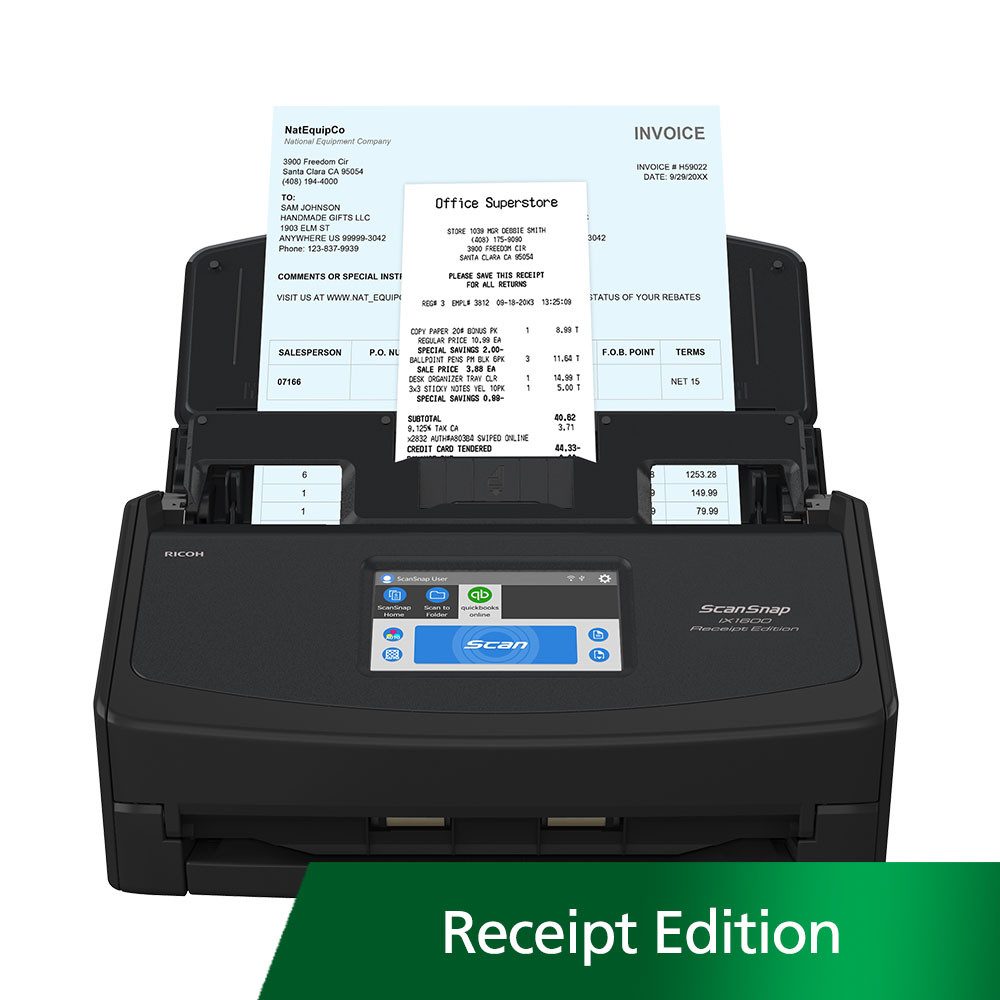
The ScanSnap iX1600 Receipt Edition is a specific edition for people who want a receipt and invoice workflow alongside a desktop duplex scanner. PFU's US Store identifies the black edition as PA03770-B675 and describes extraction of receipt or invoice details into editable fields for the operator to review and categorize before the file and data are passed into an existing QuickBooks account. The page explicitly says QuickBooks is not included. This review assesses the documented route, not its accuracy: no recognition-rate, time-saving or bookkeeping test was conducted. It is an earlier iX1600 configuration; PFU says the iX1600 has been upgraded to the iX2500, so verify current app and service support before relying on the specialized workflow.
Receipt processing is more than scanning an image
The edition's practical distinction is software integration, not a faster feeder. PFU says it analyzes receipts and invoices, places extracted information into editable fields and lets the operator review and categorize that information before sending it to an existing QuickBooks account. That review step matters: machine-readable text and structured fields can be wrong, and a receipt may have a faint total, handwritten note, tax line or vendor name that deserves a human check. The manufacturer describes a workflow feature, not an independent guarantee that every supplier, document layout or tax detail will be recognized correctly. Ask which QuickBooks version and account type are currently supported, what setup is required, and whether the application still meets your accounting process. QuickBooks licensing or access is not bundled with the scanner, and the Store page does not establish that every QuickBooks product or subscription is compatible.
Do not confuse that accounting route with the iX1600's separate ScanSnap Cloud feature. PFU also documents direct Wi-Fi scanning to cloud services using a ScanSnap Cloud account, without a computer or mobile device. That is a general file-routing option; it is not proof that the direct-cloud path performs invoice extraction or updates QuickBooks. If you want transaction data in an accounting system, verify the host-computer/application route. If you want a scan saved directly to cloud storage, verify the specific supported destination and account requirements.
Receipt Guide changes what one load means
The Receipt Edition's key physical caveat is feeder capacity with the standard Receipt Guide attached. PFU's datasheet lists 15 ordinary documents, 50 receipts and 15 business cards with the guide; without it, ordinary documents can use the 50-sheet ADF. I assess it conservatively as a 15-sheet ordinary-document load with the guide, not an unconditional 50-sheet stack. Confirm the guide setup, media limits and current loading instructions before assuming one load handles your batch.
The core platform remains a 40 ppm / 80 ipm, duplex, 600 dpi iX1600 with a 50-sheet ADF absent the guide, USB and Wi-Fi, a 4.3-inch touchscreen and manual-single mode. Those published speed figures are manufacturer specifications, not measured receipt throughput. The real bookkeeping cycle also includes sorting papers, inspecting the images, checking extracted fields, assigning categories, resolving exceptions and filing supporting documents. If most jobs are wide stacks of ordinary pages rather than receipts and invoices, the standard iX1600 may be a better fit; this edition's value depends on the software integration, not the scanner engine alone.
Wireless controls and the TWAIN boundary
The touchscreen supports profile selection, and PFU says users can choose a QuickBooks profile or personal destinations. It also lists a mobile-device path and direct ScanSnap Cloud scanning over Wi-Fi, with a required ScanSnap Cloud account for that computer-free route. These are separate operating plans and should not be blended into a claim that a phone or cloud account is needed to use the QuickBooks capture path. Check the current ScanSnap software, supported operating system, connected device and destination before purchase.
PFU does not document TWAIN for this ScanSnap family configuration. Searchable PDFs or editable Office files do not substitute for a TWAIN driver if a capture system specifically demands one. A bookkeeping integration also does not make the scanner a full accounting platform or guarantee compatibility with a records-management application. Confirm your software owner's named requirements first.
Package and lifecycle details deserve a careful check
PA03770-B675 is distinct from the black iX1600 Standard listing PA03770-B635. The main iX1600 selector shows CG01000-310060 beside Standard, but the Store page tied to that code is titled as a Premium/Adobe bundle; the package text is inconsistent. Do not use that ambiguous code as a substitute for the Receipt part number. QuickBooks is not included, and refurbished or third-party packages may have different accessories, software, warranty and returns. Verify the exact SKU and accounting software terms with the seller.
PFU's newer iX2500 offers the current larger-feeder reference: 100 sheets, 45 ppm / 90 ipm and a larger touchscreen compared with this iX1600 platform's 50-sheet standard feeder, 40 ppm / 80 ipm and 4.3-inch display. The iX2500 Receipt Edition exists as a separate configuration in the broader family; do not assume that its package, software steps or supported account terms are identical to PA03770-B675 without checking that model's materials.
Who should consider it?
This edition belongs on a shortlist when receipts and invoices are a recurring part of a home or small-office bookkeeping routine, staff can review extracted values, and the current QuickBooks link is confirmed to fit. It is a poor match if you only need generic stacks, require a 50-sheet load of ordinary pages while the guide is attached, expect QuickBooks licensing to come with the scanner, or depend on TWAIN. Before ordering, verify the software and account route, ordinary-document load capacity with the guide, current OS support, package and seller condition. The key decision is whether a documented invoice/receipt workflow justifies the more specialized package; the scanner specifications alone cannot answer that.
Key specifications
Key details at a glance
| Scanner class | Personal desktop sheet-fed ADF |
|---|---|
| Manufacturer-listed simplex rate | 40 ppm |
| Manufacturer-listed duplex image rate | 80 ipm |
| Automatic document feeder capacity | 15 sheets |
| Optical resolution | 600 dpi |
| Connection options | USB / Wi-Fi |
| Automatic duplex capture | Yes |
| Separate manual-feed route | Yes |
| Touchscreen | Yes |
| TWAIN driver documented | No |
Use the exact model’s instructions for operating limits, supplied equipment and version differences.
Sources for this review
Sources for this assessment
Compare the workflow before you choose
Use the finder to test your connection, paper and software requirements against the documented scanner arrangements.