
Your needs, this model
Does it fit your priorities?
Can the S1100 scan both sides of a sheet in one pass?
No. Fujitsu describes the S1100 as simplex. Its CDF process can continue through pages inserted one at a time, but a two-sided original must be turned and fed again; this is not automatic duplex capture.
Explore this need in the finder →Does its one-sheet CDF count as a 20-sheet ADF?
No. The S1100 has no ADF; its single-sheet CDF means the operator keeps inserting originals. The numeric feeder requirement is not satisfied by manual page handling.
Explore this need in the finder →Can a TWAIN-only application select the S1100 directly?
The U.S. data sheet says direct TWAIN/ISIS applications are not supported. The S1100 uses ScanSnap-specific software, and the present installer/host route must be checked for the exact used unit.
Explore this need in the finder →Is the S1100 a direct wireless phone scanner?
No built-in Wi-Fi is documented. An archived ScanSnap Connect route required a compatible computer and Wi-Fi to the phone, and current supported software for S1100 is not established; do not treat it as a dependable present phone workflow.
Explore this need in the finder →Does the straight path mean there is a second special-original feeder?
No. The S1100 has two paper paths selected for different stock, but every original is still inserted one at a time. Its straight path and optional carrier-sheet support do not add a separate manual-feed mode beside an ADF.
Explore this need in the finder →Will the S1100 necessarily run on a current computer?
That is not established. PFU ended ScanSnap Manager distribution/support, the current ScanSnap Home model list does not include S1100, and a troubleshooting article's legacy driver filename is not a general compatibility guarantee. Verify the exact host and software path before relying on a specific unit.
Explore this need in the finder →A travel-size scanner, not a miniature ADF
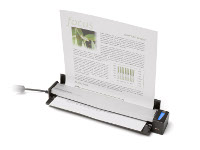
The Fujitsu ScanSnap S1100 takes one manually inserted sheet at a time. Continuous Document Feeding (CDF) lets you add pages to a scan sequence; it does not hold a stack. Fujitsu calls it single-sheet and simplex. A two-sided original must be turned and fed again, not captured automatically.
For a few receipts, forms, or travel papers, this can be easier to carry than a desktop feeder. Fujitsu lists a 350-gram body and 7.5 seconds per page for a specified Letter/A4 portrait mode; “Excellent” is 35 seconds. These are manufacturer figures, not my timing or full-job speed. Page handling, destination choice, OCR, and checking files add work. One-sided singles suit it better than a recurring two-sided stack.
The straight path changes what you can feed
The S1100 has straight-through and U-turn paths. Fujitsu associates the straight path with postcards, photos, business and ISO ID-1 cards, carrier sheets, and heavier paper; the U-turn path has a narrower paper-weight range. These limits are path-specific, not a promise for every stiff, glossy, embossed, or fragile original. Check the exact media instructions.
A carrier sheet is a separate accessory, not an automatic part of a used offer. Fujitsu lists it for larger or protected originals, including A3, B4, and 11-by-17-inch work, with its own stock limits. Long-paper mode is separately listed to 34 inches at 300 dpi or lower. These options broaden occasional single-page work, but do not add an ADF or a separate manual-feed mode beside one. In this guide, “manual feed” means an additional special-original route on a scanner with a regular feeder; the S1100's straight path is not counted that way.
USB is simple; the software check is not
The exact U.S. sheet identifies part PA03610-B005 and USB 2.0 with USB 1.1 compatibility. The unit is USB-powered from a connected computer, not a battery scanner, and the product materials do not document built-in Wi-Fi. The software is ScanSnap-specific. Fujitsu says TWAIN and ISIS applications cannot use the S1100 directly, so a scanner being able to create PDFs or images would not satisfy a program that needs a direct TWAIN source.
The largest caveat is whether a particular used unit can run on the intended computer. Old S1100 material lists ScanSnap Manager and earlier Windows/Mac systems. PFU ended Manager distribution and support in 2024. Its October 2026 ScanSnap Home table omits S1100, although a newer troubleshooting article mentions an S1100 driver filename in a legacy repair step. That does not certify a current setup. Confirm the exact OS, installed software, driver route, and file workflow; an old DVD or filename is not proof a current installation will work.
An archived page describes ScanSnap Connect phone viewing, but it needs a compatible computer and Wi-Fi between that host and the phone; the scanner itself is not wireless. Since the current compatibility table does not establish support for S1100, this assessment does not count that old route as a dependable mobile feature. Historical cloud actions also use computer software and named accounts, not computer-free scanner-to-cloud transfer.
Standard and Deluxe are different packages, not different scanners
The historical U.S. sheet identifies base part PA03610-B005 and separately describes an S1100 Deluxe software bundle. It does not give a Deluxe part number or prove a used seller has working media or a transferable license. Treat “Deluxe” as a package claim, not a different scanner or current software promise. A carrying case and five-sheet carrier pack are separate options, not assumed base-box items. Old warranty language does not establish current service terms.
Who might consider it, and what to compare
The S1100 is an earlier-model reference for someone who values a low-weight USB single-sheet device and can confirm a working legacy software setup on the exact host. It is not a shortcut to automatic duplex, unattended batches, or a current phone-first workflow.
The later S1100i is a separate product, not a suffix-free S1100 edition. Someone needing duplex batches should compare an ADF model such as the earlier S1300i; someone seeking mobile use should compare a documented Wi-Fi or battery workflow and verify its host requirements. These are workflow comparisons, not condition claims about used units.
Checks before a used S1100
Ask for a label photo to distinguish S1100 from S1100i. Verify any Deluxe claim, cable, media, carrier sheet, and software license rather than trusting a stock image. Test USB and the needed file workflow on the intended host before relying on a unit. Check the exact path for cards, heavy stock, or folded originals. PFU's U.S. “Discontinued for Service” label is not a warranty or availability claim. No ownership, hands-on test, current offer, price, or independent measurement is claimed here.
Key specifications
Key details at a glance
| Scanner class | Portable single sheet scanner |
|---|---|
| Manufacturer-listed simplex rate | 8 ppm |
| Optical resolution | 600 dpi |
| Connection options | USB |
| Automatic duplex capture | No |
| Separate manual-feed route | No |
| Touchscreen | No |
| TWAIN driver documented | No |
Use the exact model’s instructions for operating limits, supplied equipment and version differences.
Sources for this review
Sources for this assessment
- PFU America U.S. discontinued-for-service roster
- Fujitsu U.S. ScanSnap S1100 product data sheet
- PFU America S1100 Getting Started guide P3PC-3272-01EN
- PFU/Ricoh archived exact-model S1100 page
- PFU/Ricoh ScanSnap Manager distribution/support termination notice
- PFU/Ricoh ScanSnap Home supported-model specification
- PFU/Ricoh ScanSnap USB troubleshooting FAQ
- PFU/Ricoh official exact-page-linked S1100 image

Compare the workflow before you choose
Use the finder to test your connection, paper and software requirements against the documented scanner arrangements.