
Your needs, this model
Does it fit your priorities?
Will it automatically capture both sides of a stack?
No. It is an overhead simplex scanner, not a duplex ADF feeder. Page-turn detection and timed mode assist sequential book capture but do not create two-sided batch feeding.
Explore this need in the finder →Can I rely on a phone-first Wi-Fi workflow?
Do not assume so. A PFU US comparison grid labels Wi-Fi/mobile, but the SV600-specific specification lists USB Type-B and the manual route is computer-focused. This assessment treats that wireless/mobile route as unresolved; confirm with PFU if essential.
Explore this need in the finder →Does it support a TWAIN-required capture application?
PFU identifies a ScanSnap-specific driver and says Windows lacks TWAIN/ISIS support and macOS lacks TWAIN support. Confirm a supported route with the application owner.
Explore this need in the finder →An overhead camera changes the job
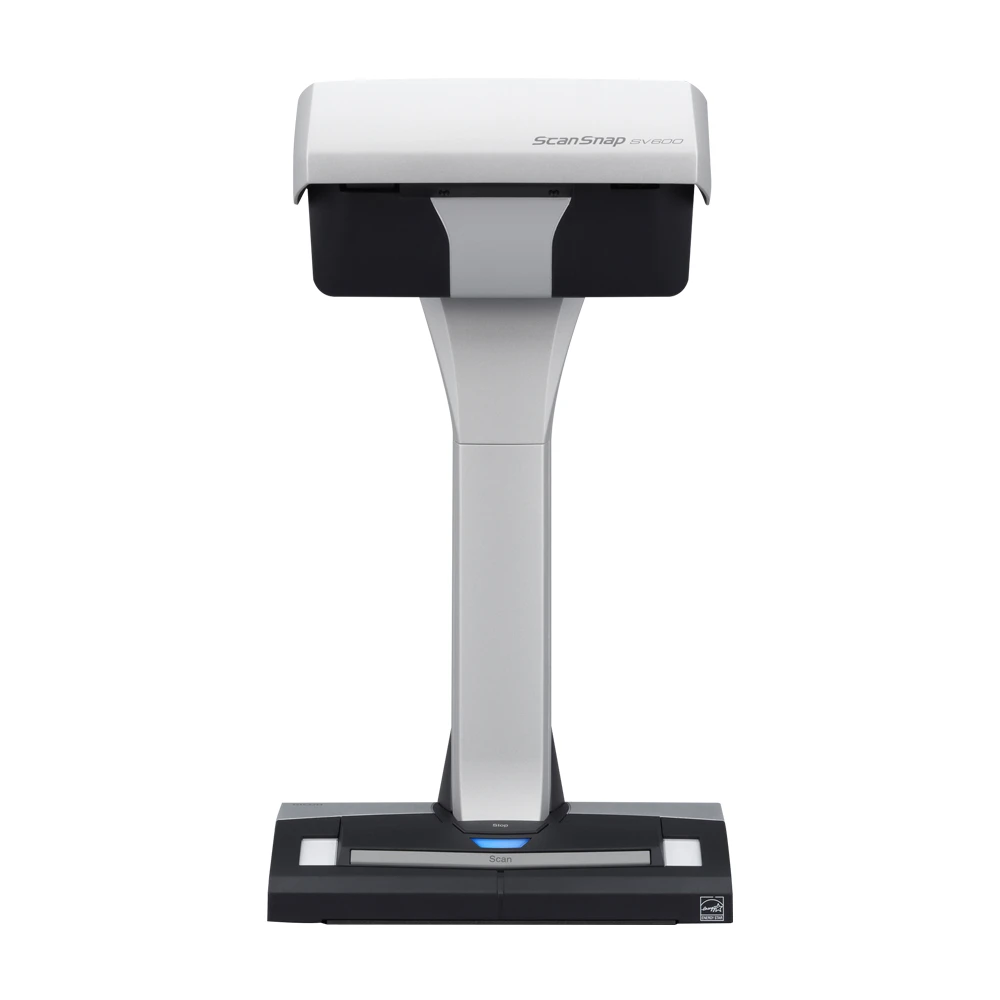
The SV600 is not a desktop sheet feeder with a book stand attached. PFU describes it as an overhead, contactless scanner: the original stays on a surface while the capture head scans from above. That changes which jobs are sensible. Bound books, magazines, newspapers, drawings, photos, fragile sheets, and originals up to the published thickness limit can be digitized without threading them through rollers or cutting a binding. For archival material or books that should stay intact, avoiding a feed path is the main reason to consider it.
That benefit comes with a different rhythm. The device scans one page or scene at a time; it has no stack ADF and does not perform automatic duplex capture. PFU advertises an A3 landscape capture cycle of three seconds per page, but a real book workflow still includes placing or turning pages, keeping a volume positioned, checking crops, and reviewing curve correction. Page-turn detection can start a scan when a page is turned, and a timed mode can trigger captures at a chosen interval. These controls reduce repeated button presses; they do not make the process equivalent to an unattended document feeder.
Book correction and large originals
The SV600’s specific processing functions are aimed at overhead work. PFU lists book-image correction for the curve formed by an open volume, page-turn detection, timed capture, automatic size detection, rotation, deskewing, and multiple-document detection. Its global product page says a single scan can handle up to ten separate documents for automatic cropping; PFU’s US Store description also names finger-image erasure. These functions address common overhead-scanning problems, but they should be understood as software assistance rather than a guarantee that every page edge, shadow, or hand position will be corrected perfectly. A preview and manual check still belong in a careful book-digitization workflow.
The specification gives a maximum capture area of 432 by 300 mm, or about 17 by 11.8 inches, and accepts documents up to 30 mm thick. There is an important qualifier: for material thicker than 5 mm, PFU reduces the maximum scan size to 400 by 300 mm. The scan head’s optical resolution varies with the angle at which it views the original, with listed horizontal values from 218 to 285 dpi and vertical values from 152 to 283 dpi. That is very different from a flatbed’s fixed optical-resolution headline. It can be appropriate for page text and book capture, but buyers who need consistent fine detail across a large flat original should evaluate sample requirements and workflow carefully rather than reading “A3” as a promise of uniform high-resolution capture.
Software and connection are material checks
The model-specific technical specification lists a USB 2.0/1.1 Type-B interface, a PFU-specific driver, and ScanSnap Home for PC. It says Windows does not support TWAIN or ISIS, and macOS does not support TWAIN. The manual-download page offers ScanSnap Home and ScanSnap Manager documentation, so the exact software generation and current operating-system support deserve attention, especially when connecting an older scanner to a newer computer. A TWAIN-dependent application should not be assumed to work merely because scans can be saved as PDF or JPEG.
There is a source conflict worth calling out rather than smoothing over. A current PFU US comparison grid labels the SV600 as supporting Wi-Fi and mobile-device scanning. The SV600-specific global specification and manual information instead list USB as the device interface, and the US Store product description lists USB 2.0. The exact-model technical documentation does not establish a wireless scanner route. This assessment therefore treats Wi-Fi and direct mobile scanning as unconfirmed; it does not match the SV600 to an essential Wi-Fi or mobile requirement. Anyone relying on those comparison-grid entries should ask PFU to confirm the intended model/software route before purchase.
Size, setup, and the right buyer
The scanner itself is about 8.27 by 6.14 inches at its base and 15.08 inches tall, according to PFU’s current specification. It needs a stable overhead position and room for the scan mat and original below the head, so its practical desk footprint is greater than the base dimensions. The global specification lists an AC adapter, cable, USB cable, background pad, and two extenders among the included items, but it warns that package contents can vary by region and shipment date. Confirm the contents of the exact US offer rather than treating a global accessory list as a guarantee.
This is a specialized choice for people who value contactless capture more than stack throughput: libraries, family archives, book projects, or occasional large and delicate originals. It is not the default recommendation for routine invoices, double-sided forms, or users who expect Wi-Fi convenience. A flatbed can be more familiar for single sheets and photographs, while a sheet-fed duplex scanner is much more natural for batches of ordinary pages. The SV600’s case rests on the originals it can handle without feeding, plus its page-turn and book-correction tools—not on a universal claim that overhead scanning is faster or sharper.
Checks before ordering
The PFU Store identifies the US SV600 offer as part PA03641-B305. Match that number to the seller’s exact scanner and confirm current Windows or macOS compatibility, the version of ScanSnap software available for the intended computer, and the actual mat, cable, adapter, and extender contents. Plan for USB-connected computer use unless PFU confirms the conflicting Wi-Fi/mobile listing for this precise configuration. If the capture application requires TWAIN, obtain a direct compatibility answer first. Finally, treat the three-second figure as a manufacturer scan-cycle claim, not the time required to digitize and quality-check a complete bound book. No independent speed, image-quality, OCR, or page-correction test is represented in this research-based assessment.
Key specifications
Key details at a glance
| Scanner class | Overhead contactless |
|---|---|
| Connection options | USB |
| Automatic duplex capture | No |
| Separate manual-feed route | No |
| Touchscreen | No |
| TWAIN driver documented | No |
Use the exact model’s instructions for operating limits, supplied equipment and version differences.
Sources for this review
Sources for this assessment
- PFU Ricoh Store: ScanSnap SV600, US part PA03641-B305
- PFU Ricoh Store SV600 Book Scanner route
- Ricoh ScanSnap SV600 global specifications (as of May 12, 2026)
- Ricoh ScanSnap SV600 manual and support index
- PFU Ricoh Store ScanSnap family listing, page 1/page 2 observations
- PFU Ricoh Store refurbished ScanSnap listing (partial observation)
- Ricoh US ScanSnap SV600 product/comparison page (direct fetch challenged)
Compare the workflow before you choose
Use the finder to test your connection, paper and software requirements against the documented scanner arrangements.