
Your needs, this model
Does it fit your priorities?
Does it offer both USB and Wi-Fi?
Yes. Brother lists USB 2.0 and 802.11 b/g/n wireless as standard interfaces. They are alternative supported connections for different setups, not a claim that one scan travels over both at once.
Explore this need in the finder →Can a mobile device participate over Wi-Fi?
Brother documents iPrint&Scan mobile scanning for this wireless model and says the mobile route requires a wireless network. Verify that your current phone, app version, destination and network are supported before depending on an older unit.
Explore this need in the finder →Is its plastic-card path the same as the ADF?
No. Brother documents a dedicated rear Card Slot for supported plastic cards, including embossed cards, with a separate slot guide and Plastic Card Mode. That is a narrow manual insertion path, not general special-media feed for envelopes or every fragile original.
Explore this need in the finder →Can a current Windows 11 host be assumed to work?
No. Brother's current U.S. Windows 11 table lists ADS-1000W as Not Supported for both drivers/software and USB users. Match the scanner to a specifically supported host and driver before considering a used package.
Explore this need in the finder →Does its network interface mean computer-free cloud storage?
Not in the reviewed documentation. Brother lists FTP and USB-memory destinations, but those are not the same as a direct upload to cloud storage; a cloud workflow should not be assumed for ADS-1000W.
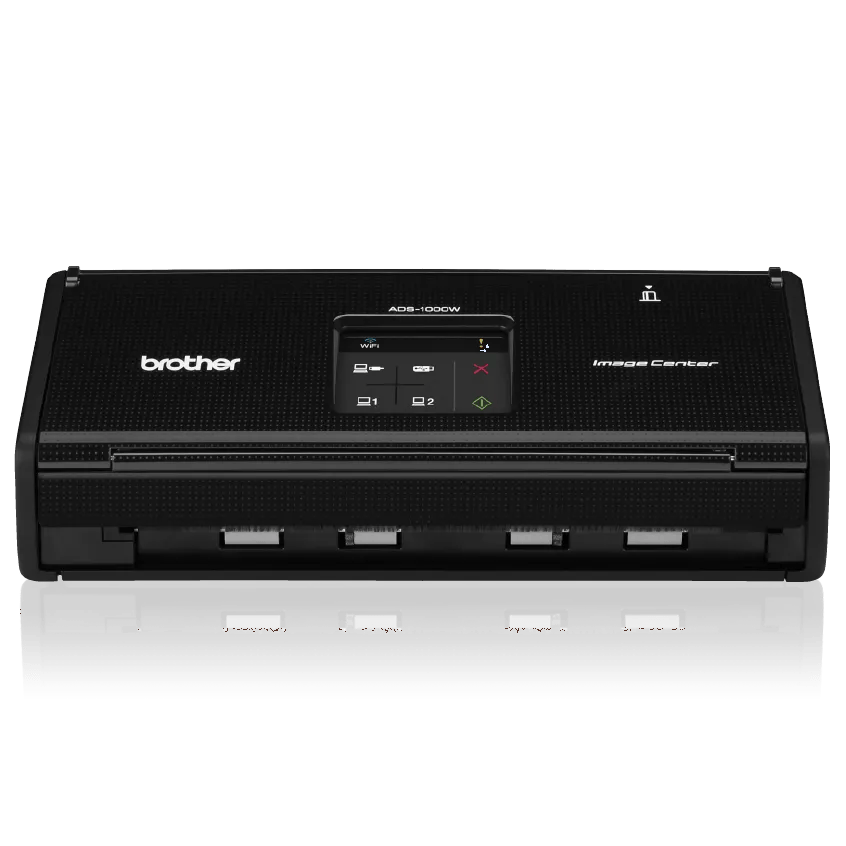
Explore this need in the finder →The ADS-1000W is a small, earlier Brother desktop scanner with a 20-sheet duplex feeder, USB 2.0, 802.11 b/g/n wireless networking and a dedicated rear slot for supported plastic cards. Brother now marks the exact model discontinued. Its product page remains useful for identifying the original configuration, but it is not evidence of current inventory, a suitable used unit or an intact seller package.
Compact batch scanning with age-related limits
Brother specifies a 20-sheet ADF and single-pass duplex scanning. Its listed maximum is 16 pages per minute, and the product page also lists up to 32 duplex images per minute. The brochure's speed note ties the headline rate to Letter paper at 300 dpi; advanced processing and actual host workflows can change the time. These are manufacturer figures, not independently measured results.
The User's Guide gives the 20-sheet loading basis as 20-pound Letter paper and sets a total-thickness limit. That is a short-batch design, not a substitute for clearing a large daily queue at once. A one-pass duplex route is helpful for contracts or two-sided forms, but when a routine regularly exceeds a few short stacks, compare a larger ADF before treating the compact footprint as the main benefit. Brother's up-to-500-page daily duty figure is a design comparison, not a guarantee of reliability or a recommended amount of daily work.
The unit is old enough that host compatibility may be the decision point. Brother's U.S. Windows 11 table lists ADS-1000W as Not Supported; using older software on unsupported systems is not guaranteed. Brother also says it will not provide new software or updates for unsupported Windows or older Mac generations. Before considering a used machine, identify the exact host, driver, application and connection route that the job requires.
Wireless and USB are useful, but not interchangeable
Brother lists Hi-Speed USB 2.0 and 802.11 b/g/n wireless as supported interfaces. USB is the familiar host-computer route; the wireless setup can share the scanner on a local network and support Brother iPrint&Scan mobile scanning. Those are different setup choices, not simultaneous use of both interfaces. The brochure does not list a 5 GHz band, so do not assume dual-band access from the word wireless.
Its electrostatic TouchPanel and one-touch scan buttons can start common tasks, but ADS-1000W does not have the color touchscreen LCD used by the related ADS-1500W. That distinction matters if multiple users expect touchscreen profile selection. One-touch behavior depends on saved destinations and software settings.
Brother documents scan-to-PC, FTP, USB flash drive and mobile-device destinations. The USB flash drive is not included in the original carton. An FTP target is a configured server destination, not cloud storage; the sources reviewed here do not establish a direct computer-free cloud upload for ADS-1000W. A Wi-Fi connection therefore should not be mistaken for a scanner-side cloud service or for a supported phone/OS pairing today.
A separate card slot is a narrow special-original feature
The rear Card Slot is a genuinely distinct insertion path and gives this small model a specific advantage for supported plastic cards. Brother's manual and U.S. troubleshooting FAQ describe adjusting the card-slot guide and using Plastic Card Mode; embossed cards are inserted with the embossed side down. The User's Guide limits card dimensions and thickness, with embossed cards up to 1.4 mm. Brother notes that an unacceptable card or an incorrectly adjusted guide can produce a card-feed error.
This is not a broad manual-feed route for envelopes, booklets or every delicate original. It is one supported card at a time through a dedicated slot. Keep cards out of the ordinary ADF workflow unless the exact instructions say the card may be fed that way. The reviewed product page lists a receipt carrier sheet in the original carton, but an older or secondhand unit may not include it; inspect package contents and wear rather than relying on original carton specifications.
Software support and what has changed
The exact U.S. specifications list TWAIN, WIA, ICA, ISIS and SANE drivers, and the model guide covers TWAIN host capture. That is relevant if older scanning software expects a driver interface, but a legacy driver listing is not proof that a current PC can use it. Brother's Windows 11 table is explicit about the unsupported status. The model support page also says BR-Receipts has not been available to download since April 2024. Do not treat that discontinued software as an included benefit for a new workflow.
For a currently listed compact USB option, the Brother ADS-1300 has a similarly small 20-sheet feeder and duplex capture but no wireless route. The newer ADS-1350W and ADS-1800W families have their own wireless and software specifications; they are not replacement units in the sense of inheriting this model's exact card slot, package or driver history. Compare the exact U.S. version and manual instead of assuming a family name makes the products equivalent.
Who should consider an earlier ADS-1000W
The ADS-1000W is worth investigating only when its compact duplex workflow, both USB and Wi-Fi alternatives, or dedicated plastic-card slot solve a specific job—and when the buyer can verify a supported host, tested condition, feed rollers, card-slot operation and seller-supplied accessories. Its 20-sheet ADF is modest, and present manufacturer support is a serious constraint. It is a weak choice if a current Windows driver, built-in touchscreen, direct-cloud workflow, larger batch capacity or dependable seller warranty is essential.
Brother's original carton list includes the scanner, AC adapter, USB cable, receipt carrier sheet, setup guide, installation DVD and warranty sheet. That is historical package information, not a promise that any used listing contains those items. Check the exact unit and seller terms, including power supply, cable, carrier sheet, software media, condition and return policy. No hands-on test or purchase is claimed.
Key specifications
Key details at a glance
| Scanner class | Compact desktop sheet-fed scanner |
|---|---|
| Manufacturer-listed simplex rate | 16 ppm |
| Manufacturer-listed duplex image rate | 32 ipm |
| Automatic document feeder capacity | 20 sheets |
| Optical resolution | 600 dpi |
| Connection options | USB / Wi-Fi |
| Automatic duplex capture | Yes |
| Separate manual-feed route | Yes |
| Touchscreen | No |
| TWAIN driver documented | Yes |
Use the exact model’s instructions for operating limits, supplied equipment and version differences.
Sources for this review
Sources for this assessment
- Brother ADS1000W U.S. product page and specifications
- Brother ADS-1000W U.S. support and downloads
- Brother ADS-1000W U.S. manuals index
- Brother ADS-1000W User's Guide, version B
- Brother U.S. FAQ: ADS-1000W plastic-card feeding and slot setup
- Brother ADS-1000W U.S. product brochure
- Brother U.S. Windows 11 support table
Compare the workflow before you choose
Use the finder to test your connection, paper and software requirements against the documented scanner arrangements.