
Your needs, this model
Does it fit your priorities?
Will it capture both sides of a sheet automatically?
Yes. Brother describes one-pass duplex capture and lists up to 50 images per minute at its specified Letter/300-dpi maximum. That figure is not a test result and does not include your software, OCR or file-handling time. The normal ADF load is up to 20 pages on the listed paper basis.
Explore this need in the finder →Can I scan a plastic card without putting it in the paper ADF?
Brother documents a separate Card Slot and says not to load plastic cards in the ADF. It takes one card at a time, and certain embossed cards may not scan correctly or may be scratched. This specific card task does not make it a general-purpose manual-feed scanner.
Explore this need in the finder →Can it scan directly from a phone or send to cloud storage without a computer?
That route is not established. The product page mentions iPrint&Scan and cloud destinations, but its scan-to wording is computer-dependent; Brother's ADS-1200 setup guide says the model cannot connect to a network. Treat it as a USB-to-computer or local USB-memory scanner, not a phone-first/cloud appliance.
Explore this need in the finder →Does it have TWAIN for a computer capture application?
Brother lists a TWAIN driver, alongside WIA, ICA and SANE. The support specification's named host systems are dated, so verify the currently offered ADS-1200 driver for your operating system and the exact capture application before relying on TWAIN.
Explore this need in the finder →The Brother ADS-1200 is an earlier compact sheet-fed scanner built around a USB-connected computer. Its more distinctive feature is a separate slot for a single plastic card, alongside a 20-sheet automatic document feeder for ordinary documents. Brother marks the model discontinued. The machine can still be a useful reference when comparing a specific used unit, but its age makes the exact host driver, power arrangement, cable and seller package part of the decision.
A small feeder, with two different input paths
Brother rates the ADF for up to 20 pages on its stated 20-pound Legal-paper basis, or within a stack height under 0.2 inches. The manufacturer lists single-pass duplex capture and maximum speeds of 25 pages per minute and 50 duplex images per minute at Letter size and 300 dpi. These figures help identify the scanner's class; they are not independent measurements and do not predict the time for a job that includes image processing, OCR, naming and saving. A 20-sheet feeder is a useful batch size for short runs, not a reason to expect a large archive to finish unattended.
Plastic cards use a different path. Brother's manual directs the operator to move the feed selector and insert one plastic card into the dedicated Card Slot; it explicitly says not to put those cards in the ADF. That is a real benefit for card-based records, but it is narrow. The manufacturer warns that some embossed cards may not scan correctly and that a card can be scratched. It is not a second tray for folded pages, envelopes or an arbitrary stack of special material. The guide also treats business cards as ADF originals, so the dedicated slot should not be generalized to every small card.
USB is the defining connection limit
The U.S. product page lists a Micro USB 3.0 computer interface, and Brother's exact-model quick-start guide says the ADS-1200 cannot connect to a network. It therefore lacks the Wi-Fi and Ethernet options that make network scanners easier to share. Brother's product page includes an iPrint&Scan compatibility row, but it does not explain a phone-to-scanner route; the setup guide describes USB host use and rules out a network connection. The evidence does not establish direct scanning from a phone.
There is also a separate USB port for scanning to a flash drive. That local-storage function is not the same as a network or cloud destination. Brother's scan-to descriptions for file, OCR and email are footnoted for use with a PC and its iPrint&Scan software. In other words, the cloud-service names on a product page should not be read as a scanner that sends files to the internet on its own. A computer can participate in a cloud workflow; the machine itself has no wireless connection.
Bus power is convenient, but conditional
Brother lists an AC adapter in the U.S. carton contents and also documents USB bus power from a computer. Bus power can help at a desk without an available wall outlet, but the manual requires a USB 3.0 Micro cable for that mode and says scanning will be slower. Long Paper, Thick Paper and Scan to USB are not supported while bus powered. A used-unit listing should be checked for the adapter and the correct host cable rather than assumed to contain everything visible in a retailer photograph.
Driver evidence is not a promise for every computer
Brother lists TWAIN, WIA, ICA and SANE drivers, which gives the ADS-1200 more capture-software routes than a scanner that relies only on a bundled utility. The support specification's explicit TWAIN host table is dated, while Brother's current support page has a separate operating-system matrix and downloads. A current operating-system label does not guarantee that a particular third-party capture program will work, so match the exact ADS-1200 driver and named application before buying an older unit for a managed workflow.
The product page also lists a 1,000-page maximum daily duty cycle, but that number should not be treated as a recommended everyday volume or a durability test. The paper path, rollers, separator and maintenance history of a used scanner matter, and the current sources do not establish the state of any particular unit.
How it differs from nearby Brother choices
The current-reference ADS-1300 occupies a similar compact, 20-sheet duplex category but uses a USB-C interface and a newer software profile. The ADS-1200's separate plastic-card slot may make it the more interesting earlier model for a card-centered task, while its network-free design is a clear drawback for a shared office. Brother's ADS-1800W adds Wi-Fi and touchscreen controls to a compact feeder, so a phone or network workflow points in a different direction. Those are model distinctions, not evidence that accessories, cables or operating systems transfer between them.
What to verify before considering an earlier unit
First confirm that the label and model code actually say ADS-1200; the separate ADS-1190 and wireless ADS-1250W appear in shared documentation but are not interchangeable records. Ask what is included, whether the AC adapter is present, whether the host cable is appropriate, and whether the seller's return terms cover a scanner that fails to feed consistently. Then check Brother's current driver page against the computer and capture software you intend to use. For cards, follow the slot's one-card instructions and inspect the card-size, thickness and embossing limitations. Do not pay for this model expecting Wi-Fi, a direct phone connection, computer-free cloud upload or a general manual-feed tray.
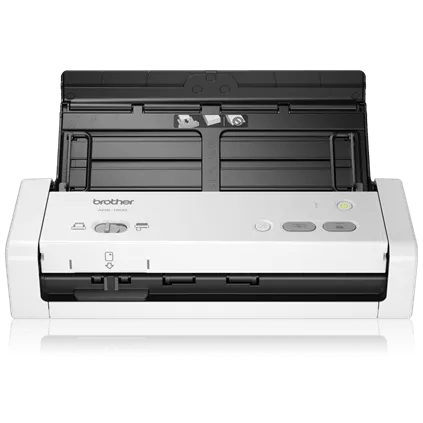
This assessment is based on Brother's U.S. product page, support specification, model-indexed manual and setup guide. No hands-on testing or inspection of a seller's unit is claimed. The integrated manufacturer image depicts the scanner body only; it does not show what an individual used package contains.
Key specifications
Key details at a glance
| Scanner class | Compact desktop sheet-fed scanner |
|---|---|
| Manufacturer-listed simplex rate | 25 ppm |
| Manufacturer-listed duplex image rate | 50 ipm |
| Automatic document feeder capacity | 20 sheets |
| Optical resolution | 600 dpi |
| Connection options | USB |
| Automatic duplex capture | Yes |
| Separate manual-feed route | Yes |
| Touchscreen | No |
| TWAIN driver documented | Yes |
Use the exact model’s instructions for operating limits, supplied equipment and version differences.
Sources for this review
Sources for this assessment
- Brother U.S. ADS1200 product page and specifications
- Brother U.S. ADS-1200 support specifications
- Brother U.S. ADS-1200 manuals index
- Brother ADS-1190/ADS-1200 shared U.S. Online User's Guide
- Brother ADS-1190/ADS-1200 U.S. Quick Setup Guide
- Brother U.S. ADS-1200 supported operating systems
- Exact U.S. ADS1200 product-page image asset
- Brother U.S. product recalls page
Compare the workflow before you choose
Use the finder to test your connection, paper and software requirements against the documented scanner arrangements.