
Your needs, this model
Does it fit your priorities?
Can I keep both a wired computer route and a wireless setup available?
Brother documents Micro USB 3.0 for a computer and 802.11b/g/n Wi-Fi for separate setups. The product is an earlier model; confirm the specific host, cable, driver and 2.4 GHz network before relying on it. The New condition filter does not override the product page's Discontinued/Out of Stock status.
Explore this need in the finder →Can I scan to cloud storage without a computer?
Only a conditional phone-mediated route is supported here: Brother's indexed Apple-device guide describes scanning to an iPhone/iPad, saving a PDF and uploading or sharing through an installed app or online account. Brother's product-page cloud-service destinations themselves require a PC, and its older Android guide only confirms saving scans to device memory/opening another app. Do not treat this as a touchscreen's direct cloud feature or promise Android parity.
Explore this need in the finder →Is there a separate manual-feed option for plastic cards?
Yes, but it is narrow: the separate Card Slot takes one supported plastic card at a time. The guide warns not to place cards in the ADF, notes that some cards can be scratched and some embossed cards may not scan correctly, and directs business cards to the ADF one at a time instead.
Explore this need in the finder →Will the feeder hold an entire short batch at once?
Brother rates the ADF for up to 20 pages on 20 lb Legal paper or a stack under 5 mm. That is a per-load ceiling, not an endurance rating; a longer batch needs reloads, and long sheets have separate restrictions: one at a time, under 300 × 300 dpi, and simplex only.
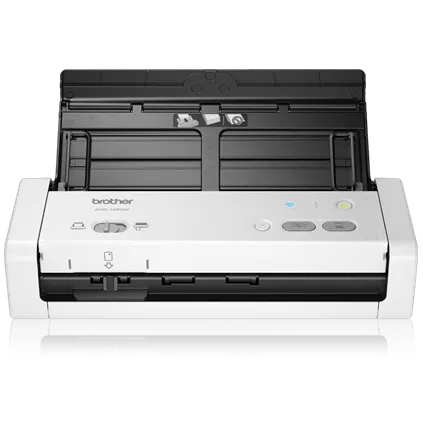
Explore this need in the finder →The Brother ADS-1250W is an earlier compact duplex document scanner whose useful distinction is its choice of separate computer and phone workflows. It has a 20-page automatic feeder, a physical card slot for one plastic card at a time, USB and Wi-Fi connections, and no touchscreen. Brother’s U.S. product page showed the model as out of stock when checked, and the desktop catalogue card carried a Discontinued badge. This assessment is about the documented U.S. model, not a promise of current seller availability or a claim of hands-on testing.
A short-stack duplex feeder
Brother specifies a 20-sheet ADF on 20 lb Legal-size paper or a stack under 5 mm. That is a per-load ceiling, so a larger stack means returning to reload the feeder; it is not a suggested daily volume. The product page gives maximum rates of 25 pages per minute simplex and 50 images per minute duplex. Brother’s brochure ties those figures to color and monochrome Letter pages at 300 dpi. They are manufacturer ratings, not measured throughput, and a complete workflow that includes deskew, OCR, file handling or cloud transfer can take longer. The listed 1,000-page daily duty-cycle figure is also a comparison limit, not an endurance test or a sensible target for every office.
The 20-page capacity suits short batches better than a long unattended queue. Receipts, photos and other special originals have separate loading guidance; a mixed stack is not automatically safe because the feeder holds 20 sheets. The specification also lists 600 by 600 dpi optical resolution. That is a published ceiling, not a guarantee of a particular OCR result.
USB, Wi-Fi and the actual phone route
A Micro USB connection supports capture to a computer. Brother’s shared guide says ADS-1250W can also use USB 3.0 Micro bus power from the host, but that mode is slower, requires the appropriate USB 3.0 Micro cable, does not work over wireless, and excludes Long Paper, Thick Paper and Scan to USB. A cable appearing in one product-page specification table is not enough to assume that it will accompany a used unit; check the exact seller package.
On wireless, Brother documents 802.11b/g/n infrastructure Wi-Fi and a model-specific Wireless Direct connection. The shared guide says this scanner needs a 2.4 GHz network rather than a 5 GHz-only SSID. Wireless Direct is a local scanner-to-phone connection: it is not the same thing as an internet connection and I do not count the direct link itself as cloud access. For router-connected standalone scanner setup, the Quick Setup Guide says a PC connection is required. That makes the ADS-1250W less straightforward if the desired workflow is to configure a network scanner once and then rely on the machine without any computer involvement.
Mobile use is documented through Brother iPrint&Scan, but the cloud distinction needs care. The product page’s own cloud-service destination note requires a PC, internet access, Brother software and a service account. Separately, the model’s indexed Apple-device guide describes scanning to an iPhone or iPad, saving the result as a PDF, then uploading or sharing it through another installed app or online-service account. That is a conditional phone-mediated route without a computer; it is not direct scanner-to-cloud delivery. Brother’s older Android guide confirms saving scans to device memory and opening them in other applications, but does not establish equivalent Android cloud behavior. Confirm the current app, device, service account and network arrangement before treating phone-to-cloud as essential.
A narrow card slot, not a second general feeder
The separate Card Slot is useful for occasional supported plastic cards, but its limits are important: Brother instructs users to load one card at a time and not to send plastic cards through the ADF. The manual warns that some cards can be scratched and some embossed cards may not scan correctly. Business cards are different: the guide directs those through the ADF one at a time, not the plastic-card slot. This is a real separate special-original route, but not a general manual feeder for envelopes, folded pages or every unusual document.
For long paper, the manual allows one sheet at a time up to 34 inches, below 300 by 300 dpi and in simplex only. That path is a poor proxy for routine duplex capture. Check Brother’s handling instructions before loading fragile or unusually thick originals.
Basic controls and software checks
The ADS-1250W has a physical button-and-indicator panel, not a touchscreen. Brother lists TWAIN, WIA, ICA and SANE drivers, but the old operating-system rows do not guarantee compatibility with a current host or third-party application. Check the exact host, driver release and software requirement before buying or installing a used scanner.
Compared with the earlier USB-only ADS-1200, the ADS-1250W adds wireless and mobile routes while retaining a 20-sheet feeder and card slot. The ADS-1700W is the better fit if a touchscreen matters: Brother identifies that model, not the ADS-1250W, as having the touchscreen LCD. Check current app and driver support for this earlier scanner.
What to verify before choosing one
The saved U.S. product-page captures disagree about carton contents. One section lists the scanner, AC adapter and printed papers; a separately hydrated specification table adds a USB cable and Product Safety Guide; the older brochure lists adapter and documents but no cable. I would not promise a complete box or cable from those records. Ask what adapter, cable and papers accompany the specific unit, check its condition and return terms, and confirm current driver support. The selected “New” catalogue filter describes an offer condition, not product lifecycle or availability.
Key specifications
Key details at a glance
| Scanner class | Compact desktop sheet-fed scanner |
|---|---|
| Manufacturer-listed simplex rate | 25 ppm |
| Manufacturer-listed duplex image rate | 50 ipm |
| Automatic document feeder capacity | 20 sheets |
| Optical resolution | 600 dpi |
| Connection options | USB / Wi-Fi |
| Automatic duplex capture | Yes |
| Separate manual-feed route | Yes |
| Touchscreen | No |
| TWAIN driver documented | Yes |
Use the exact model’s instructions for operating limits, supplied equipment and version differences.
Sources for this review
Sources for this assessment
- Brother U.S. ADS1250W product page and specifications
- Brother U.S. desktop scanner category, selected New condition result state
- Brother U.S. ADS-1250W support specifications
- Brother U.S. ADS-1250W manuals index
- Brother ADS-1190/ADS-1200/ADS-1250W/ADS-1700W U.S. Online User's Guide, Version B
- Brother ADS-1190/ADS-1200/ADS-1250W/ADS-1700W U.S. Quick Setup Guide, Version A
- Brother ADS-1250W two-page product brochure
- Brother iPrint&Scan Mobile Print/Scan Guide for Apple Devices
- Brother iPrint&Scan Mobile Print/Scan Guide for Android
- Exact-page-linked U.S. ADS-1250W front image asset
- Brother U.S. Product Recalls page
Compare the workflow before you choose
Use the finder to test your connection, paper and software requirements against the documented scanner arrangements.