
Your needs, this model
Does it fit your priorities?
Can the ADS-1500W send a scan to an online service without a computer beside it?
After configuration, the model-specific Web Connect Guide describes scanner-side upload to a supported online service over Wi-Fi without a computer at scan time. Initial access setup requires an Internet-connected computer with Brother software, the chosen service account and an Internet-connected wireless network. The guide’s dated service list does not prove current provider support.
Explore this need in the finder →What does the 20-page ADF rating mean for a one-loading job?
Brother states up to 20 standard pages on 20 lb (80 g/m²) Letter stock or within the stated 79-mil / 2-mm stack limit. Long paper and the separate plastic-card slot are one-original routes; they do not increase the ordinary ADF stack.
Explore this need in the finder →Does it have a separate route for an occasional plastic card?
Yes, narrowly: the exact guide documents a rear Card Slot that handles one supported plastic card at a time, including embossed cards within the stated thickness limit. This is not a general manual feeder for envelopes or all fragile originals.
Explore this need in the finder →Can its touchscreen select a TWAIN computer workflow as well as Wi-Fi destinations?
Brother lists TWAIN for computer capture and a 2.7-inch touchscreen with 12 programmable shortcuts, alongside USB and Wi-Fi modes. The support table is an older OS snapshot; verify the current host and receiving application rather than inferring compatibility from the driver label.
Explore this need in the finder →A compact duplex scanner with a real front-panel workflow
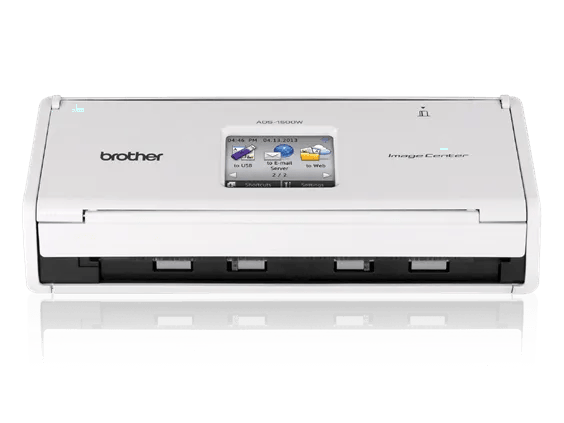
The Brother ADS-1500W is an earlier U.S. sheet-fed document scanner, not a flatbed or a battery-powered travel scanner. Its point of difference is the way it joins a small, 20-sheet automatic document feeder with wireless destinations and a 2.7-inch color touchscreen. Brother lists single-pass duplex capture at up to 18 pages per minute, or 36 duplex images per minute. Those are manufacturer ceilings under the stated setup, not observed results from this review.
The control panel is more than a connection indicator: the U.S. product page lists 12 programmable shortcut buttons, and Brother's manual shows scan profiles and destinations launched from the screen. That can help a small shared desk when people want to choose a saved route without opening a computer application for every job. It does not remove the work of creating profiles, maintaining accounts or checking who can access destinations.
The feeder is for short, ordinary stacks
The quoted ADF capacity is up to 20 pages. Brother qualifies this for 20-pound (80 g/m²) Letter paper, with a stack no thicker than 79 mil (2 mm); the guide also cautions against mixing paper thicknesses or qualities. Treat 20 as a one-loading limit under those conditions, not as an all-media capacity. Its long-paper setting is a one-sheet route, and the dedicated rear Card Slot handles one compatible plastic card at a time. The separate slot is useful for a narrow task, but it is not a general-purpose manual feed for envelopes, folded documents or every fragile original.
The product page lists a receipt carrier sheet in the U.S. carton contents, while the manual notes that carrier-sheet availability depends on country. It is a computer-capture aid for a single receipt; the manual says it cannot be used for scans saved directly to a USB flash drive. Confirm that the exact offered unit still includes the carrier sheet, and follow the specific card or receipt procedure rather than treating these as extensions of the 20-sheet batch. The maker's published daily figure is up to 500 scanned pages, a design-comparison ceiling, not a tested recommended workload.
Those limits put the ADS-1500W in a different class from Brother's larger earlier workgroup feeders. For perspective, the separately reviewed ADS-2800W has a documented 50-sheet ADF, while this model is the smaller desktop option; the two should not be compared on capacity or on their network arrangements alone. The ADS-1500W is a more relevant fit when short stacks, front-panel destination selection and a dedicated card slot matter more than batch size.
USB, Wi-Fi and cloud are separate parts of the workflow
Brother lists Hi-Speed USB 2.0 and 802.11b/g/n wireless. A computer-connected USB arrangement is available, and the Wi-Fi arrangement can put the scanner on a network for supported mobile scanning through Brother iPrint&Scan. These are alternative connection modes for different setups; they do not mean one document is simultaneously sent over both connections. The exact U.S. product page says mobile use requires a wireless network, so a phone's current app and operating-system compatibility still needs a check.
The touchscreen also offers direct Scan to USB memory and the older Web Connect destination path. Scan to USB is local storage: Brother says the flash drive is not included. Web Connect is the more conditional computer-free route. The ADS-1500W guide describes uploading to configured online services without a computer at scan time, but the model-specific Web Connect guide requires a computer with Brother software for initial access setup, a service account, and an Internet-connected wireless network. A computer-free scan is therefore not a computer-free installation. The service list in a 2013 guide does not guarantee that a named provider or account still works with this scanner today.
For paper that must enter a desktop document-management application, Brother lists TWAIN and other scan drivers, and its guide describes computer-side scanning and OCR routines. But the model's age matters: the U.S. support page checked for this assessment lists Windows 10 and older Windows versions, Linux and older macOS entries, with some rows visibly marked as no longer updated. A driver label is not a compatibility guarantee for a current computer, current TWAIN application or security policy. Confirm the exact OS, driver package and receiving software before valuing that route.
What to verify before considering an older unit
Brother's U.S. page marks the model discontinued and out of stock; that is a manufacturer-page status, not proof that every reseller lacks a unit or an endorsement of a used listing. The U.S. product page's package table names the scanner, AC adapter, USB cable, receipt carrier sheet, setup/user documents and a one-year limited warranty. Those contents and warranty cannot be transferred to a used, renewed or seller-specific package. Inspect the actual listing, included power supply and cable, return terms, condition and any account or driver requirements.
There is also an unresolved measurement issue: Brother's U.S. product page lists a compact unit dimension set of 11.2 by 4.1 by 3.3 inches, while the separate model specification table gives 11.2 by 10.0 by 9.1 inches. Neither source explains the basis well enough to use one as operating clearance. Do not plan a tight shelf around either number; check the exact manual's access and paper-path needs and measure the space your setup requires.
The ADS-1500W is a defensible earlier-model candidate only when its specific combination is useful: automatic two-sided short stacks, USB or Wi-Fi, an on-device touchscreen, a one-card slot and a configured Web Connect route. It is not a larger-volume substitute for a 50-sheet scanner, and no individual app, host, cloud service, used-unit condition or seller package is certified here. Use the connection guide and paper-handling guide to separate those questions, then match the exact offered configuration in the same-condition finder.
Key specifications
Key details at a glance
| Scanner class | Compact desktop sheet-fed scanner |
|---|---|
| Manufacturer-listed simplex rate | 18 ppm |
| Manufacturer-listed duplex image rate | 36 ipm |
| Automatic document feeder capacity | 20 sheets |
| Optical resolution | 600 dpi |
| Connection options | USB / Wi-Fi |
| Automatic duplex capture | Yes |
| Separate manual-feed route | Yes |
| Touchscreen | Yes |
| TWAIN driver documented | Yes |
Use the exact model’s instructions for operating limits, supplied equipment and version differences.
Sources for this review
Sources for this assessment
- Brother U.S. ADS1500W product page
- Brother U.S. ADS-1500W support specifications
- Brother U.S. ADS-1500W manuals index
- Brother ADS-1000W/ADS-1500W User Guide (ADS-1500W-qualified sections)
- Brother ADS-1000W/ADS-1500W Network User Guide
- Brother ADS-1500W Web Connect Guide
- Brother iPrint&Scan Mobile Print/Scan Guide for Apple Devices
- Brother U.S. ADS-1500W Supported OS page
- Brother U.S. ADS-1500W Downloads page (Linux RPM selector)
- Brother U.S. ADS-1500W consumables and accessories page
- Exact U.S. ADS1500W product-page image
Compare the workflow before you choose
Use the finder to test your connection, paper and software requirements against the documented scanner arrangements.