
Your needs, this model
Does it fit your priorities?
Can this earlier scanner use a phone without a computer at scan time?
Yes, Brother documents iPrint&Scan scanning with an Android or iOS phone without a computer. ADS-1700W also has model-qualified Wi-Fi Direct for a phone-to-scanner link without an access point. Check that the exact current app and phone OS still support the device.
Explore this need in the finder →Can a phone-led ADS-1700W scan reach iCloud without a computer?
Brother's mobile-app FAQ says supported iOS scanning can save a scan to iCloud. That is an app-mediated phone workflow, not an unrestricted scanner-to-cloud promise; confirm iPrint&Scan, iOS, network and account support before relying on it. The Wi-Fi Direct setup is a separate local connection, not the infrastructure-Wi-Fi cloud path.
Explore this need in the finder →Does the 20-page feeder meet a 20-sheet minimum, and what changes at 30?
It meets a 20-sheet minimum: Brother rates the ADS-1700W ADF for up to 20 pages on its 20 lb Legal-paper or under-5-mm basis. It does not meet 30 sheets, and the number is per loading rather than a daily batch total.
Explore this need in the finder →Is there a separate path for plastic cards?
Yes, Brother documents a dedicated Card Slot for one plastic card at a time, separate from the ADF; some embossed cards may fail and a card can be scratched. The slot is not for business cards—Brother directs those through the ADF one at a time—and it is not a general manual feed for envelopes or folded originals.
Explore this need in the finder →Can it duplex a long original?
The model supports ordinary two-sided ADF scanning, but Brother's guide says long paper is loaded one document at a time and is not available for 2-sided scanning. The listed 34-inch maximum therefore does not imply a duplex long-paper route.
Explore this need in the finder →What this earlier model does well
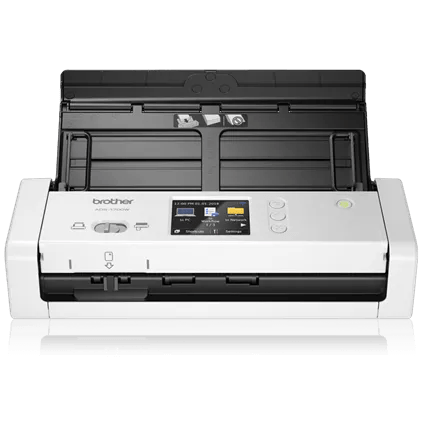
The Brother ADS-1700W is a compact, sheet-fed scanner built for short batches where a touchscreen and wireless phone option are useful. Brother's U.S. page lists a 20-page automatic document feeder, single-pass duplex scanning, USB and 802.11 b/g/n Wi-Fi. It also lists a 2.8-inch color touchscreen for choosing saved destinations. This is a review of manufacturer documentation, not a hands-on test. Brother marks the exact U.S. model discontinued; that label does not establish the stock, condition, warranty or package of any specific resale unit.
A 20-sheet feeder, with a real ceiling
Brother rates the ADF for up to 20 pages on 20-pound Legal paper or a stack under 5 mm. That is enough for a modest daily packet, but it is a small one-load limit: a larger stack needs reloads, and the guide says not to mix originals with different thicknesses or paper quality in one batch. Capacity is not a daily-volume rating. The separate 1,000-page maximum daily duty figure is a manufacturer comparison rating, not a recommended workload or an endurance result.
The product page lists maximum rates of 25 pages per minute simplex and 50 images per minute duplex, with Brother's speed note specifying Letter paper at 300 dpi. Dual CIS sensors allow both sides to be captured in one pass. Those ratings help place the scanner in its class, but they are not measurements of a real job with file handling, OCR, a slow host or a mixed paper stack. The 600-by-600-dpi optical figure is distinct from the page's interpolated resolution claim.
USB and Wi-Fi are different ways to set up
Brother lists Micro USB 3.0 for a local computer connection and 802.11 b/g/n Wi-Fi for network use. The wireless specification is not dual-band: Brother's guide says the machine does not support a 5 GHz SSID and calls for a 2.4 GHz network. The Quick Setup Guide also describes wireless setup for the ADS-1700W without a PC. A model-qualified section of the User's Guide documents Wi-Fi Direct between the scanner and a mobile device without an access point. That direct link is different from joining a home or office router. Do not assume the two modes provide the same internet or cloud access.
For a wired desktop job, TWAIN is among the interfaces Brother lists, alongside WIA, ICA and SANE. Its support specification gives specific older operating-system versions for TWAIN, while the separate OS page lists a broader set of systems and cautions that available features vary by operating system. A driver name or OS row does not prove that a particular capture application works with the current driver. Confirm the exact host, app, driver release and cable before relying on a used scanner. Brother's U.S. base-box list names an AC adapter and documentation, but not a USB host cable.
Phone scanning is documented; cloud claims need narrowing
Brother's mobile FAQ identifies the ADS-1700W for iPrint&Scan and says mobile scanning can happen without a computer. Its User's Guide also qualifies Wi-Fi Direct instructions to this model. Brother's separate iPrint&Scan FAQ says supported iOS scanning can save a scan to iCloud; the Android text describes saving to device storage or opening it in another app. That is a useful phone-mediated route, but not a promise that all phones, app versions or destinations behave alike.
The product page also lists OneDrive, Google Drive and Dropbox under iPrint&Scan cloud services. That listing does not establish the same destination path from the touchscreen for every service. The manual describes separate panel operations for a computer, network folder, FTP/SFTP, email server and USB drive; some require a profile to be configured in advance. If computer-free cloud is essential, verify the actual phone, OS, app version, account and destination you plan to use. In particular, Wi-Fi Direct is a phone link, not by itself proof of internet access.
A separate slot for plastic cards, not every special original
The feed selector changes between ADF use and a separate Card Slot. Brother says not to put plastic cards in the ADF and permits only one card at a time in the slot; it warns that some cards can be scratched and some embossed cards may not scan correctly. The specified plastic-card thickness is limited, with embossed cards allowed only up to the stated maximum. This is a narrow positive for a separate card path, not a general manual-feed route for envelopes, folded pages or delicate mixed originals.
There is an important distinction in Brother's documentation: although the product page's copy groups plastic cards and business cards near the dedicated slot, the model-specific User's Guide says the Card Slot is not designed for business cards. It directs business cards through the ADF, one at a time. The guide also allows a long original up to 34 inches, but only one document at a time, below 300-by-300 dpi, and says long paper is not available for two-sided scanning. A one-pass duplex claim for ordinary sheets should not be stretched to that long-paper case.
How it compares, and what to check
The earlier ADS-1200 shares the 20-sheet duplex feeder and listed TWAIN, but its documented setup is USB-only and its controls are not a profile-selection touchscreen. The ADS-1700W adds Wi-Fi and a touch panel, but those additions bring network, phone and app requirements rather than a bigger batch. Brother's current-reference ADS-1800W is a nearby comparison with a 20-sheet feeder and higher published speed figures; see its own assessment rather than assuming every software or cloud workflow is interchangeable. None of these manufacturer maxima is an independent speed test.
Before considering an ADS-1700W, match the exact model code and distinguish the base ADS-1700W from the separately listed RADS-1700W refurbished offer. Check the used unit's physical condition, included adapter and USB cable, return terms and warranty separately. Confirm your 2.4 GHz network, phone/app path, cloud account and host driver before treating a saved touchscreen profile as ready for your workflow. The scanner is AC-powered, and an old support entry does not guarantee future app or operating-system compatibility.
Key specifications
Key details at a glance
| Scanner class | Compact wireless desktop sheet-fed scanner |
|---|---|
| Manufacturer-listed simplex rate | 25 ppm |
| Manufacturer-listed duplex image rate | 50 ipm |
| Automatic document feeder capacity | 20 sheets |
| Optical resolution | 600 dpi |
| Connection options | USB / Wi-Fi |
| Automatic duplex capture | Yes |
| Separate manual-feed route | Yes |
| Touchscreen | Yes |
| TWAIN driver documented | Yes |
Use the exact model’s instructions for operating limits, supplied equipment and version differences.
Sources for this review
Sources for this assessment
- Brother ADS1700W U.S. product page and specifications
- Brother ADS-1700W U.S. support specifications
- Brother ADS-1700W U.S. manuals index
- Brother User's Guide for ADS-1190/ADS-1200/ADS-1250W/ADS-1700W
- Brother Quick Setup Guide for ADS-1190/ADS-1200/ADS-1250W/ADS-1700W
- Brother ADS-1700W U.S. supported operating systems
- Brother iPrint&Scan mobile FAQ scoped to ADS-1700W
- Brother mobile scanning FAQ scoped to ADS-1700W
- Brother ADS-1700W two-page U.S. product brochure
- Brother U.S. product recalls page checked for ADS-1700W
- Exact ADS-1700W image linked from Brother's U.S. product page
Compare the workflow before you choose
Use the finder to test your connection, paper and software requirements against the documented scanner arrangements.