
Your needs, this model
Does it fit your priorities?
Can a phone take part in scanning?
Brother describes using Mobile Connect from a phone over Wi-Fi and lists mobile compatibility. Check current app and phone support and whether the network route matches your setup.
Explore this need in the finder →Can it send scans to a cloud service without a computer?
The product page describes saving directly to cloud services from the scanner. The destination still depends on the supported app/service, network and account requirements; this is not a claim that the scanner works offline.
Explore this need in the finder →Does it have a screen for choosing scan destinations?
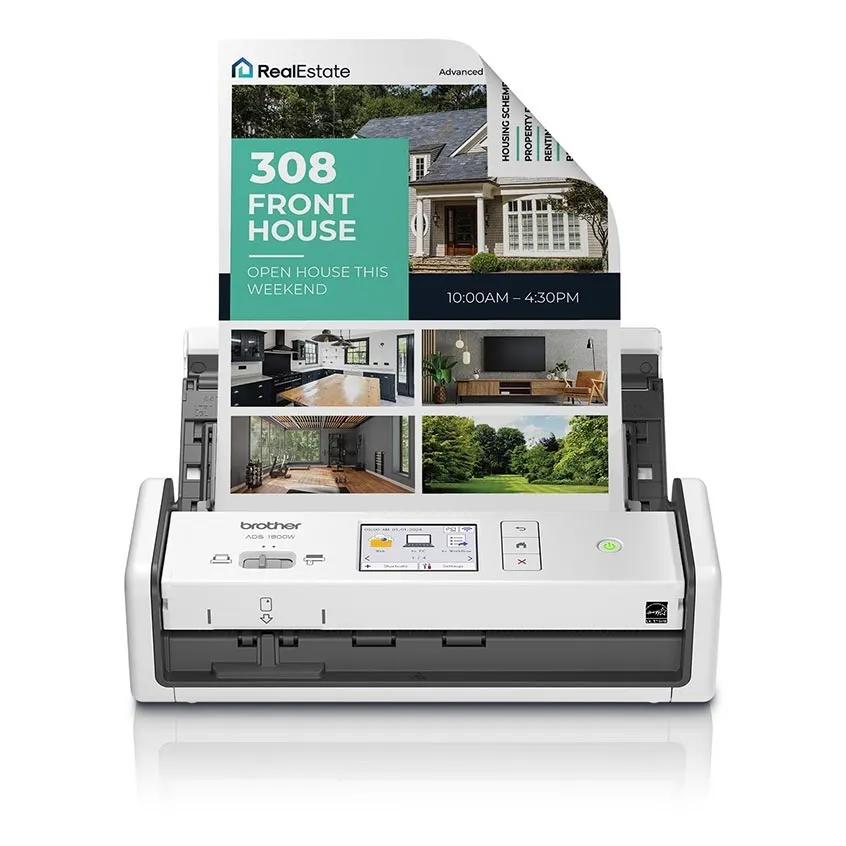
Yes. Brother specifies a 2.8-inch color touchscreen for presets, shortcuts and settings. That is smaller than the 4.3-inch screen on the ADS-4900W.
Explore this need in the finder →Is its feeder a 100-sheet batch feeder?
No. Brother specifies capacity up to 20 sheets. It can duplex those pages, but users with larger routine stacks should compare a 100-sheet model such as the ADS-4900W.
Explore this need in the finder →The ADS-1800W adds wireless and machine-side controls to a compact 20-sheet duplex scanner. Brother describes a 2.8-inch color touchscreen, Wi-Fi use with Mobile Connect, cloud destinations and USB connectivity. Its practical appeal is therefore not a larger batch than the ADS-1300; it is the ability to start or route short jobs without making one computer the center of every scan. The same 20-sheet feeder remains a real limit for long stacks.
Wireless control, compact capacity
Brother’s product page lists single- and double-sided scanning up to 30 pages per minute, up to 60 duplex images per minute, 600 by 600 dpi optical resolution and a 20-page automatic document feeder. A 1,000-page maximum daily duty cycle is also listed. Maximum speed and daily-cycle figures describe the manufacturer’s product specification, not the speed of a tested job or a recommended workload for every user. Image processing, OCR, destination choice, page condition and feeder reloading can make the elapsed time quite different.
The touchscreen can set destinations, shortcuts and scanner settings at the unit. Brother describes connecting a smartphone through its Mobile Connect app and a Wi-Fi connection, and says scans can be saved directly to cloud services. This gives the ADS-1800W more stand-alone flexibility than the USB-only ADS-1300. But a “cloud” destination still depends on the supported service, network, account and software path. Before treating it as a computer-free archive, identify the exact destination and check the current setup instructions and account requirements.
Paper and software boundaries
Brother lists duplex capture, continuous scan, auto image rotation, blank-page skip, automatic deskew, background-color and bleed-through removal, and an ID-scan feature. The product page discusses cards and documents of different lengths. Such feature lists explain what the unit is designed to handle; they do not certify that fragile originals, curled receipts or unusual card stock will feed safely without preparation. Follow the current instructions for special media and use the carrier-sheet guidance where Brother recommends it.
The specifications list TWAIN, WIA, ICA and SANE drivers and output options that include searchable PDF and image formats. That range can fit a desktop capture application or an OCR workflow, but the specific software and operating-system combination still matters. Brother’s support page points users toward its download center for current drivers and manuals. The desktop iPrint&Scan support table includes ADS-1800W for listed Windows and later macOS rows, but its compatibility table has date-bounded OS columns; consult the current download page rather than assuming support for an unlisted future system.
A source-page detail worth checking
Brother’s product page lists “Micro USB 3.0” under standard interfaces, while its in-box list names a USB Type-C 3.2 cable. Because those descriptions do not align cleanly, confirm the physical connector and supplied cable for the exact unit or package before purchasing. The match treats the scanner as offering USB and Wi-Fi because both connection routes are listed; it does not settle which connector generation is present. Do not buy a separate cable from a guessed specification.
Wi-Fi is listed as 802.11 b/g/n. The inspected product source does not establish a 5 GHz band, and the page does not list Ethernet. The ADS-4900W is the more suitable comparison when a wired network, a 100-page feeder, 56 shortcuts or higher-volume ratings are central. The ADS-1300 is the simpler comparison when a direct USB-to-computer arrangement is enough and machine-side wireless controls are unnecessary.
Who should shortlist it?
This model is worth comparing for home offices or mobile-oriented desks that scan short duplex batches and value a touchscreen, phone app and Wi-Fi routing. It is less compelling for large daily stacks: the 20-sheet capacity will require more reloads than the ADS-4900W, and the published maximum duty cycle is lower. It also remains a sheet-fed scanner, so bound books, flat photographs or delicate originals that should not pass through rollers need another capture method.
Before ordering
Match the ADS-1800W model code and confirm whether the offer is new or refurbished and what it includes. Verify the connector and cable discrepancy, phone-app support, current network requirements, cloud-service availability, driver support and exact paper handling instructions. Brother lists a one-year limited warranty on the product page; read the current US warranty and seller return terms. This review is based on manufacturer information, not hands-on operation: no speed, feed reliability, OCR quality, app behavior or durability test was performed.
Key specifications
Key details at a glance
| Scanner class | Compact wireless desktop sheet-fed scanner |
|---|---|
| Manufacturer-listed simplex rate | 30 ppm |
| Manufacturer-listed duplex image rate | 60 ipm |
| Automatic document feeder capacity | 20 sheets |
| Optical resolution | 600 dpi |
| Connection options | USB / Wi-Fi |
| Automatic duplex capture | Yes |
| Touchscreen | Yes |
| TWAIN driver documented | Yes |
Use the exact model’s instructions for operating limits, supplied equipment and version differences.
Sources for this review
Sources for this assessment
Compare the workflow before you choose
Use the finder to test your connection, paper and software requirements against the documented scanner arrangements.