
Your needs, this model
Does it fit your priorities?
Can I use ADS-2000e with an Android phone?
Brother’s ADS-2000e materials list Android mobile scanning and state that an Android cable is required but not included. That is not Wi-Fi and does not establish iPhone support or current Android-app compatibility; check the exact phone, cable and app before considering an older unit.
Explore this need in the finder →Does ADS-2000e have Wi-Fi or Ethernet?
No network interface is documented. The model-specific brochure lists High-Speed USB 2.0 and “Network Connectivity: No.” Although its shared guide also covers ADS-2500We, the network and Web Connect entries are explicitly limited to that other model.
Explore this need in the finder →Does carrier-sheet handling qualify as manual feed?
No separate manual-feed route is established. A carrier sheet is a handling aid within the normal paper path; this questionnaire asks for a distinct feed route for special originals, not a long list of compatible items.
Explore this need in the finder →What are the host-support risks?
Brother’s U.S. Windows 11 support table lists ADS-2000e as not supported for Driver/Software and USB users. It is discontinued, so verify a specifically supported host and current driver before considering one; separately confirm the seller’s power, USB and Android cables.
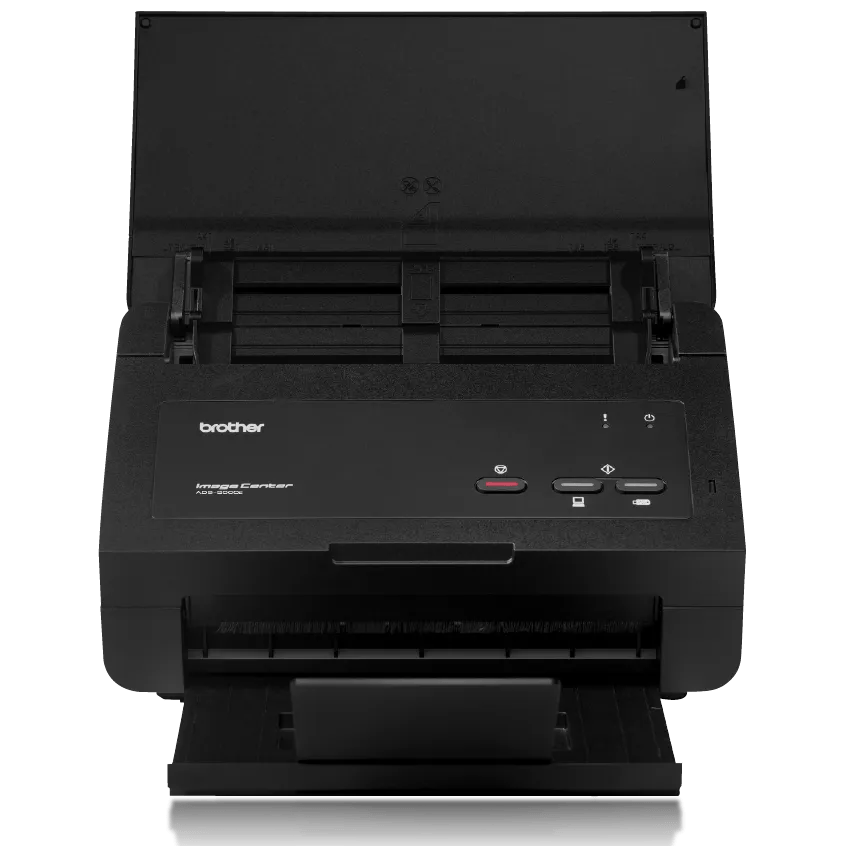
Explore this need in the finder →The Brother ADS-2000e is an earlier, USB-only duplex desktop document scanner with a 50-sheet feeder and a manufacturer-listed TWAIN driver. It has no documented network connection or display. One unusual detail is that Brother lists scanning to Android mobile devices using a cable. That is a separate, older accessory-dependent route—not a wireless feature—and it deserves careful compatibility checking before a used unit is considered.
Duplex capture from a USB-connected computer
Brother specifies single-pass two-sided scanning up to 24 pages per minute or 48 images per minute. The speed note uses Letter originals at 300 dpi with advanced features off, so the advertised ceiling is not an independent throughput measurement. Color processing, OCR, paper condition, software, corrections and the destination can all affect real job time. Brother also lists a maximum daily duty figure of 1,500 pages; this is for designed-durability comparison, not a recommended daily workload or a guarantee of longevity.
The ADF holds up to 50 pages on Brother’s 20 lb (80 g/m²) basis, subject to the guide’s dimensions and thickness. It offers a substantial step above portable single-sheet devices, but it remains a per-load limit. Continuous scanning of additional pages, if configured through the host, does not mean an unattended stack beyond the feeder’s actual capacity. Lighter receipts, photos, cards and other special originals have separate instructions, so do not treat “supports receipts and cards” as a promise that every batch is safe to feed in bulk.
USB-only does not mean no mobile option
The ADS-2000e brochure lists High-Speed USB 2.0 and explicitly says network connectivity is not present. It is therefore a wired computer scanner, not a Wi-Fi or Ethernet model. Brother’s brochure separately lists Android mobile scanning and notes that an Android cable is required but not included. That creates a real phone-related workflow, but it does not establish Wi-Fi, iPhone compatibility, current Android app support or a cloud-storage destination. Check the model-specific app, cable type and exact phone before assuming this old connection remains practical.
The full user-guide title also names the ADS-2500We, a different configuration. Its network and Web Connect guide entries are marked “ADS-2500We only.” That distinction matters: the shared manual family is not proof that the ADS-2000e gains the sibling’s Wi-Fi, Ethernet or online-service features. The ADS-2000e remains USB-only in its own brochure and the product page.
A physical panel, not a profile touchscreen
The ADS-2000e has physical buttons and no display, according to Brother’s ADS-2000e-specific brochure. Host software is thus central to selecting file type, destinations and processing options. The product’s model page lists TWAIN alongside other scanner drivers, which may make it usable with software that expects TWAIN, but the intended program and current computer still need to be verified. A driver specification is not a compatibility guarantee for every new operating system.
That age is material. Brother’s current U.S. Windows 11 table marks ADS-2000e not supported for Driver/Software and USB users. This is a significant limitation for someone planning to attach it to a current Windows machine. A seller’s claim that it powered on does not establish that the feeder, rollers, current driver, bundled software, Android connection or USB cable meets the job.
Carrier sheets are not a manual-feed mode
Brother lists a carrier sheet among handling accessories, and the scanner can work with selected special originals under its instructions. Still, the reviewed documentation does not establish a separately selectable general manual-feed inlet. A carrier sheet is a guide for handling material through the existing feed path, not a second slot that accepts envelopes or mixed nonstandard stacks. If such a mode is essential, the ADS-2000e does not qualify on the evidence reviewed here.
When this discontinued model makes sense to investigate
The ADS-2000e has a coherent role only when an older, compatible host and USB duplex workflow are already understood—or when a specific Android cable setup is confirmed. It may suit a modest workgroup that values the 50-sheet ADF and is comfortable managing its software age. It is a poor choice when Wi-Fi, Ethernet sharing, direct cloud, a touchscreen, a separate special-media feed or supported Windows 11 USB operation is required. For a wired comparison, the ADS-3000N adds Gigabit Ethernet and a faster rated engine but has the same 50-sheet tray; it is a different model, not a drop-in feature set.
The assessment uses Brother’s exact U.S. ADS2000E page, support specification, manual index, shared user guide, ADS-2000e-specific U.S. brochure and the Windows 11 support table. No independent speed, reliability, mobile setup, OCR or current offer has been tested.
Key specifications
Key details at a glance
| Scanner class | Desktop sheet fed |
|---|---|
| Manufacturer-listed simplex rate | 24 ppm |
| Manufacturer-listed duplex image rate | 48 ipm |
| Automatic document feeder capacity | 50 sheets |
| Optical resolution | 600 dpi |
| Connection options | USB |
| Automatic duplex capture | Yes |
| Separate manual-feed route | No |
| Touchscreen | No |
| TWAIN driver documented | Yes |
Use the exact model’s instructions for operating limits, supplied equipment and version differences.
Sources for this review
Sources for this assessment
- Brother ADS2000E U.S. product page and specifications
- Brother ADS-2000e U.S. support specifications
- Brother ADS-2000e U.S. manuals index
- Brother User’s Guide for ADS-2000e / ADS-2500We; model-specific route distinctions
- Brother ADS-2000e U.S. two-page brochure
- Brother U.S. Windows 11 support table
- Brother ADS2000E exact U.S. product-page image asset
Compare the workflow before you choose
Use the finder to test your connection, paper and software requirements against the documented scanner arrangements.