
Your needs, this model
Does it fit your priorities?
Does the Brother ADS-2200 have Wi-Fi or a direct phone route?
No scanner Wi-Fi route is established for the ADS-2200. Brother lists USB 2.0, while its generic mobile-compatibility note requires a wireless network; the shared wireless procedures are identified for the ADS-2700W only. Do not count the ADS-2200 as a Wi-Fi/mobile choice without exact model-specific proof.
Explore this need in the finder →Does its ADF meet a 50-sheet batch minimum?
Brother specifies up to 50 pages for the ADS-2200 on 20 lb (80 g/m²) Legal paper or within a stated stack-thickness limit. That makes 50 the documented upper one-load boundary, not a promise for heavier or mixed stock; a 60-sheet minimum is above this profile.
Explore this need in the finder →Can I require both duplex capture and a TWAIN host driver?
Yes, Brother lists two-sided capture and TWAIN for the ADS-2200. The 35 ppm/70 ipm figures are manufacturer's maximums, not tests, and the driver table does not prove compatibility with every current host or application; check that pair before relying on it.
Explore this need in the finder →Is the ADS2200B package definitely a two-year warranty and included USB cable?
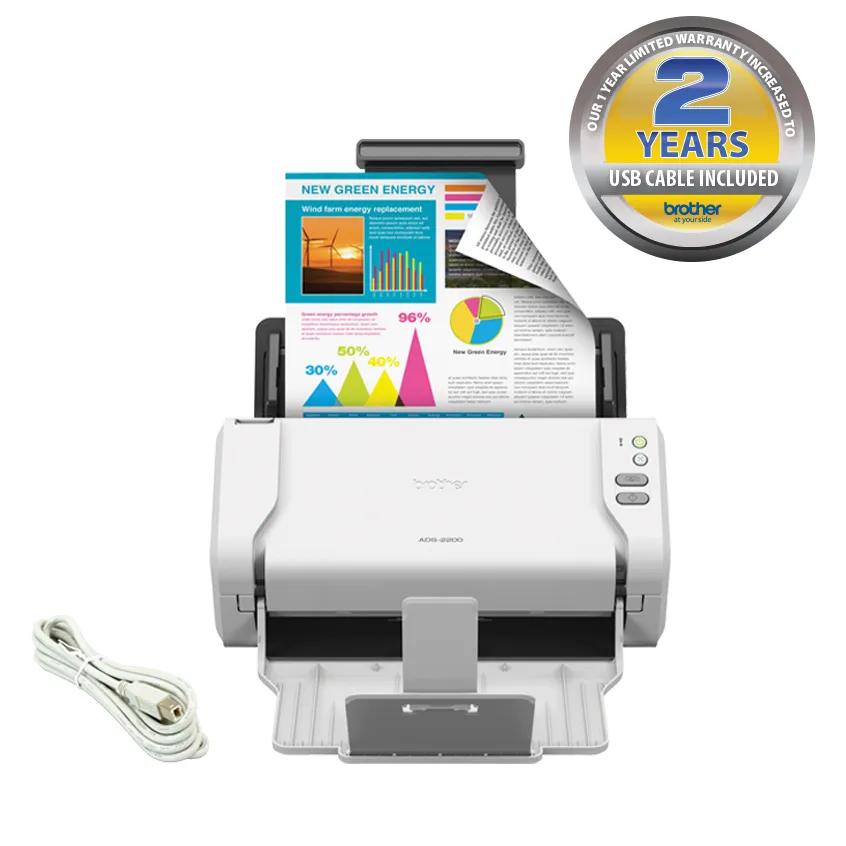
Brother's ADS2200B page headline and product image advertise a USB cable and two-year limited warranty, but the same page's in-box table lists only scanner, adapter and documentation with a one-year limited warranty. Treat those package terms as unresolved and ask the seller to confirm the exact carton and written warranty before purchase.
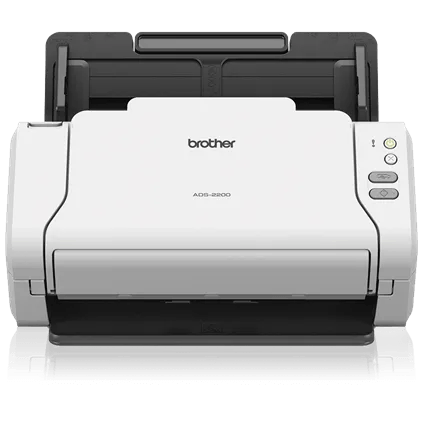
Explore this need in the finder →The ADS-2200 is an earlier Brother desktop feeder for a specific routine: connect by USB, scan both sides in one pass, and use a TWAIN-capable application. Brother rates its ADF at 50 pages and the scanner at up to 35 pages per minute. The exact page identifies USB, not Wi-Fi; the shared ADS-2200/ADS-2700W manual assigns wireless and touchscreen procedures to the ADS-2700W. This is a document-based assessment, not a hands-on test.
What the 35/70 figures do—and do not—say
Brother lists up to 35 pages per minute and 70 images per minute for duplex scanning, with the disclaimer tied to Letter at 300 dpi and advanced features off. That is a rated maximum, not a measured result for color OCR, mixed receipts, file conversion, jam recovery, or delivery. The U.S. page also lists 600 dpi optical and up to 1,200 dpi interpolated resolution; the latter is not a second optical-resolution measure.
The more useful routine limit is the 50-sheet ADF. Brother’s U.S. support specification and user guide tie that maximum to 20 lb (80 g/m²) Legal paper or a stated stack-thickness limit. Capacity is one loading, not a daily workload promise. The next selectable finder threshold above 50 is 60, and this model does not meet it.
USB is the operating plan, not a wireless shortcut
The ADS-2200 connects to a computer with Hi-Speed USB 2.0. It also has a second USB port for scanning directly to a compatible flash drive, a separate destination that should not be confused with a network or cloud route. The basic control panel has physical buttons for Scan to PC and Scan to USB rather than the ADS-2700W’s touchscreen. Brother’s shared guide shows that device-family distinction directly: the ADS-2200 and ADS-2700W have separate control-panel instructions, and touchscreen, Ethernet and Wi-Fi setup are labelled for the 2700W.
There is a potentially misleading generic reference on the ADS-2200 page to phone/tablet compatibility, but its own note says mobile compatibility requires a wireless network. The exact model’s USB-only interface and the model-qualified manual do not establish a scanner-to-phone wireless route. A mobile app on a device elsewhere in the workflow would not, by itself, make the scanner wireless. If a phone connection is essential, look at an exact wireless model and confirm the current app and operating-system requirements.
TWAIN and legacy host checks
Brother lists TWAIN and the user guide describes capture from TWAIN-compliant Windows and Mac applications. The support specification’s listed operating-system versions are dated, while the live model downloads page presents newer OS selectors and packages. These sources establish that Brother has model-specific software materials; they do not guarantee that a particular current computer, security policy, scanner application, or legacy installation will work. Before considering an older unit, identify the host OS and capture application, then check Brother’s current ADS-2200 downloads and the application owner’s TWAIN requirements. A PDF button or USB port is not a substitute for a required driver interface.
Special originals stay in the same paper path
Brother lists receipts, business cards, plastic cards, and other supported originals. The manual describes an ADF path, recommends a carrier sheet for some thin material, and limits plastic-card mode to one card at a time. Those are useful operating instructions, but they do not establish a separate general manual-feed inlet. If a special original cannot safely use the normal ADF path, confirm the exact size, weight, carrier-sheet procedure, and card setting in the current guide rather than assuming the phrase “versatile media handling” means a second tray.
ADS2200B is a package caveat, not a second scanner assessment
Brother separately lists the ADS2200B Scanner Bundle. Its headline and bundle image advertise a USB cable and a two-year limited warranty. However, the same product page’s “What’s Included” table says ADS-2200B scanner, AC adapter, and documentation, and lists a one-year limited warranty. That contradiction matters if the cable or warranty is part of the value calculation, so this assessment treats ADS2200B as a covered package variant of the ADS-2200 scanner, not a new scanning capability. Confirm the precise carton, included cable, written warranty, seller, unit condition, and return terms before relying on any bundle description.
Where it sits among earlier Brother models
The ADS-2200 fits below network-equipped siblings, not beside them as an interchangeable option. The ADS-2500W adds Wi-Fi/Ethernet, touchscreen controls and a separately documented Web Connect route. The ADS-2700W adds Wi-Fi Direct and touchscreen control, but its reviewed guide does not establish the ADS-2500W’s cloud workflow. The ADS-3000N offers wired Ethernet alongside USB and a different workgroup-style workflow. By contrast, the ADS-2200 is the simpler USB host scanner with the same 50-sheet ADF tier and a lower rated 35/70 ppm/ipm ceiling than faster workgroup profiles. If the extra interface matters, compare those exact reviews instead of treating the “ADS” family as one feature set.
The strongest case for the ADS-2200 is an earlier unit where USB, one-pass duplex, a 50-sheet load, and TWAIN are enough—and where the buyer can verify the driver and package. It is a poor fit for essential Wi-Fi, a touchscreen, direct cloud storage, or a minimum feeder load above 50. Brother’s product page marked the model discontinued and out of stock when checked; that historical state says nothing about a seller’s present inventory. No current price, seller offer, unit condition, or hands-on performance is asserted.
Primary references checked: Brother’s ADS2200 U.S. product page, U.S. specifications, manual index and ADS-2200/ADS-2700W User’s Guide. The bundle comparison uses the separate ADS2200B product page. Read the USB and device-sharing guide for the same earlier USB/duplex/TWAIN workflow, and confirm current host support before purchase.
Key specifications
Key details at a glance
| Scanner class | Desktop sheet fed |
|---|---|
| Manufacturer-listed simplex rate | 35 ppm |
| Manufacturer-listed duplex image rate | 70 ipm |
| Automatic document feeder capacity | 50 sheets |
| Optical resolution | 600 dpi |
| Connection options | USB |
| Automatic duplex capture | Yes |
| Separate manual-feed route | No |
| Touchscreen | No |
| TWAIN driver documented | Yes |
Use the exact model’s instructions for operating limits, supplied equipment and version differences.
Sources for this review
Sources for this assessment
Compare the workflow before you choose
Use the finder to test your connection, paper and software requirements against the documented scanner arrangements.