
Your needs, this model
Does it fit your priorities?
Is the ADS-2400N a Wi-Fi scanner because Brother lists mobile support?
No. Brother's model-specific quick setup says the ADS-2400N cannot connect to a network through Wi-Fi. It can be wired to Ethernet while a supported phone is on the same local network; that is a mobile route, not built-in scanner Wi-Fi.
Explore this need in the finder →Can I use a phone with the ADS-2400N without a computer at scan time?
Brother's setup sheet shows the scanner connected to the network by LAN cable and points to iPrint&Scan for the mobile device. Check that the current phone/app path remains supported; the scanner itself has no Wi-Fi radio.
Explore this need in the finder →Can the ADS-2400N send a scan to a SharePoint destination without a computer at scan time?
Brother's family guide documents a SharePoint profile configured through network management and a direct scanner-to-server route. A computer is needed to set up the profile, and the exact current endpoint, credentials and service behavior should be verified; this does not establish generic cloud compatibility.
Explore this need in the finder →Does its feeder meet a 50-sheet minimum and a 60-sheet minimum?
Brother's support specification gives an upper 50-page ADF load on 20 lb (80 g/m²) Legal paper or within the stated stack-thickness limit. That meets 50, not 60, and does not guarantee a full batch of heavier or mixed originals.
Explore this need in the finder →Does the ADS-2400N have a separate general manual-feed path?
No separate manual-feed inlet is established in the reviewed model materials. Brother documents ADF handling, card settings and carrier sheets, but those do not create a second general paper path.
Explore this need in the finder →Can USB-to-computer capture and mobile networking be treated as one operating setup?
Not on the reviewed plans. Brother's quick setup distinguishes USB computer installation from the wired-network mobile route. The finder therefore does not treat two separate arrangements as one combined USB-plus-mobile plan.
Explore this need in the finder →What this model is for
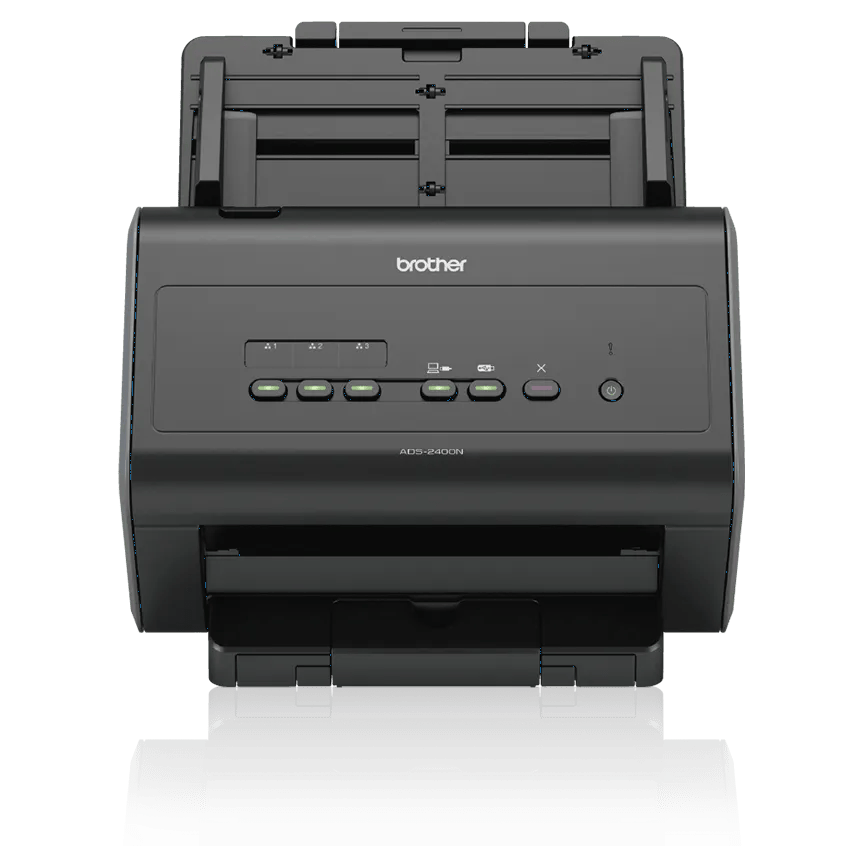
The ADS-2400N is an earlier U.S. workgroup document scanner whose defining distinction is wired networking rather than wireless convenience. Brother's exact U.S. listing describes a desktop color scanner with USB 2.0 and Gigabit Ethernet, a 50-page automatic document feeder, and single-pass two-sided capture. The model is not a Wi-Fi scanner: Brother's setup sheet explicitly says this model cannot join a network through Wi-Fi.
This assessment is based on Brother's product page, U.S. specification table, support pages and model-family user/quick-setup guides. It is not a hands-on test. Brother marks the exact U.S. listing discontinued and out of stock as checked on November 1, 2026; that says nothing about the existence, price, condition or return policy of any particular reseller unit.
Choose the connection by the device that will do the work
For computer capture, Brother lists Hi-Speed USB 2.0 and TWAIN among the included driver interfaces. The exact guide also describes computer applications using TWAIN. Ethernet is a separate option for a shared workgroup installation; the scanner's two standard interfaces are not the same as built-in Wi-Fi. In the model's support specification, Wi-Fi Certified is No. It has physical scan controls rather than the color touchscreen shown on the ADS-2800W and ADS-3600W sibling pages.
The network path can still be useful for a phone, provided the scanner is cabled to the local network and the mobile device uses that same network. Brother's ADS-2400N quick-setup sheet shows “mobile device (LAN cable to Network)” as its supported setup, while also warning that this model cannot connect to the network through Wi-Fi. In other words, the phone may use Wi-Fi; the scanner itself does not. Brother names iPrint&Scan for mobile use, but its general product-page note about mobile-device compatibility uses different USB wording. Confirm the current app, phone, operating system and network arrangement before buying for mobile capture.
Brother's manual also documents a Scan-to-SharePoint profile configured through the network-management tools and says the scanner can send a scan directly to a SharePoint server. The profile needs an address and credentials, and initial setup is not computer-free. The manual's network-setup note and the product page's broad “Scan To” disclaimer are not perfectly aligned in scope; the supported destination is a configured SharePoint server, not an assurance that every cloud service, tenant or current authentication flow works. Treat it as a specific legacy workflow to verify, not generic cloud compatibility.
The feeder is a 50-sheet boundary, not a universal batch promise
Brother rates this ADF at up to 50 pages on 20 lb (80 g/m²) Legal paper or within the stated less-than-0.2-inch (5 mm) stack limit. The online guide says to use 20 lb paper, fan sheets and load them individually. A 50-sheet minimum is therefore the documented boundary; a 60-sheet requirement is beyond it. Paper size, thickness and stock change what can be loaded safely, and the maximum is per load—not a daily throughput or independent reliability result.
Brother specifies automatic duplex and describes both sides being captured in one pass. Its product page advertises up to 40 pages per minute; the detailed sheet also lists up to 80 images per minute for two-sided scans, with advanced features off at Letter and 300 dpi. These are manufacturer ratings, not measured results for a buyer's mix of paper, OCR, file destinations and software. The guide's continuous-scan procedure allows another batch to be added, but it does not increase the number held in the feeder at one time.
Carrier-sheet handling for receipts and photos, business-card settings, and plastic-card support are special uses of the documented scanner path; none establishes a separate, general manual-feed inlet. If an essential workflow needs a distinct manual-feed route for fragile, folded or unusually sized originals, this model's paperwork does not establish that capability. Do not count a carrier sheet or one-card setting as a second feed path.
Driver flexibility needs an exact-host check
Brother lists TWAIN, WIA, ICA, ISIS and SANE, and the current U.S. supported-OS table checked for this review lists Windows 11 and current macOS versions, including macOS 26. That is more reassuring than relying only on an old installation DVD, but it still is not a promise for a particular capture program, business image-processing package, locked-down workstation or future update. The support page says available functions vary by operating system, and legacy software can stop receiving updates. Check the exact ADS-2400N driver and named TWAIN application with the intended host before committing.
The older machine's workflow is oriented toward a wired office: Ethernet destinations and USB-connected computer capture, with physical buttons and stored network profiles rather than a screen-led setup. Brother's spec lists a 6,000-page maximum daily duty-cycle figure; its own explanation treats this as a comparison ceiling, not a recommended everyday workload. It does not establish endurance, maintenance cost or image quality for a particular office.
Who should shortlist it—and what to verify
The ADS-2400N is worth considering only when an earlier-model scanner fits the brief: USB-to-computer capture with a listed TWAIN route, wired Ethernet sharing, automatic duplex, and a feeder need no higher than its documented 50-page load. A phone or configured SharePoint path may also fit, but only on the wired-network arrangement and after verifying the current app or destination. Buyers who require scanner Wi-Fi, a touchscreen, a feeder above 50 sheets, a separate manual-feed path or an unqualified modern cloud service should keep those requirements hard rather than inferring them from the network label.
Before considering an offer, match the exact ADS2400N model code; confirm the unit's condition, return terms and written warranty; and check what that individual carton includes. Brother's base-page carton list names an AC adapter, USB cable and carrier sheet, but a used or refurbished seller package may differ. Verify the current driver and destination setup, then check the intended paper against the loading instructions. Those checks are more important here than a headline speed or a discontinued manufacturer's price line.
Key specifications
Key details at a glance
| Scanner class | Desktop sheet fed |
|---|---|
| Manufacturer-listed simplex rate | 40 ppm |
| Manufacturer-listed duplex image rate | 80 ipm |
| Automatic document feeder capacity | 50 sheets |
| Optical resolution | 600 dpi |
| Connection options | USB / Ethernet |
| Automatic duplex capture | Yes |
| Separate manual-feed route | No |
| Touchscreen | No |
| TWAIN driver documented | Yes |
Use the exact model’s instructions for operating limits, supplied equipment and version differences.
Sources for this review
Sources for this assessment
- Brother ADS2400N U.S. product page and specifications
- Brother ADS-2400N U.S. support specifications
- Brother ADS-2400N U.S. manuals index
- Brother User's Guide for ADS-2400N/ADS-2800W/ADS-3000N/ADS-3600W
- Brother ADS-2400N family Quick Setup Guide
- Brother ADS-2400N U.S. supported operating systems
- Brother U.S. Windows 11 support table
- Brother iPrint&Scan supported desktop-model table
- Brother exact ADS2400N U.S. product-page image
Compare the workflow before you choose
Use the finder to test your connection, paper and software requirements against the documented scanner arrangements.