
Your needs, this model
Does it fit your priorities?
Can it send a scan to cloud storage without a computer at scan time?
Brother’s model-specific Web Connect Guide names ADS-2500W and explains configured touchscreen uploads to supported web services. Initial registration requires a computer, and later use requires a service account and Internet access. Confirm that the intended service still supports this older scanner.
Explore this need in the finder →Does it connect by both USB and Wi-Fi?
Yes. Brother lists Hi-Speed USB 2.0 and built-in 802.11b/g/n Wi-Fi, plus Ethernet. These are alternative arrangements for different setups, not a claim that one scan travels over both interfaces.
Explore this need in the finder →What should a Windows 11 buyer verify?
Brother’s current U.S. Windows 11 table lists ADS-2500W as not supported for driver/software and USB users. A used unit, legacy driver or seller listing does not prove a current installation is supported; verify the exact host, driver, firmware and intended method.
Explore this need in the finder →Does its ADF meet a 50-sheet minimum?
Brother’s support specification gives up to 50 pages on 20 lb legal paper or within the stated stack-thickness limit. Treat this as a one-load, stock-qualified maximum, not every original type or a daily scan quota.
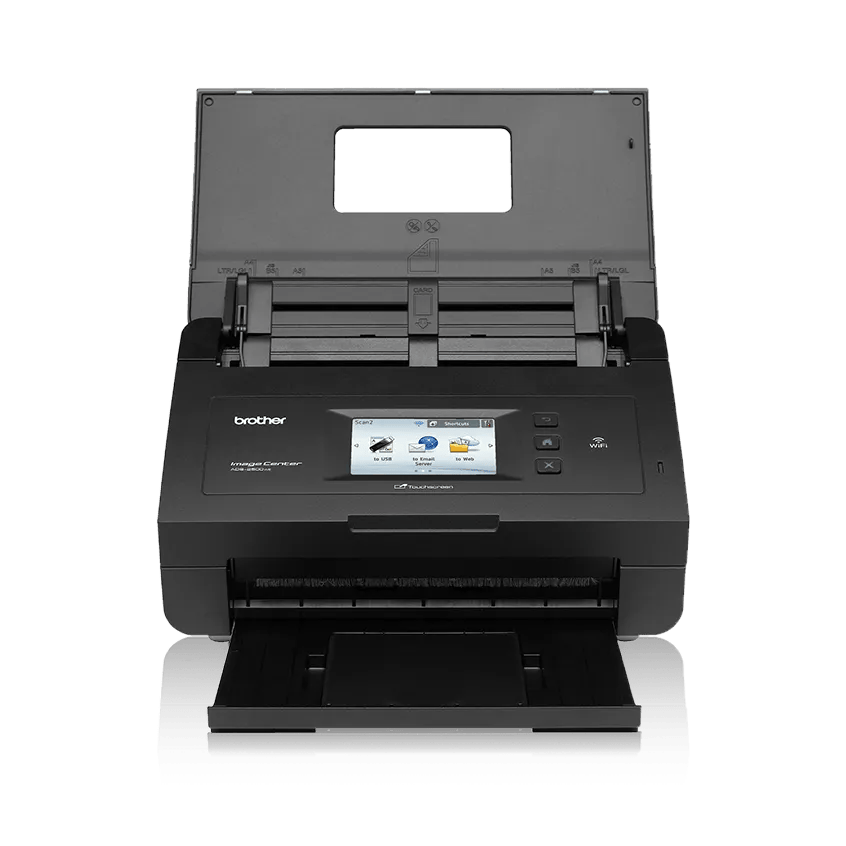
Explore this need in the finder →The ADS-2500W is an earlier U.S. workgroup scanner with a 50-sheet, single-pass duplex ADF, a 3.7-inch touchscreen, USB 2.0, 802.11b/g/n Wi-Fi and Ethernet. Brother marks this exact model discontinued. It is therefore a research profile for identifying an older unit, not evidence that a particular used scanner is available, supported, complete or in working order.
Short stacks, with a screen at the center
Brother specifies up to 24 pages per minute and 48 duplex images per minute. These are manufacturer maxima, not independently measured results; Brother’s rate notes qualify the advertised speed with a Letter-size original at 200 or 300 dpi and advanced processing features disabled. A real workflow with OCR, blank-page handling, mixed paper, naming and network delivery should not be expected to match the headline rate automatically.
The ADF holds up to 50 pages, with Brother’s support specification limiting that figure to 20 lb legal-size stock or a stack below its stated thickness limit. Think of it as a one-load boundary, not a daily quota and not a promise that 50 receipts, cards or heavy originals can be mixed indiscriminately. The manual’s loading rules matter when the routine includes unusual stock. Brother lists a maximum daily duty cycle of 1,500 pages, but calls that a design comparison; it is not a recommended operating target or endurance test.
A color touchscreen makes the model different from scanners whose panel only has a few physical start buttons. It gives users a visible destination and scan-job interface, though stored profiles and accounts still need setup. The unit is a workgroup desktop machine rather than a pocketable scanner, and the buyer should confirm that the exact used chassis, panel and feeder operate correctly before relying on it.
USB, wireless and Ethernet are separate setups
The interface list is unusually broad for an older desk scanner: USB 2.0 for a local computer, built-in Wi-Fi and wired Ethernet. “Both” should be read as flexibility between a USB-attached computer and a network arrangement, not as a claim that one job is transported simultaneously over USB and wireless. Brother also lists standard host drivers including TWAIN. That can be relevant when an older capture program depends on that interface, but a driver name on a specification page does not prove compatibility with a current operating system or every application.
Brother’s own U.S. Windows 11 support table lists ADS-2500W as not supported for Driver/Software and USB Users. A discontinued scanner might still be usable with a supported legacy host or a working network installation, but those are questions to resolve for the exact machine and operating system, not assumptions to make from a seller’s generic “works” description. Identify the connection method, current driver and target application first.
Web Connect is a real capability, with setup and service conditions
Unlike models where “networked” only means a shared folder or an email destination, Brother’s Web Connect Guide specifically names ADS-2500W and describes sending a scan from the scanner’s touchscreen to supported Internet services. This is a genuine computer-free-at-scan-time route after it has been configured. It is not an instant first-use feature: Brother says initial Web Connect setup requires a computer with Internet access, and the desired service requires an account. The scanner also needs access to an Internet-connected network.
The guide establishes a published model capability; it does not tell us whether a particular cloud provider continues to authorize this old machine today. Check the precise service, authentication procedure, network security and current Brother support before treating that route as essential. A cloud icon on an old touchscreen is not proof the endpoint still works. Mobile-device scanning is another distinct option and depends on a compatible wireless network, phone, app and destination. Neither phone scanning nor Ethernet should be collapsed into a blanket “cloud-ready” promise.
Not a general-purpose manual-feed machine
The manufacturer lists common originals such as documents, cards, receipts and photos, but the reviewed model documentation does not establish a separately selected general manual-feed inlet. A carrier sheet or a one-at-a-time ADF procedure is not the second route asked about by a shopper who wants a dedicated special-original path. If the job includes delicate photographs, envelopes or stiff cards, check each original type’s loading instructions and whether the needed accessory is actually included with the used offer.
When this older model is worth investigating
The ADS-2500W may be worth researching when a touchscreen-operated, network-shared 50-sheet duplex feeder and the specifically documented Web Connect workflow would solve a known task—and when the buyer can verify the host and service setup. It is a poor fit if current Windows 11 USB support, a guaranteed cloud service, a separate manual-feed path, or a seller-backed new-product warranty is essential. A newer ADS-4700W/ADS-4900W is a distinct touchscreen family, while the ADS-4300N is a wired workgroup alternative with no built-in scanner Wi-Fi or touchscreen. Their features should be compared from their own manuals, not borrowed to fill gaps here.
Brother’s exact U.S. ADS2500W product page, support specification, manual index, model-specific Web Connect Guide and Windows 11 support table underpin this assessment. No hands-on test, customer survey, current service check, price or seller availability is claimed.
Key specifications
Key details at a glance
| Scanner class | Desktop sheet fed |
|---|---|
| Manufacturer-listed simplex rate | 24 ppm |
| Manufacturer-listed duplex image rate | 48 ipm |
| Automatic document feeder capacity | 50 sheets |
| Optical resolution | 600 dpi |
| Connection options | USB / Wi-Fi / Ethernet |
| Automatic duplex capture | Yes |
| Separate manual-feed route | No |
| Touchscreen | Yes |
| TWAIN driver documented | Yes |
Use the exact model’s instructions for operating limits, supplied equipment and version differences.
Sources for this review
Sources for this assessment
Compare the workflow before you choose
Use the finder to test your connection, paper and software requirements against the documented scanner arrangements.