
Your needs, this model
Does it fit your priorities?
Can a phone scan directly to the scanner without a router?
The ADS-2700W guide documents Wi-Fi Direct scanning from a mobile device. That is a local phone-to-scanner method, not Internet access or cloud upload. Check current app/OS compatibility and whether Wi-Fi Direct is allowed in your environment.
Explore this need in the finder →Is USB capture available for a computer?
Yes. Brother lists Hi-Speed USB 2.0 and documents PC scanning with TWAIN-compliant applications. Confirm that the current driver and intended capture software work on the exact host; Brother’s Windows 11 table does not affirm USB-user support.
Explore this need in the finder →Is it confirmed for computer-free cloud storage?
I would not treat it as confirmed. The generic product-page Internet/account disclaimer does not identify a supported ADS-2700W cloud destination, and the model guide/index inspected here documents local PC, network, mobile and USB-memory paths without a Web Connect cloud guide. Check the current official model guide for the intended service.
Explore this need in the finder →What does its 50-sheet rating cover?
Brother’s guide specifies up to 50 pages at 20 lb (80 g/m²) paper. That is the per-load feeder limit for the stated stock basis, not a capacity promise for every media type or an independent throughput result.
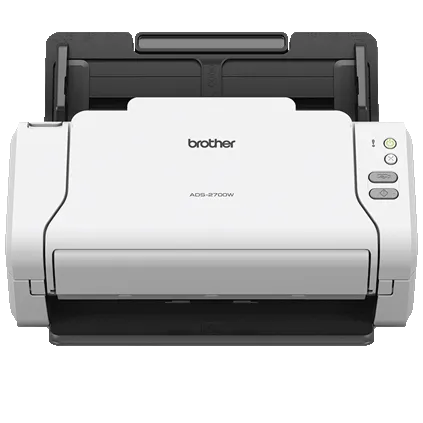
Explore this need in the finder →Brother’s ADS-2700W is a compact earlier desktop scanner with a 50-sheet duplex ADF, a 2.8-inch color touchscreen and several ways to connect: USB 2.0, Wi-Fi, Wi-Fi Direct and Fast Ethernet. Brother labels the exact U.S. model discontinued. Its value today depends less on the number of ports than on whether the specific legacy workflow, driver and phone connection still make sense.
ADF and headline speed
Brother rates the ADS-2700W at up to 35 pages per minute and 70 images per minute in two-sided scanning. Those are manufacturer maximums, with speed notes tied to Letter originals at 300 dpi and advanced features turned off. They should not be treated as independent tests or a promise for color OCR, double-feed recovery, file conversion or network delivery. A useful comparison starts with the job’s settings and software, not only the large number in the brochure.
The model guide gives a 50-page ADF limit using 20 lb (80 g/m²) paper. This is a one-loading capacity, not the amount of paper suitable for every media type. Brother lists multiple original formats and continuous scanning of pages beyond one tray load, but that does not turn the 50-sheet figure into a guarantee of unattended batch size or daily throughput. Match the manual’s original-size and weight rules to the actual stack.
Wi-Fi Direct is not the same as cloud
The connection choices serve different situations. USB connects the scanner to a computer; Wi-Fi or Ethernet joins a network; Wi-Fi Direct supports a local phone-to-scanner connection without the ordinary router arrangement. Brother’s model guide includes a section for scanning from a mobile device over Wi-Fi Direct. It is a useful distinction if a phone must talk to the scanner locally, but it does not provide Internet access by itself and is not a cloud-upload capability.
For the ordinary wireless network route, Brother lists mobile support through iPrint&Scan and notes that mobile-device use requires a wireless network. The touchscreen can expose configured scan destinations, and USB memory, a PC, email, network folders and other local destinations appear in the materials. However, the exact ADS-2700W guide and manual index reviewed for this assessment do not establish a model-specific Web Connect/cloud-storage path. The product page includes a general Internet/account disclaimer, but the exact destination list and model guide do not name a direct-to-cloud service route. This assessment therefore does not count the scanner as confirmed to send to cloud storage without a computer. Check the current model guide for the precise provider and setup before making it a requirement.
Touchscreen and software compatibility
The 2.8-inch touchscreen separates the ADS-2700W from a basic button-only desktop ADF. It can present settings and configured destinations, while up to 25 scan profiles are listed in Brother’s product material. A screen is helpful when multiple users share the unit, but profile setup, permissions and network security remain administrative work. A touchscreen alone says nothing about whether a particular legacy cloud endpoint is still available.
Brother lists TWAIN, WIA, ICA and SANE, and the user guide covers scanning through TWAIN-compatible applications. Brother’s Windows 11 table shows a Driver/Software checkmark for ADS-2700W but a dash for USB Users. That is narrower than a universal compatibility promise: confirm the current driver download, interface, application and operating-system version you need. Linux, macOS or corporate-managed environments require their own checks as well.
Do not infer a second feed route
The ADF accepts several types of material, including cards, receipts and photos, and Brother recommends a carrier sheet for some light media. None of those facts proves a distinct manual-feed path for occasional special originals. The reviewed sources do not describe a separately selected second inlet. If an occasional document cannot safely go through the normal feeder, inspect the exact media instructions and accessories rather than treating a broad list of “supported media” as a special feed mode.
Who might still consider the ADS-2700W
This discontinued scanner is most plausible for a small office that wants a compact duplex ADF, a real touchscreen, and either Wi-Fi Direct or a shared network route, while being prepared to confirm the host and app. Its 50-sheet load is smaller than the 80-sheet ADS-4300N and far below larger departmental feeders. The ADS-2500W also has a touchscreen and network options, but its exact model-specific Web Connect guide establishes a different cloud workflow; do not transfer that feature to the ADS-2700W. Conversely, the wired ADS-3000N has a higher rated speed but no touchscreen or scanner Wi-Fi. Choose by the one route you actually need.
Research sources include Brother’s exact U.S. ADS2700W product page, support specifications, manual index, the model-applicable user guide and the Windows 11 table. No current seller offer, hardware test, cloud login test or customer-experience claim is made.
Key specifications
Key details at a glance
| Scanner class | Desktop sheet fed |
|---|---|
| Manufacturer-listed simplex rate | 35 ppm |
| Manufacturer-listed duplex image rate | 70 ipm |
| Automatic document feeder capacity | 50 sheets |
| Optical resolution | 600 dpi |
| Connection options | USB / Wi-Fi / Wi-Fi Direct / Ethernet |
| Automatic duplex capture | Yes |
| Separate manual-feed route | No |
| Touchscreen | Yes |
| TWAIN driver documented | Yes |
Use the exact model’s instructions for operating limits, supplied equipment and version differences.
Sources for this review
Sources for this assessment
- Brother ADS2700W U.S. product page and specifications
- Brother ADS-2700W U.S. support specifications
- Brother ADS-2700W U.S. manuals index
- Brother Online User’s Guide for ADS-2700W (shared PDF title also names ADS-2200)
- Brother U.S. Windows 11 support table
- Brother ADS2700W exact U.S. product-page image asset
Compare the workflow before you choose
Use the finder to test your connection, paper and software requirements against the documented scanner arrangements.