
Your needs, this model
Does it fit your priorities?
Is ADS-3000N a Wi-Fi scanner because it supports mobile devices?
No scanner Wi-Fi radio is listed; Brother specifies Gigabit Ethernet and USB 3.0. Its mobile disclaimer says the phone needs a wireless network, so a phone on Wi-Fi may share a LAN with the Ethernet scanner. Confirm the app, network and device instead of treating this as Wi-Fi Direct.
Explore this need in the finder →Can it send scans to cloud storage without a computer?
The product page lists cloud services in the iPrint&Scan/software context, but also says scan-to features require a connected PC with applicable software. The shared guide’s Web Connect destination is scoped to ADS-2800W/ADS-3600W, not ADS-3000N. Do not count it as a confirmed computer-free cloud model.
Explore this need in the finder →What does its 50-sheet feeder rating cover?
The ADS-3000N guide specifies up to 50 pages at 20 lb (80 g/m²) legal size or below the stated stack thickness. This is one load, not daily work volume; lightweight receipts, embossed cards and other materials have separate instructions.
Explore this need in the finder →Can users select profiles on a touchscreen?
No touchscreen is listed. Brother describes three programmable physical shortcut buttons and the model guide documents physical controls. A preset hardware key can be useful but it is not a touchscreen profile selector.
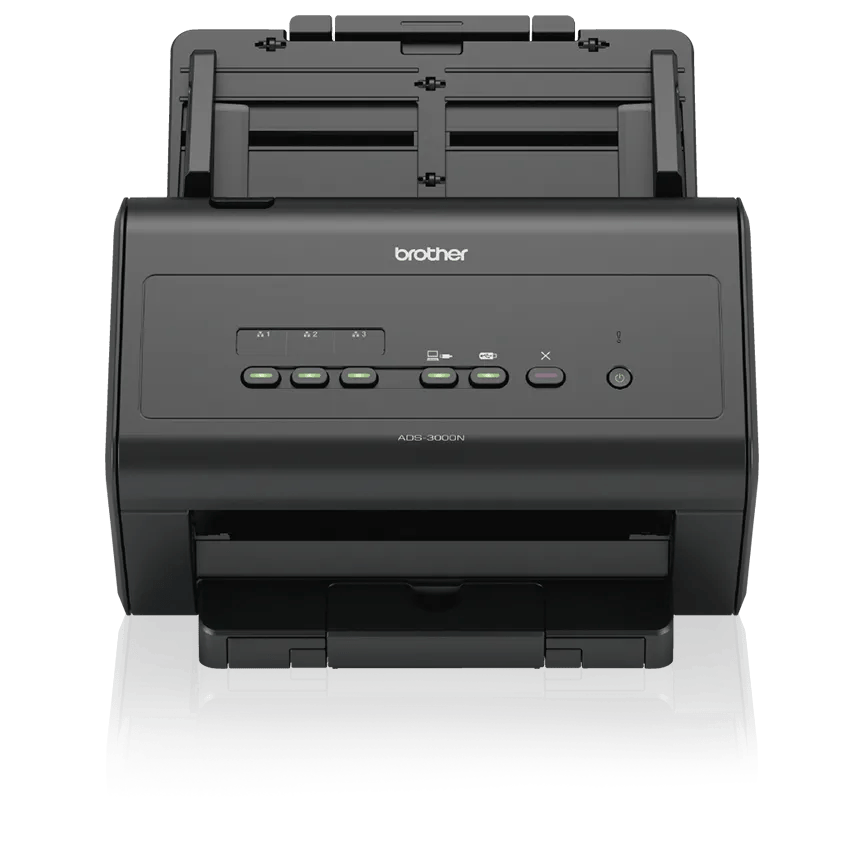
Explore this need in the finder →The Brother ADS-3000N is an earlier wired workgroup scanner built around Gigabit Ethernet and USB 3.0. It has a 50-sheet duplex ADF, manufacturer-rated output up to 50 pages per minute, three programmable physical shortcuts and TWAIN among its listed drivers. Brother marks the exact U.S. model discontinued. Its chief distinction from wireless desktop models is network cabling rather than scanner Wi-Fi.
Fast rating, modest feeder
Brother specifies up to 50 pages per minute and 100 duplex images per minute with advanced features off and Letter paper at 300 dpi. Those figures describe the manufacturer’s rate condition, not the result of an independent test. OCR, image corrections, mixed originals, long-paper settings and the destination software can all change throughput. Brother also lists a 7,500-page maximum daily duty figure, but explains that maximum duty is meant to compare designed durability among like products. It is not a recommended daily workload.
The ADF is the more practical constraint: up to 50 pages using 20 lb (80 g/m²) paper, legal size, or within the manual’s stated stack thickness. Capacity is a one-load paper limit, not the same thing as the speed number or continuous-scan software. A user who regularly loads larger queues may need to plan for refills, and the rating should be reduced or checked against the original type when handling receipts, business cards or embossed plastic cards.
Brother lists a carrier sheet in the original carton contents. That may be useful for selected thin or unusual originals, but the exact seller package must be checked; a discontinued unit may not arrive with all original items. A carrier sheet goes through the scanner’s normal paper path. The reviewed ADS-3000N sources do not document a second manual-feed inlet.
Ethernet, mobile and cloud are different claims
The scanner has SuperSpeed USB 3.0 with USB 2.0 compatibility and Gigabit Ethernet. Brother’s product page also lists mobile-device support, with a note that mobile use requires a wireless network. Those facts can fit a workgroup arrangement where the scanner is wired to the LAN and a phone uses Wi-Fi on the same compatible network. They do not mean the scanner itself has Wi-Fi, Wi-Fi Direct or a wireless-radio setup. The model page does not list a scanner Wi-Fi interface.
There is a related cloud nuance. Brother lists OneDrive, Google Drive and Dropbox in its iPrint&Scan cloud-services material, yet the same page qualifies scan-to features as applying when connected to a PC with applicable software. In the exact shared family guide, Web Connect is assigned to ADS-2800W and ADS-3600W, not ADS-3000N. The evidence therefore supports a host-dependent cloud software workflow, not a scanner-panel upload that works without a computer. Ethernet is not itself cloud access, and a phone using Wi-Fi does not make the scanner’s scan job PC-free.
TWAIN and panel controls
The U.S. page lists TWAIN, WIA, ICA, ISIS and SANE drivers. Brother’s Windows 11 table currently shows ADS-3000N with a driver/software checkmark and a dash in the USB Users column. That distinction should be checked against the intended setup and actual Brother downloads rather than treated as support for any application, operating system or cable arrangement. IT buyers should confirm the exact driver package and whether their capture tool requires TWAIN, ISIS or another interface.
The interface is a physical button panel, not a touchscreen. Brother lists three programmable shortcut keys for common scanning tasks. That may be easier than navigating through a menu for a few established profiles, but it is a different interaction model from the touchscreens on the ADS-2500W or ADS-2700W. It also makes saved destinations and host or network configuration important parts of setup.
Who should consider this wired workgroup profile
The ADS-3000N is worth examining when a user needs a fast rated two-sided engine on Ethernet or USB, a physical shortcut panel and documented host drivers. Its tradeoffs are equally specific: a 50-sheet load, no touchscreen, no scanner Wi-Fi, discontinued status, and no established computer-free cloud route. The current-reference ADS-4300N has an 80-sheet ADF and a limited Manual Single Mode but lower rated speed; it is a distinct wired product. A buyer seeking a different combination should compare exact model manuals rather than infer features from the similar ADS family naming.
Brother’s exact U.S. ADS3000N product page, support specification, manual index, family user guide, brochure and Windows 11 table underpin this review. No hands-on run, customer survey, speed measurement or present seller offer is claimed.
Key specifications
Key details at a glance
| Scanner class | Desktop sheet fed |
|---|---|
| Manufacturer-listed simplex rate | 50 ppm |
| Manufacturer-listed duplex image rate | 100 ipm |
| Automatic document feeder capacity | 50 sheets |
| Optical resolution | 600 dpi |
| Connection options | USB / Ethernet |
| Automatic duplex capture | Yes |
| Separate manual-feed route | No |
| Touchscreen | No |
| TWAIN driver documented | Yes |
Use the exact model’s instructions for operating limits, supplied equipment and version differences.
Sources for this review
Sources for this assessment
- Brother ADS3000N U.S. product page and specifications
- Brother ADS-3000N U.S. support specifications
- Brother ADS-3000N U.S. manuals index
- Brother User’s Guide for ADS-2400N/ADS-2800W/ADS-3000N/ADS-3600W
- Brother ADS-3000N U.S. product brochure
- Brother U.S. Windows 11 support table
- Brother ADS3000N exact U.S. product-page image asset
Compare the workflow before you choose
Use the finder to test your connection, paper and software requirements against the documented scanner arrangements.