
Your needs, this model
Does it fit your priorities?
Can this model scan with a phone or tablet?
Brother’s model-specific user guide lists Mobile Connect for the ADS-3300W, and its product-page note requires a wireless network. Confirm the current app, mobile OS, account and network before depending on it.
Explore this need in the finder →Can an operator start a saved job at the scanner?
The ADS-3300W has a 2.8-inch color touchscreen and up to 20 shortcut profiles. A destination still needs to be configured in the supported application or network settings first.
Explore this need in the finder →Will it handle a two-sided stack of sixty sheets per load?
Brother specifies a 60-sheet ADF maximum on 20 lb A4/Letter paper and automatic two-sided scanning. The rating is a per-load maximum; paper limits, preparation and its conflicting 40-ppm/40-ipm speed fields should be checked.
Explore this need in the finder →Can I scan directly to a USB memory stick?
Brother documents an on-device Scan to USB route for supported flash storage up to 128 GB in listed FAT12, FAT16, FAT32 or exFAT formats. The drive is separate from the package; this is not computer-free cloud.
Explore this need in the finder →Does it have a TWAIN driver?
Brother lists TWAIN. Confirm the exact available driver and compatibility with your operating-system build and capture software before choosing an earlier unit.
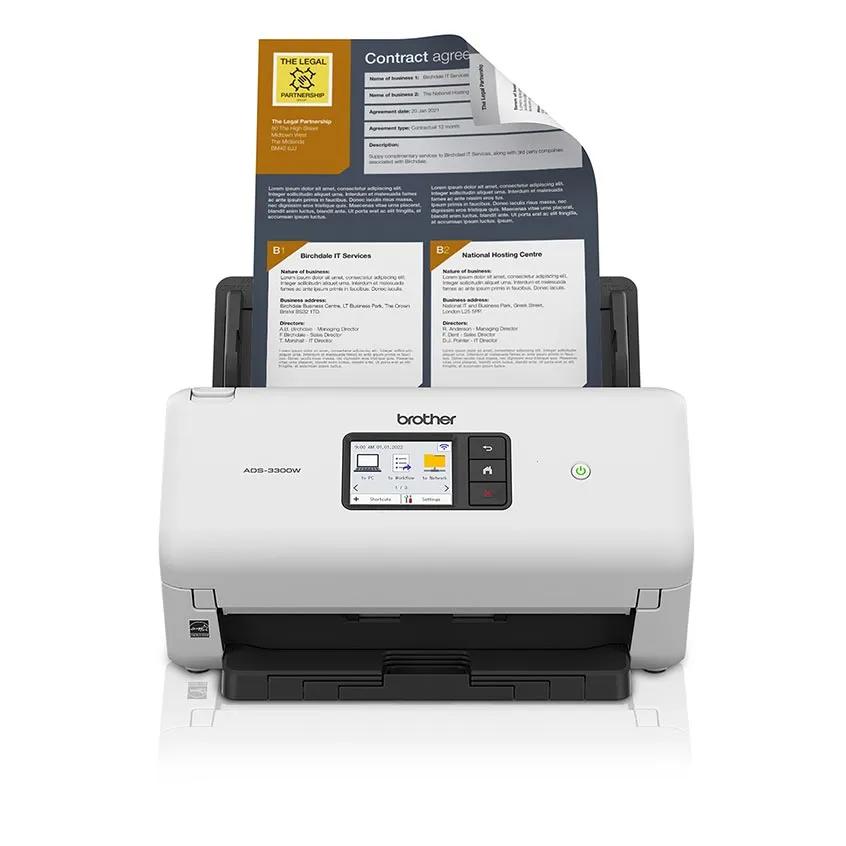
Explore this need in the finder →The Brother ADS-3300W is a mid-volume, sheet-fed desktop scanner with a 60-sheet duplex feeder, touchscreen, USB, Ethernet and Wi-Fi. Its important difference from the USB-only ADS-3100 is the set of network and mobile routes plus controls at the machine. Brother’s U.S. category card described the ADS-3300W as discontinued, while its dedicated product page still showed a New condition selection but Out of Stock when checked on November 1, 2026. This is a source-based assessment, not a hands-on test or an offer-status guarantee.
A practical feeder, not a throughput promise
Brother specifies a maximum 60-sheet automatic document feeder, with that capacity based on 20 lb paper in A4 or Letter size. The machine scans both sides in one pass. Brother’s headline says up to 40 pages per minute for single- and double-sided work, but its detailed product specifications identify the duplex maximum as 40 images per minute. Pages and images are different units; the public fields do not support converting this to an 80-image-per-minute promise. These are manufacturer maxima under its stated setup, not independent measurements or a prediction for a particular OCR profile, network destination or paper stack.
The feeder makes sense for batches that would be tedious to feed one sheet at a time, but 60 sheets is a loading limit, not a daily-volume recommendation. Brother also gives a 6,000-page maximum daily duty figure and says it is for comparing designed durability among similar machines; it does not recommend operating at that number or show a tested endurance result. Continuous scanning can add pages beyond the first load, though the operator still handles each batch. Check the exact original type, paper condition and loading steps rather than treating the capacity as a guarantee against misfeeds.
Network choices add setup, not automatic sharing
The ADS-3300W lists USB 3.0, 10/100 Ethernet and 2.4 GHz 802.11b/g/n Wi-Fi, including Wi-Fi Direct. These are alternative ways to configure a job, not a claim that every destination works over every connection. USB is a straightforward choice for a computer-owned scan workflow; Ethernet suits an administered wired network; infrastructure Wi-Fi can support the model’s mobile route. Wi-Fi Direct is a local wireless connection, not Internet access. The product page says mobile scanning requires a wireless network, and the manual identifies Brother Mobile Connect for supported phones and tablets. Confirm the exact app, operating-system version, phone and network policy before relying on that route.
Brother lists destinations such as a computer, network folder, FTP/SFTP, email server, SharePoint, USB flash storage and cloud services. Those labels have their own prerequisites: for example, Brother says cloud services need an Internet connection and account. The sources reviewed do not establish a reliable one-touch, computer-free cloud workflow for this model, so a cloud requirement should not be inferred from the destination list. It has a direct Scan to USB function, but that is local removable storage rather than cloud backup.
The touchscreen is useful when a job is configured
The 2.8-inch color touchscreen opens model-specific Scan to PC, Network, FTP/SFTP, email-server and USB functions. Brother documents up to 20 shortcut profiles, so a small office can place recurring destinations on the scanner after the underlying computer or network settings are configured. It will not choose the right folder, access credentials or retention policy on its own. The ADS-3100 is the simpler neighboring option: it shares a 60-sheet feeder but has USB as its listed interface and no touchscreen, so it is a closer fit when one attached computer owns the workflow. The ADS-3300W’s premium is about network routes and on-device selection, not a larger ADF.
For direct USB-stick jobs, the U.S. specification supports USB mass-storage drives up to 128 GB and lists FAT12, FAT16, FAT32 and exFAT. A drive is not part of the listed box contents; Brother lists the scanner, USB interface cable, AC adapter and Quick Setup Guide, with a one-year limited warranty. A compatible drive and an allowed file format still need to be checked. The exact manual also warns not to remove a drive during a scan.
Host software and originals need a final check
Brother lists TWAIN, WIA and SANE among the drivers, and the model guide describes compatible computer applications as part of the scanning setup. The current U.S. support page lists Windows, Linux, macOS and mobile operating-system options, while warning that features vary by operating system. That broad list is not a guarantee for a named records system, OCR engine, driver release or managed computer; verify both the scanner’s current package and the target application’s requirements.
The exact specifications list plain, thin, thick and recycled paper, business cards and plastic cards, with a standard document width from 2 to 8.5 inches and length from 2 to 14 inches. Follow Brother’s model guide for card loading, longer originals and exclusions. A sheet-fed path is not a glass platen for books or a safe substitute for a flatbed when originals are fragile, bound or unusually thick. The optional carrier sheet is a separate purchase and is not a second manual-feed inlet.
Who should still compare it?
Consider the ADS-3300W when a 60-sheet duplex feeder, a small desktop footprint, networked destinations and touchscreen shortcuts are useful together. Prefer a USB-only model if networking is unnecessary, or a model with a documented cloud workflow if direct cloud transfer is essential. Brother’s dedicated page showed the ADS-3300W as out of stock at the time checked; its current seller availability, package condition and warranty therefore need separate verification. Brother also lists the ADS-3350W as a distinct model in this family, so do not treat the similar model numbers as aliases or accept a listing without checking the exact code. No feed-reliability, image-quality, OCR, speed or endurance test was performed for this review.
Key specifications
Key details at a glance
| Scanner class | Professional desktop sheet-fed scanner |
|---|---|
| Manufacturer-listed simplex rate | 40 ppm |
| Manufacturer-listed duplex image rate | 40 ipm |
| Automatic document feeder capacity | 60 sheets |
| Optical resolution | 600 dpi |
| Connection options | USB / Ethernet / Wi-Fi |
| Automatic duplex capture | Yes |
| Touchscreen | Yes |
| TWAIN driver documented | Yes |
Use the exact model’s instructions for operating limits, supplied equipment and version differences.
Sources for this review
Sources for this assessment
- Brother ADS-3300W U.S. product page and detailed technical specifications
- Brother ADS-3300W U.S. support specifications
- Brother ADS-3300W U.S. manuals index
- Brother ADS-3300W U.S. supported operating systems
- Brother online user guide index for ADS-3100/ADS-3300W/ADS-3350W; exact ADS-3300W edition context
- Brother online user guide: ADS-3300W touchscreen LCD overview
- Brother online user guide: supported computer and mobile applications; Brother Mobile Connect identified for ADS-3300W
- Brother online user guide: loading documents through the ADF
- Brother online user guide: save ADS-3300W scans to a computer
- Brother online user guide: save ADS-3300W scans to a USB flash drive
- Brother exact ADS-3300W U.S. product-page image asset
Compare the workflow before you choose
Use the finder to test your connection, paper and software requirements against the documented scanner arrangements.