
Your needs, this model
Does it fit your priorities?
Can the scanner join a wireless/mobile routine as well as a wired setup?
Brother lists USB, Ethernet and 2.4 GHz Wi-Fi, plus a model-applicable Mobile Connect route and Wi-Fi Direct. Verify phone, OS, account and network requirements for the intended method.
Explore this need in the finder →Can an operator choose a job on the device?
The ADS-3350W includes a 2.8-inch color touchscreen and programmable shortcuts. That differs from the ADS-3100, which uses a more basic panel; confirm that a desired destination can be configured under your office policy.
Explore this need in the finder →Can it save to a USB memory stick without starting every scan from a computer?
Brother documents a Scan to USB function for a compatible separately purchased drive. The manual's initial configuration route uses computer software, and drive format/capacity limits still apply.
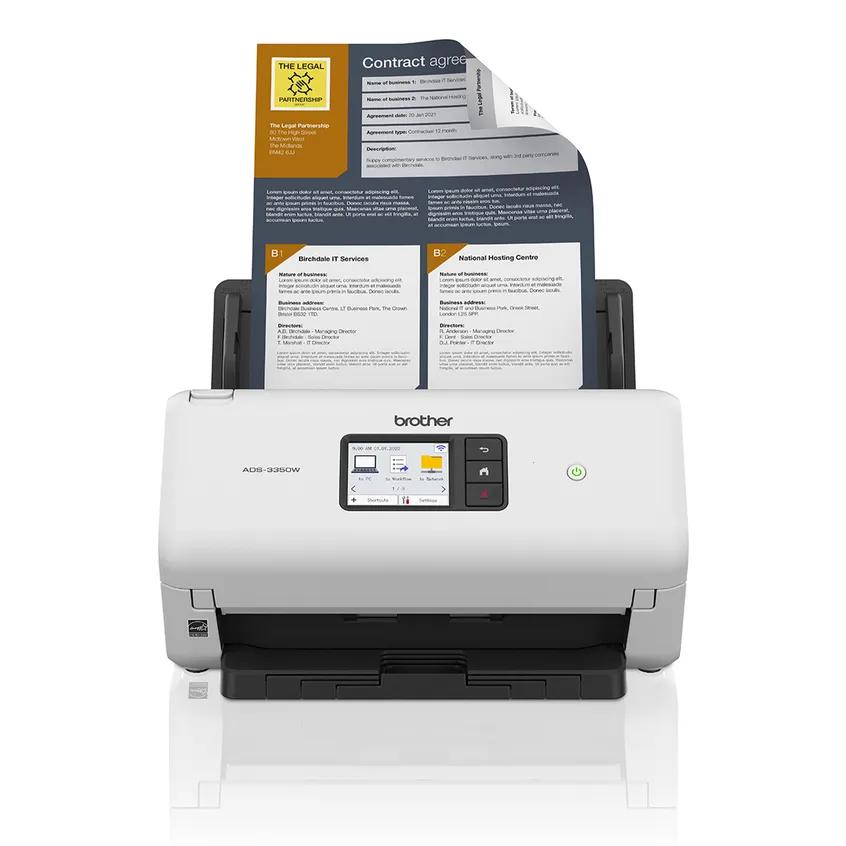
Explore this need in the finder →The Brother ADS-3350W is a networked desktop ADF scanner: it combines a 60-sheet feeder, duplex capture, a color touchscreen, 2.4 GHz Wi-Fi, Ethernet and USB. Its clearest distinction from the closely related ADS-3100 is the built-in network and mobile path, not feeder size. Brother’s headline speed wording and its detailed duplex-rate field do not line up neatly, so this assessment keeps those figures carefully qualified. It is a research-based reading of US Brother material, not a test.
One feeder, several destinations
Brother specifies a 60-sheet automatic document feeder based on 20 lb paper and single-pass duplex capture. The product page advertises up to 40 pages per minute for both single- and double-sided scanning. Its detailed US specification table lists the maximum duplex rate as 40 images per minute, which is not the same unit as pages per minute and does not substantiate 80 images per minute. Because Brother’s public product wording is inconsistent across those fields, do not treat the marketing line as a real-world double-sided throughput guarantee. Both are manufacturer maxima under stated conditions, not independent measurements.
The feeder capacity is more useful for mid-volume home-office jobs than a compact 20-sheet desktop unit, but a 60-sheet tray still needs reloading for larger projects. Brother also publishes a maximum daily duty-cycle comparison number of 6,000 pages. Its own note says that number helps compare designed durability between similar models; it is not a recommended workload, a tested endurance result or a claim that every paper stock will feed reliably.
Connectivity is the main reason to choose it
For a local computer, the ADS-3350W has USB 3.0. For shared use it adds 10/100 Ethernet and 2.4 GHz 802.11b/g/n Wi-Fi; Brother also documents Wi-Fi Direct for a mobile device without a wireless router. Wi-Fi Direct is a local connection, while infrastructure Wi-Fi joins a network, so those options should not be collapsed into one assumed workflow. The inspected specifications do not establish a 5 GHz radio.
Brother’s US product specifications list mobile-device compatibility and Mobile Connect; the current support page lists iOS and Android. That does not validate your phone, app version, account or destination. The scanner also lists destinations such as network folders, FTP/SFTP, email server, SharePoint and USB flash storage. Those options help when an office has an administrator or a clear setup plan, but they are not automatic compatibility with every server or security policy: network credentials, file formats and the receiving system matter. The product page mentions cloud services through Brother iPrint&Scan, but the material reviewed here does not establish a direct touchscreen-to-cloud-without-a-computer route. Check the current setup guide for the exact destination you need.
A touchscreen helps at the machine
The 2.8-inch color touchscreen differentiates the ADS-3350W from the more basic ADS-3100. Brother advertises 20 programmable shortcut buttons, along with direct Scan to USB from the machine. An operator can choose a configured job at the scanner rather than relying on a computer window for every start. Brother lists USB flash-drive support up to 128 GB in FAT12, FAT16, FAT32 or exFAT formats in its technical specifications; the flash drive itself is not included in the carton. Ethernet and Wi-Fi scanning likewise depend on profiles and network configuration, not simply on plugging in a cable.
Brother lists TWAIN, WIA and SANE driver types, but the exact driver availability depends on the operating system. Its US support page currently shows Windows, Mac, Linux, iOS and Android; the supported feature set varies by OS. That list is not proof that a specific records application, OCR language or device-management policy works. Confirm the exact machine code, current driver and named application before making a scanner central to a workflow.
Paper handling still needs judgment
The official specifications list standard paper, business cards and plastic cards, and give a maximum standard document size of 8.5 by 14 inches. A carrier sheet is optional for certain thinner or irregular originals; the manual’s loading guidance matters, especially for receipts, clippings and photos. Brother warns against items such as glossy or coated paper, attached notes or photos, staples or clips, wet ink, heavily curled sheets and papers outside its thickness limits. A broad product-page reference to photographs should not override the more specific loading instructions. This is a sheet-fed device, not a flatbed for bound books or fragile originals.
How it differs from nearby Brother choices
The ADS-3100 keeps the same 60-sheet capacity and lists up to 40 ppm simplex or 80 ipm duplex, but its standard interface is USB only; it lacks the ADS-3350W’s built-in touchscreen, Ethernet, Wi-Fi and Mobile Connect route. The ADS-3350W therefore makes more sense when multiple operators, network scanning or phone-assisted capture are real requirements. Brother’s ADS-4700W steps up to an 80-sheet feeder and a larger touchscreen, while the ADS-4900W lists a 100-sheet feeder. Those are capacity and feature comparisons, not a claim that a larger model is always faster or more reliable.
Who should shortlist it?
Compare the ADS-3350W if you need a moderate ADF stack, automatic duplex, machine-side controls and a choice of local, wired-network, wireless or mobile workflows. Skip it if your work requires a documented 5 GHz connection, a much larger feeder, a flatbed, or a proven direct-cloud route that avoids a computer. The official package lists the ADS-3350W, USB 3.0 interface cable, AC adapter and quick setup guide with a one-year limited warranty. Match the code ADS3350W rather than a similarly named ADS-3300W or another model, verify any carrier sheet or USB flash drive separately, and confirm your app, network and destination before purchase. No OCR, image-quality, throughput, feed-reliability or endurance test was performed for this review.
Key specifications
Key details at a glance
| Scanner class | Professional desktop sheet-fed scanner |
|---|---|
| Manufacturer-listed simplex rate | 40 ppm |
| Manufacturer-listed duplex image rate | 40 ipm |
| Automatic document feeder capacity | 60 sheets |
| Optical resolution | 600 dpi |
| Connection options | USB / Ethernet / Wi-Fi |
| Automatic duplex capture | Yes |
| Touchscreen | Yes |
| TWAIN driver documented | Yes |
Use the exact model’s instructions for operating limits, supplied equipment and version differences.
Sources for this review
Sources for this assessment
- Brother ADS-3350W US product page and specifications
- Brother ADS-3350W US support specifications
- Brother ADS-3350W US manuals index
- Brother ADS-3350W US supported operating systems
- Brother ADS-3100/ADS-3300W/ADS-3350W Online User's Guide index
- Brother Online User's Guide: configure ADS-3350W Wi-Fi Direct network manually
- Brother Online User's Guide: ADS-3350W acceptable documents
- Brother Online User's Guide: ADS-3350W unacceptable documents
- Brother Online User's Guide: save ADS-3350W scans to USB flash drive
Compare the workflow before you choose
Use the finder to test your connection, paper and software requirements against the documented scanner arrangements.