
Your needs, this model
Does it fit your priorities?
Can it support a phone-involved Wi-Fi routine without giving up two-sided stack feeding?
Brother's ADS-3600W guide documents mobile scanning on a Wi-Fi network, and the U.S. product page lists duplex capture and a 50-sheet ADF. Confirm that your phone, app version and wireless policy are supported, and remember that the manual's actual loading capacity varies by paper size and weight.
Explore this need in the finder →Can staff select a saved job at the scanner rather than navigate a computer for every batch?
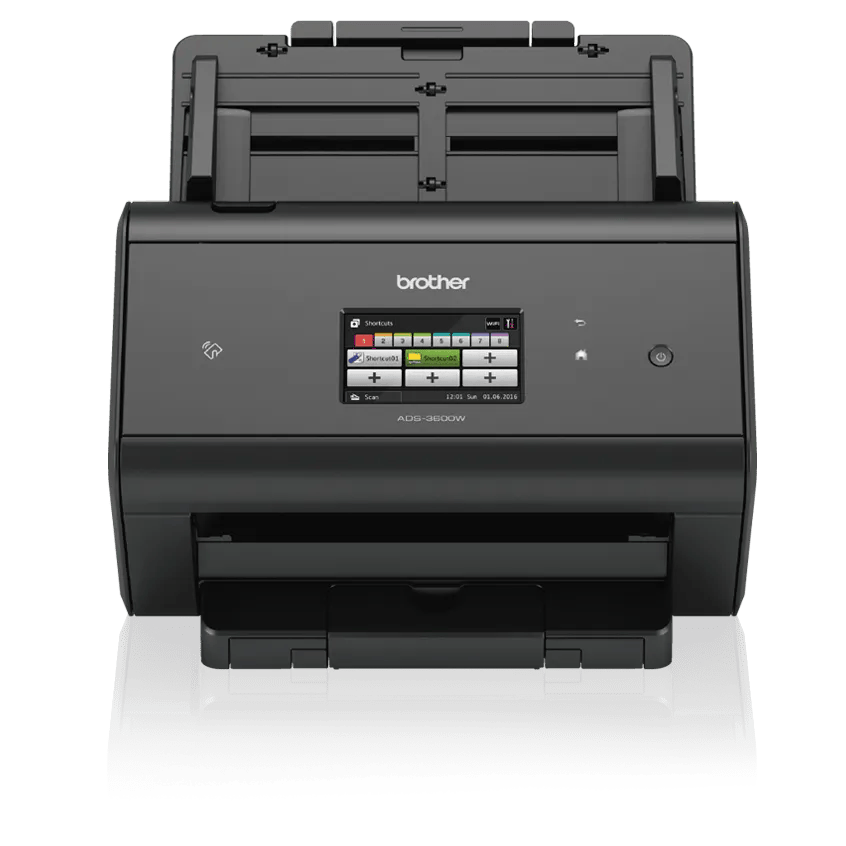
The model has a 3.7-inch color touchscreen and up to 48 programmable shortcuts. Brother also documents an ADS-3600W-only NFC reader for registered card shortcuts; an administrator must configure access, and this does not certify the scanner for a particular security policy.
Explore this need in the finder →Can a configured network scan upload to an online service without a computer at scan time?
Brother's exact Web Connect guide permits machine-side uploads after configuration, but first access requires an Internet-connected computer running the full Brother driver/software package and an Internet-capable scanner network. The chosen service may require an account unless it supports guest use; check that the provider still supports the service you need.
Explore this need in the finder →The Brother ADS-3600W is an older workgroup-oriented sheet-fed scanner built around a 50-sheet automatic document feeder, one-pass duplex capture, on-device profiles and several distinct ways to connect. The U.S. product page now labels this model discontinued. Its specification sheet describes flexible direct-to-network features, but those features bring setup, service-account and IT questions of their own. This is a source-based assessment, not a hands-on test.
A 50-sheet feeder, with a paper-specific ceiling
Brother lists up to 50 sheets in the ADF and a maximum rated simplex speed of 50 pages per minute, with duplex capture rated as high as 100 images per minute. The distinction between sheets, pages and images matters: a page is one side, while an image is one scanned side. Brother's speed note qualifies the maximum for Letter stock at 300 dpi with advanced features turned off. It is a device rating, not a promise for a mixed batch, network transfer, OCR job or downstream file save.
The 50-sheet value is not a universal load count. Brother's model guide shows that capacity changes with size and basis weight: its chart allows up to 50 A4/Letter sheets at 80 g/m², but lists 41 for Legal-size stock at the same weight. A heavier stack may be smaller still. Treat the ADF as a convenient moderate batch size, then check the exact loading chart before a large run. The listed 7,500-page maximum daily duty figure is a comparison aid for similar Brother devices, not a recommendation to feed that many pages each day or an endurance result.
More than a USB desktop scanner
The ADS-3600W has SuperSpeed USB 3.0, Gigabit Ethernet and 2.4 GHz 802.11b/g/n Wi-Fi, plus Wi-Fi Direct. USB-to-computer capture is a straightforward arrangement when the right driver and application are installed. An Ethernet deployment can suit a shared desk or managed workgroup; Wi-Fi gives a wireless alternative, and the guide also describes direct wireless pairing. These are supported setup choices, not a reason to assume the scanner should connect to every network at once. Brother's inspected U.S. specifications do not establish a 5 GHz radio.
The model's direct destinations are unusually varied for a feeder in this size class. The U.S. page lists USB memory, network folders, FTP/SFTP, SharePoint, an email server and Web Connect services. The Web Connect Guide for this exact model says the scanner can upload to a supported service without a computer during the scan itself. That convenience is conditional: initial access requires an Internet-connected computer with Brother's full driver/software package and a temporary registration step. The chosen service may require an account unless it supports guest access. Later jobs still need a working Internet path and a service that remains supported. Do not buy it for a named cloud destination until an administrator has checked its current provider, account and network requirements.
Mobile scanning is a separate route. Brother's shared user guide explicitly includes the ADS-3600W in the iPrint&Scan workflow and describes scanning over Wi-Fi. That does not establish compatibility with a particular phone, app release or security policy. Wi-Fi Direct is a local link; it should not be mistaken for Internet access or for the configured Web Connect workflow.
A control panel designed for repeat jobs
The 3.7-inch color touchscreen and 48 programmable shortcuts can make a difference when several operators repeat named tasks. Brother also singles out the ADS-3600W—not the otherwise closely related ADS-2800W—for NFC-card authentication and ID-card shortcuts in its guide. Secure Function Lock and directory-authentication options offer administrators additional controls, but they must be configured and do not amount to a security certification. The practical question is whether your IT team can install, secure and maintain the scanner in the environment where it would actually be used.
Driver listings include TWAIN and several other interfaces, and Brother's current U.S. operating-system page lists Windows 11 alongside older platforms. Driver features vary across systems, however. A TWAIN label does not guarantee that a particular capture application, OS update, network policy or user account will work. Check the exact driver package and named software before building a records workflow around this older model.
Paper handling is still ADF handling
The specification page gives a standard single-sheet size up to 8.5 by 14 inches, while the manual describes a longer-original route and special settings. Brother lists receipts, photos, business cards and plastic cards among supported media, but their handling is not interchangeable: the product page calls for a carrier sheet with receipts and requires one for photos, and Brother recommends carrier-sheet use below 39 g/m². The listed base carton includes one carrier sheet; verify it is still present if the scanner is used or refurbished. The manual also allows up to five plastic cards per load, with a documented maximum embossed thickness of 1.4 mm, while warning that some cards may be scratched or rigid cards may not feed reliably.
This is a sheet-fed design, not a flatbed for books or delicate bound originals. No separate manual-feed bypass is established by the reviewed U.S. sources, so do not equate feeding one item through the ADF with a dedicated special-original route. If fragile, taped, curled or otherwise unusual pages are central to the job, the relevant manual instructions—not a broad media list—should determine whether another machine type is safer.
Where it fits among Brother's older workgroup models
The ADS-2800W shares a 50-sheet feeder, touchscreen class and network-and-cloud orientation, while the ADS-3600W adds the model-specific NFC card-reader workflow and has its own specification profile. Both still need exact host, service and offer checks. Compared with newer Brother workgroup scanners, this model's appeal is its set of direct destinations and operator controls, not a claim of newer support or faster real-world throughput. Its U.S. listing is explicitly discontinued; that status does not prove no reseller has a unit, but neither does an old product-page offer widget establish current stock.
Who should keep it on the list?
Consider the ADS-3600W only if your workflow values a 50-sheet duplex ADF, touchscreen shortcuts, TWAIN capture and a managed USB, wired or wireless network path—and you can verify the exact host software and service setup before buying. It is a weaker fit if you require 5 GHz Wi-Fi, a flatbed, a separately documented manual-feed route, guaranteed cloud-provider support or a current model with an uncomplicated replacement package. The manufacturer describes a baseline carton and one-year limited warranty, but those details do not transfer to a used or refurbished seller offer. Match the exact ADS3600W model code, inspect the actual accessories and condition, and confirm the return terms. No scan-quality, feed-reliability, OCR, speed or endurance test was performed for this review.
Key specifications
Key details at a glance
| Scanner class | Professional desktop sheet-fed scanner |
|---|---|
| Manufacturer-listed simplex rate | 50 ppm |
| Manufacturer-listed duplex image rate | 100 ipm |
| Automatic document feeder capacity | 50 sheets |
| Optical resolution | 600 dpi |
| Connection options | USB / Ethernet / Wi-Fi / Wi-Fi Direct |
| Automatic duplex capture | Yes |
| Touchscreen | Yes |
| TWAIN driver documented | Yes |
Use the exact model’s instructions for operating limits, supplied equipment and version differences.
Sources for this review
Sources for this assessment
- Brother ADS-3600W U.S. product page and specifications
- Brother ADS-3600W U.S. support specifications
- Brother ADS-3600W U.S. manuals index
- Brother U.S. ADS-2400N/ADS-2800W/ADS-3000N/ADS-3600W User's Guide, version D
- Brother U.S. ADS-2400N/ADS-2800W/ADS-3000N/ADS-3600W Network User's Guide
- Brother ADS-2800W/ADS-3600W Web Connect Guide
- Brother ADS-3600W U.S. supported operating systems
- Brother ADS-3600W U.S. product brochure
- Brother U.S. product recall index
Compare the workflow before you choose
Use the finder to test your connection, paper and software requirements against the documented scanner arrangements.