
Your needs, this model
Does it fit your priorities?
Can the scanner use USB for a computer-owned routine?
Yes. Brother specifies USB 3.0, and its model guide describes a Scan to PC path that requires the host scanning application and its settings. This is separate from the Ethernet network setup.
Explore this need in the finder →Does it have an actual one-at-a-time route for special originals?
Yes, the ADS-4300N guide documents Manual Single Mode and specifically describes envelopes and multi-layered transfer paper. The mode disables multifeed detection, and irregular-size originals may require the separately sold carrier sheet.
Explore this need in the finder →Can it scan a phone over a network?
Brother lists AirPrint and Mobile Connect, but says the mobile route requires a wireless network. A wired Ethernet scanner and a phone on Wi-Fi may share a LAN; confirm that your exact app, phone and network are supported. This is not a built-in scanner Wi-Fi claim.
Explore this need in the finder →How large a stack fits in one loading?
Brother lists up to 80 sheets, with maximum ADF capacity based on 20 lb paper. It is a loading limit, not a speed or duty-cycle guarantee; check the paper and original-size limits for the exact job.
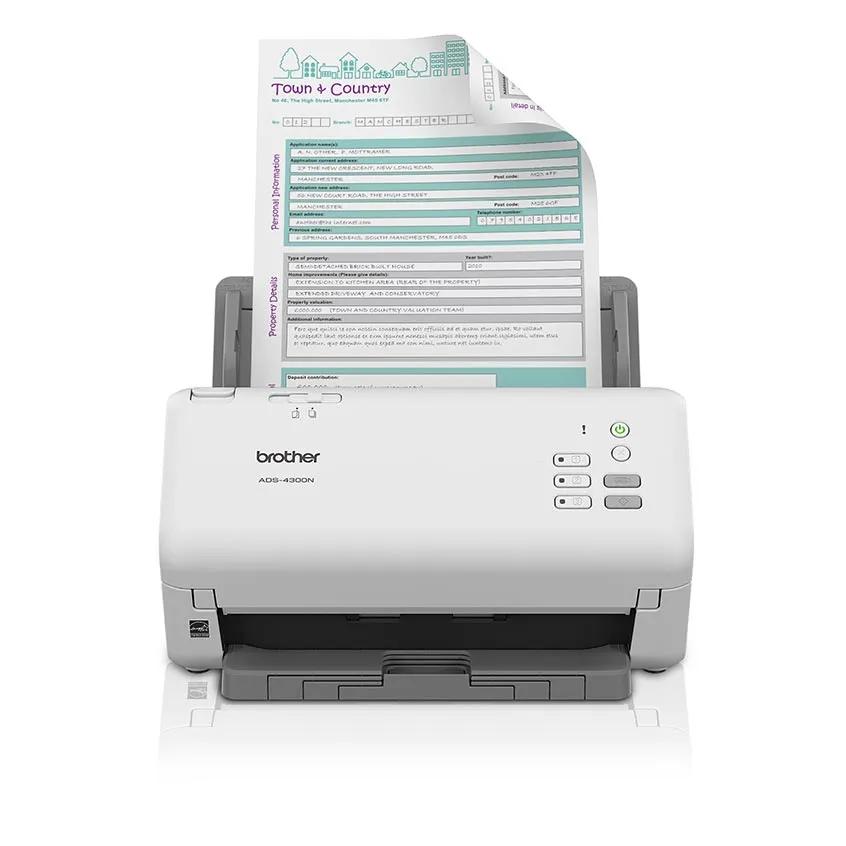
Explore this need in the finder →The ADS-4300N is a wired, sheet-fed office scanner whose strongest case is not an all-in-one wireless panel: it is the combination of a substantial duplex feeder, USB host capture, Ethernet sharing and a separately selected one-at-a-time feed mode. Brother's U.S. product page identifies model ADS4300N and lists an 80-sheet ADF, 40-page-per-minute simplex maximum and 80-image-per-minute duplex maximum. Those are manufacturer specifications, not results from an independent test.
An 80-sheet duplex path for routine batches
Brother specifies the ADF capacity at up to 80 pages, with the maximum based on 20-pound paper. For a desk processing ordinary multipage records, that is a useful middle size: larger than compact 20- or 50-sheet devices, but below the 100-sheet ADS-4900W tier. Capacity describes one loading under a stated paper basis; it does not promise that every weight, width, curled edge or mixed stack can be loaded to the same count.
The manufacturer lists single-sided scanning up to 40 ppm and duplex scanning up to 80 ipm when advanced features are off, for Letter documents at 300 dpi. There is no independent measurement here, and OCR, document separation, host processing, file naming, network traffic and the receiving application can add time. Brother also lists a maximum daily duty figure of 6,000 pages. It is a durability comparison, not a suggested workload, guaranteed cycle life or proof of reliable continuous production. Buyers should size the unit to the actual routine and service requirements rather than use the maximum as an output target.
USB and Ethernet are distinct working arrangements
USB 3.0 supplies the straightforward computer-attached route, with Brother listing TWAIN, WIA, ISIS and SANE drivers. The product's Scan to PC button still depends on a scanning application installed and configured on the host. A general driver list is not a compatibility guarantee for a named operating system, capture program, server policy or device-management setup; check the current ADS-4300N download page against those exact requirements.
Ethernet adds a network-connected arrangement for a shared work area. Brother documents direct network destinations such as FTP/SFTP and network folders, and the product page lists mobile scanning through AirPrint and Brother Mobile Connect. The brochure warns that the mobile route requires a wireless network, so a phone on Wi-Fi may use a compatible LAN while the scanner itself is attached by Ethernet. That is not a built-in Wi-Fi radio, nor evidence that every phone or app will find the device on every managed network. The model is a poor fit if Wi-Fi on the scanner is a hard requirement.
There is no touchscreen. The manual describes physical controls, a document-separation switch and three assignable network-device scan buttons. Those buttons can launch configured network functions, but they are not a touchscreen menu for browsing profiles. Brother's marketing and software listings mention cloud services; the model-specific guide's Brother Web Connect, touchscreen cloud-upload workflow is assigned to ADS-4700W and ADS-4900W rather than ADS-4300N. Do not treat a host-based cloud feature or an FTP destination as proof of computer-free scanner-to-cloud delivery.
The useful extra is a special-original mode—with limits
Unlike a model that only sends awkward originals through its usual ADF path, the ADS-4300N guide documents a switch between Continuous Feed Mode and Manual Single Mode. It gives envelopes and multi-layered transfer paper as examples for the single-feed setting. That is a practical, separate operating choice for occasional originals, not a second feeder tray and not permission to run every fragile or attached document through the machine.
There are important operating costs to this flexibility. Brother warns that multifeed detection is unavailable in Manual Single Mode and that changing the switch during a scan can damage the scanner. The guide also says an optional carrier sheet is required for irregular-size documents and is not included in the box. Check the exact original, thickness, carrier-sheet requirement and feed procedure before adopting this route. A carrier sheet is an accessory, not an automatic part of a retailer bundle.
How it differs from nearby Brother models
The ADS-4300N sits between the more compact Brother ADS-1300 and the networked ADS-4700W/ADS-4900W family. The ADS-1300 has a 20-sheet feeder and USB-only desktop workflow. ADS-4300N scales to 80 sheets, Ethernet and manual-single feed, but gives up the ADS-4700W's touchscreen and Wi-Fi. The ADS-4900W increases the listed capacity to 100 sheets and the speed tier to 60 ppm/120 ipm; those differences may matter more than a small top-line price comparison, but seller packages and present availability must be checked independently.
The ADS-4300N carton listed by Brother includes the scanner, AC adapter, USB 3.0 cable and Quick Setup Guide. The exact model page lists a three-year limited warranty, but a seller's offer, included software entitlements, return terms and warranty applicability should be verified for the unit being considered. An Ethernet cable is not listed in that carton content. No price, stock state or customer experience is inferred here.
Who should shortlist it
This model is a considered candidate when several people share an Ethernet-connected scanner, routine stacks are best handled in an 80-sheet duplex feeder, a host needs the listed TWAIN or ISIS route, and occasional special originals justify a manual-single mode. It is less convincing for a small desk that only scans a few pages, a workflow that requires a built-in touchscreen or scanner Wi-Fi, or a team that expects one-tap Web Connect cloud upload without a computer. Its feature list is useful for scoping a deployment, but named OS/application support, network security rules, optional carrier sheets and the seller's exact package are still purchase checks.
Evidence and limits
This assessment uses Brother's U.S. model page, U.S. support specifications, brochure and selected ADS-4300N Online User's Guide sections for the control panel and special-original mode. I did not conduct a hands-on feed, speed, OCR, reliability or image-quality test. For a real workflow, check the current manual and driver downloads for the exact scanner, host, software and originals.
Key specifications
Key details at a glance
| Scanner class | Professional desktop sheet-fed scanner |
|---|---|
| Manufacturer-listed simplex rate | 40 ppm |
| Manufacturer-listed duplex image rate | 80 ipm |
| Automatic document feeder capacity | 80 sheets |
| Optical resolution | 600 dpi |
| Connection options | USB / Ethernet |
| Automatic duplex capture | Yes |
| Separate manual-feed route | Yes |
| Touchscreen | No |
| TWAIN driver documented | Yes |
Use the exact model’s instructions for operating limits, supplied equipment and version differences.
Sources for this review
Sources for this assessment
- Brother ADS4300N U.S. product page and specifications
- Brother ADS-4300N U.S. support specifications
- Brother ADS-4300N U.S. manuals index
- Brother Online User's Guide: ADS-4300N control panel and network-device scan buttons
- Brother Online User's Guide: ADS-4300N manual-single paper handling
- Brother ADS-4300N two-page U.S. product brochure
Compare the workflow before you choose
Use the finder to test your connection, paper and software requirements against the documented scanner arrangements.