
Your needs, this model
Does it fit your priorities?
Can it scan both sides of an office stack in one pass?
Brother specifies duplex capture and up to 80 images per minute, a manufacturer maximum under stated test conditions rather than an independent throughput result. The automatic feeder holds up to 80 sheets of 20 lb paper; actual job time depends on settings and the receiving workflow.
Explore this need in the finder →Can a phone participate in a Wi-Fi scan routine?
Brother lists Mobile Connect and mobile-device compatibility for ADS-4700W. The documented fit is a Wi-Fi plan; check your phone's current app support, network and required destination before depending on it.
Explore this need in the finder →Can it upload scans to an online service without a computer beside it?
Yes, Brother's Online User's Guide describes a touchscreen Web Connect upload without using a computer. Initial service access and account registration require setup steps, an Internet-connected network and a supported service; this is not a promise that every cloud account works.
Explore this need in the finder →Will a capture program that specifically needs TWAIN have a documented driver route?
Brother lists TWAIN among the ADS-4700W scan drivers. Confirm the exact driver release, host operating system and application pairing rather than treating the general driver listing as proof of a specific integration.
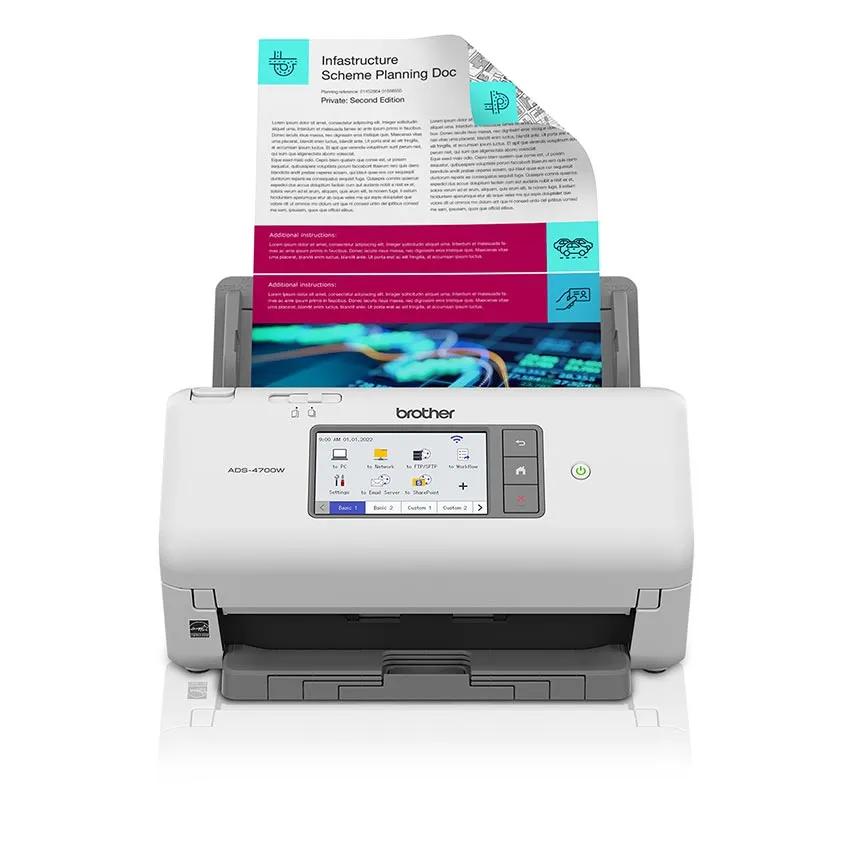
Explore this need in the finder →The ADS-4700W is a wired-and-wireless workgroup scanner in Brother's desktop line. This assessment is based on Brother's US product information and model-specific support materials, not on hands-on use or an independent speed test. Its central question is not whether it can scan a stack—the product is built around an automatic duplex feeder—but whether its 80-sheet capacity, touchscreen network routes and software fit the work and the office network you actually have.
Where it sits next to the ADS-4900W
The ADS-4700W shares much of the visible workflow with the ADS-4900W: a 4.3-inch color touchscreen, up to 56 custom shortcuts, Ethernet, USB, a wireless network interface, mobile compatibility and broad scanning destinations. The differences are consequential. Brother rates the ADS-4700W at up to 40 pages per minute simplex and 80 images per minute duplex, with an 80-sheet feeder and a maximum daily cycle of 6,000 pages. The ADS-4900W is listed at 60 ppm, 120 ipm, a 100-sheet feeder and a 9,000-page maximum daily cycle. These are manufacturer figures, not our measurements, and the 80-page feeder rating is based on 20 lb paper.
That makes the 4700W a plausible middle tier when 80 pages per loading is enough and the touchscreen or network options matter, but the larger model's extra capacity is not essential. It is not an automatically better value: current seller offers, condition and package must be compared separately, and a published daily maximum is not a recommended sustained workload or evidence of durability. If your routine regularly starts with a full 100-sheet batch, the 4900W has a documented feeder advantage. If you rarely fill 80 pages, that gap may not matter.
Several ways to start and route a scan
The standard interfaces are USB 3.0, Ethernet and Wi-Fi. The model-specific Brother guide is more precise than the broad word “wireless”: ADS-4700W is listed with 2.4 GHz 802.11b/g/n, while Brother lists dual-band 2.4/5 GHz for the ADS-4900W. An office that requires a 5 GHz wireless client should not assume this model qualifies; Ethernet is the documented network alternative. The product page also names AirPrint and Brother Mobile Connect, but phone compatibility depends on the current app, device and network.
A touchscreen can be useful when one device serves several people or repeat destinations. Brother says users can create up to 56 shortcuts; its product page also lists routes such as a computer, network folder, email server, SharePoint, FTP/SFTP, USB memory and cloud services. “Can send to the cloud” still has setup attached: Brother's Web Connect guide says the machine needs Internet access and an online-service account, and registration is set up in advance. After that setup, the guide describes selecting a service from the scanner touchscreen and uploading without a computer beside the device. Check that the exact service and network policy are supported before treating that as a paperless one-button routine.
For software-led capture, Brother lists TWAIN, WIA, ISIS and SANE drivers. That's broader than PDF output alone, but it does not prove that a named records, accounting or document-management application will work with a particular operating-system release. Ask the application's owner or IT administrator to confirm the exact driver and host before purchase. A USB-connected computer routine is straightforward to understand; network-to-server and computer-free routes are separate workflows with their own configuration.
Feeder strengths—and paper boundaries
Brother specifies automatic duplex and an 80-sheet ADF. The headline 40 ppm / 80 ipm rates are stated for Letter paper at 300 dpi with advanced features switched off; they should not be read as an all-day throughput promise. Batch separation, blank-page removal, deskew, barcode metadata and other processing can help shape an office routine, but they also mean the configured job may take longer than the headline rate. The daily-cycle maximum of 6,000 pages is a design comparison supplied by Brother, not a guarantee about any individual's workload.
The product page lists receipts, business cards, plastic or laminated cards and index cards among media types. Read the operating instructions for the actual stock: the same user guide warns against several materials that are easy to mistake for ordinary paper, including glossy or mirrored media, photographs on photographic paper, documents with attached stickers or notes, carbonless sheets, staples and papers of uneven thickness. Brother's product page separately calls for a carrier sheet for photos. Do not translate that broad media list into a promise that an original glossy photo can go straight through the feeder. If an original is fragile, bound, unusually thick or valuable, this is a sheet-fed machine rather than a flatbed; choose a safer capture route instead.
Who should shortlist it—and what to verify
The ADS-4700W merits a look for an office that wants duplex batch capture, a networked touchscreen and a choice between local USB and shared network workflows without stepping up to the ADS-4900W's faster 100-sheet tier. It is a less obvious choice where 5 GHz Wi-Fi is mandatory, where TWAIN/ISIS compatibility must be proven with one particular application, where 100 sheets must fit in each loading, or where the usual originals are books and glossy photographs. The product page lists a three-year limited warranty; confirm the current written terms and whether the exact offer is new or refurbished, since Brother also lists refurbished RADS products separately.
Before ordering, match the exact ADS-4700W code and included base package, confirm the current OS and driver downloads, and check your network's wireless band or Ethernet access. For cloud and mobile work, verify your own service account, mobile app and administrator rules; for special media, read the model's current handling instructions. No hands-on feed reliability, OCR accuracy, image quality, maintenance cost or independent speed testing is claimed here. The decision is best made from those documented capabilities and the limitations of your own route, not from a speed number in isolation.
Key specifications
Key details at a glance
| Scanner class | Professional desktop sheet-fed scanner |
|---|---|
| Manufacturer-listed simplex rate | 40 ppm |
| Manufacturer-listed duplex image rate | 80 ipm |
| Automatic document feeder capacity | 80 sheets |
| Optical resolution | 600 dpi |
| Connection options | USB / Ethernet / Wi-Fi |
| Automatic duplex capture | Yes |
| Touchscreen | Yes |
| TWAIN driver documented | Yes |
Use the exact model’s instructions for operating limits, supplied equipment and version differences.
Sources for this review
Sources for this assessment
- Brother ADS-4700W US product page and specifications
- Brother ADS-4700W US support specifications
- Brother ADS-4700W United States manuals index
- Brother Online User's Guide: ADS-4700W specifications and interfaces
- Brother Online User's Guide: upload documents using Brother Web Connect
- Brother Online User's Guide: unacceptable documents
- Brother ADS-4900W US product page, for model-specific comparison
Compare the workflow before you choose
Use the finder to test your connection, paper and software requirements against the documented scanner arrangements.