
Your needs, this model
Does it fit your priorities?
Can it connect by both USB and Wi-Fi?
Yes. Brother lists USB 3.0 and dual-band Wi-Fi as standard interfaces. Those are alternative supported arrangements; the match does not mean a single scan uses both at once.
Explore this need in the finder →Can a phone be part of the scan workflow?
Brother lists mobile-device compatibility, Brother Mobile Connect, Wi-Fi Direct and touchscreen scan destinations. Verify the current app, network and destination requirements for the phone you use.
Explore this need in the finder →Is its feeder large enough for a 100-sheet loading?
Brother specifies an ADF capacity of up to 100 pages, with maximum capacity based on 20 lb paper. That is a loading limit, not an estimate of the time a stack will take to scan.
Explore this need in the finder →Can capture software that requires TWAIN use it?
The product specification lists TWAIN among the included drivers. Confirm the precise driver and operating-system combination required by your application before relying on it.
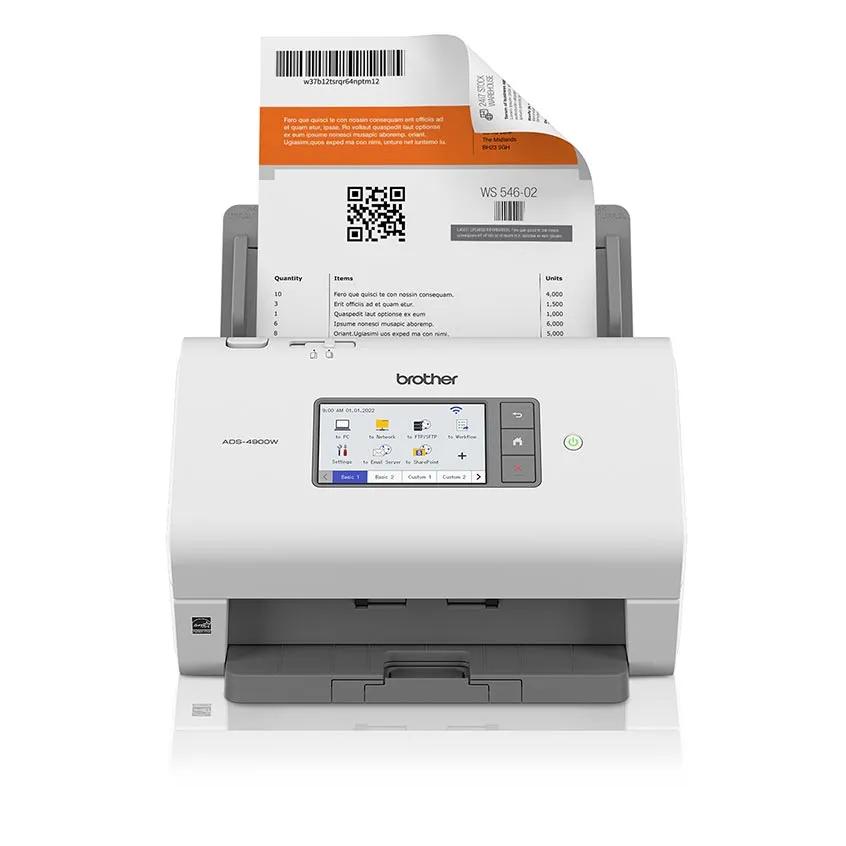
Explore this need in the finder →The ADS-4900W is Brother’s high-volume desktop option in this group: it pairs a 100-page automatic document feeder with a touchscreen, Ethernet, dual-band Wi-Fi and USB. That makes the useful question less “how fast is the headline number?” and more “does this mix of feeder, destinations and controls match the work queue?” The manufacturer publishes up to 60 pages per minute simplex and 120 images per minute duplex, but those figures are maximums under stated conditions—not a promise of the time your whole workflow will take.
A feeder built for longer stacks
Brother specifies a 100-sheet ADF and automatic duplex capture, so two-sided pages do not require a manual flip between sides. Its brochure lists the top speed with advanced features off, letter-size pages at 300 dpi. Scan settings, file processing, software, page condition and interruptions can affect a real job, and this assessment did not measure throughput or feed reliability. The separately listed maximum daily duty cycle is 9,000 pages. That is a manufacturer rating for comparing designed volume, not a recommended daily target for every office or evidence that each unit will run at that rate without maintenance.
Paper flexibility is broader than ordinary office sheets: Brother lists receipts and photos (with a carrier-sheet recommendation), business cards, plastic or laminated cards and index cards. The brochure gives a supported width range of 2 to 8.5 inches and length up to 197 inches. It also gives card thickness limits, including up to 1.32 mm for embossed cards. Those ranges do not remove the need to consult the exact feed instructions for fragile, curled, stapled or unusually thick originals. A sheet-fed scanner is still a poor substitute for a flatbed when the original cannot safely pass through rollers.
Network choices and direct destinations
Its interfaces include Ethernet, USB 3.0 and dual-band 2.4/5 GHz Wi-Fi. In a shared office, Ethernet can make a fixed network route more practical; a wireless setup may be preferable where cabling is inconvenient; USB remains an option for a directly connected workstation. These are documented alternatives, not a claim that one scan is sent over every connection at once.
The product material lists scan destinations that include a computer, network folder, email server, SharePoint, FTP/SFTP, USB memory, workflow services, mobile devices and cloud services. The 4.3-inch color touchscreen and 56 customizable shortcuts are meaningful if several people need repeatable scan-to destinations without opening a desktop application for every job. Brother lists Mobile Connect and Wi-Fi Direct among mobile compatibility routes. Cloud and email-server use can depend on a network, service account, administrator settings or supported application; those conditions should be checked for the destination that matters.
Software fit matters as much as file format
Brother lists TWAIN, WIA, ISIS and SANE drivers, which gives it more documented integration paths than models that only offer a branded one-touch workflow. The supported-output list includes searchable PDF, PDF/A, TIFF, JPEG and editable Office formats. Included applications differ by operating system; the brochure names ScanEssentials for Windows, iPrint&Scan for Windows and Mac, and Kofax utilities for Windows. Check the current download page for the exact host computer and software version rather than treating an old brochure’s compatibility matrix as current.
Searchable PDF and editable-document output can reduce filing work, but the existence of an OCR option does not establish recognition accuracy on your forms, handwriting or languages. Keep the source paper until the digital record has been checked, especially for records that must remain complete and legible.
How it differs from compact Brother models
Against the ADS-1300, the ADS-4900W’s distinction is not just wireless: its feeder is five times the stated capacity, it has Ethernet and an operator touchscreen, and its published maximum speed and daily rating are higher. The ADS-1800W adds Wi-Fi, mobile use and a small touchscreen to a compact 20-page feeder, but it is not the same high-volume proposition. If most jobs are a handful of pages and portability or price matters more than batch size, the larger model’s footprint and features may go unused. If a workflow requires a flatbed, a different paper path or an exact connector that is not listed, another class of device may be necessary.
Checks before choosing it
Match the ADS-4900W model code to the base unit rather than assuming that a retailer’s bundle, refurbished offer or replacement-supply package is identical. Confirm the exact operating-system driver, the required capture interface, the Wi-Fi/Ethernet setup, the cloud service’s account requirements and the permitted media thickness. Check where the scanner will sit and leave room to load and collect pages. Brother lists a three-year limited warranty on the product material; review the current US warranty terms and any seller’s condition and return rules. The performance figures here are manufacturer specifications, and no hands-on scanning, software test or durability assessment was performed.
Key specifications
Key details at a glance
| Scanner class | Professional desktop sheet-fed scanner |
|---|---|
| Manufacturer-listed simplex rate | 60 ppm |
| Manufacturer-listed duplex image rate | 120 ipm |
| Automatic document feeder capacity | 100 sheets |
| Optical resolution | 600 dpi |
| Connection options | USB / Ethernet / Wi-Fi |
| Automatic duplex capture | Yes |
| Touchscreen | Yes |
| TWAIN driver documented | Yes |
Use the exact model’s instructions for operating limits, supplied equipment and version differences.
Sources for this review
Sources for this assessment
Compare the workflow before you choose
Use the finder to test your connection, paper and software requirements against the documented scanner arrangements.