
Your needs, this model
Does it fit your priorities?
Can the DS-740D capture both sides without manually turning each single sheet?
Yes. Brother describes single-pass duplex scanning. Its maximum speed figures are manufacturer ratings, and its exact product page separately lists up to 15 maximum duplex images per minute; none is an independent throughput test. It still accepts only one sheet per loading, so duplex is not stack feeding.
Explore this need in the finder →Will the DS-740D process a 20-sheet pile automatically?
No. Brother's model-qualified guide sets a maximum of one page (one sheet) at a time. The scanner has a feed slot, not a documented 20-sheet ADF. A one-sheet input description is not a way to satisfy a minimum ADF-capacity choice.
Explore this need in the finder →Can it scan to a phone or cloud account without a computer?
No qualifying independent route is documented. The exact U.S. product page marks Wi-Fi as not applicable and says its bundled software destinations run when connected to a PC with applicable software. Plan for a host computer and verify its current driver/application support.
Explore this need in the finder →Does the optional carrier sheet provide a separate feed for special originals?
No. Brother's guide describes the carrier sheet entering the same feeder slot; it is an optional media aid, not a separate manual-feed inlet or an automatic tray.
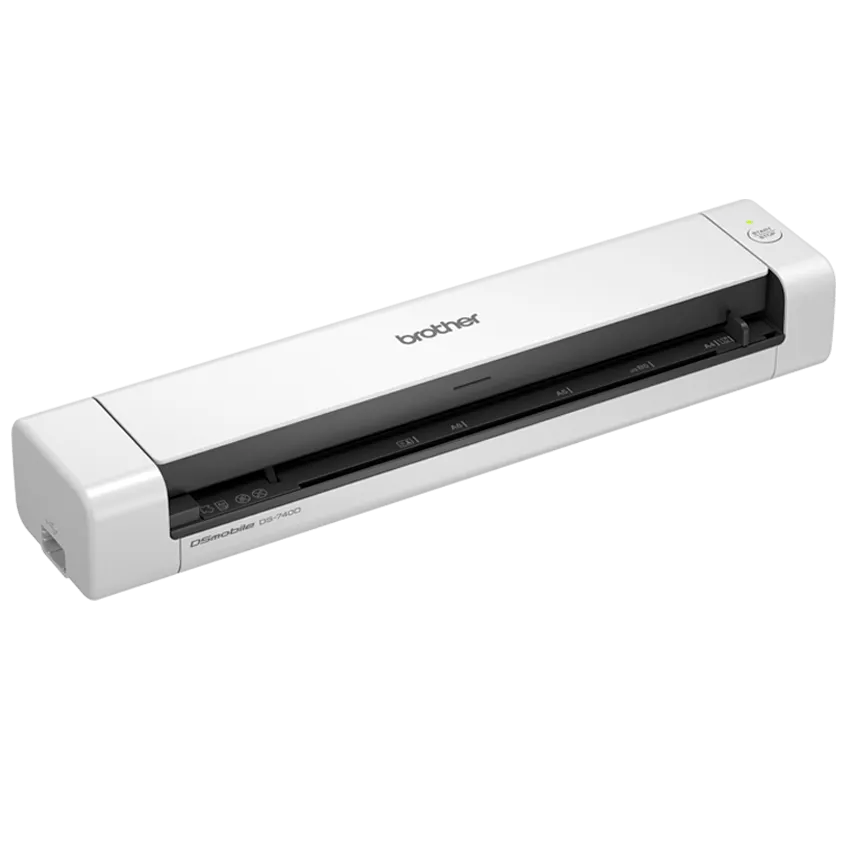
Explore this need in the finder →The Brother DS-740D is a narrow-use portable scanner: it can capture both sides of one sheet in a pass, draws power through its Micro USB connection, and returns paper along a compact vertical path. The important limit is hidden in the word “duplex.” This is not a little desktop ADF. Brother’s model guide says to load one sheet at a time, so a packet still requires the operator to feed each original. This assessment is based on manufacturer records, not hands-on testing.
Two sides at once, one sheet at a time
For receipts, forms or a few double-sided pages carried between desks, the DS-740D solves a real inconvenience: Brother describes single-pass two-sided capture, so you do not have to feed a sheet again just to scan its reverse. The U.S. product page advertises up to 16 pages per minute and the brochure repeats a 16-ppm maximum for simplex and duplex operation. However, the same product page’s detailed duplex-speed field says 15 maximum images per minute. Those are manufacturer numbers with different labels, not a promise about the rate your documents, settings and computer will achieve. We have not measured speed, image quality, alignment, jam frequency or OCR accuracy.
Do not compare that duplex feature with feeder capacity as if they were the same thing. Brother’s model-qualified guide lists a maximum of one page (one sheet) per loading. You insert a sheet, let it pass, and then load the next one. The machine is better understood as a portable one-original-at-a-time scanner than as a desktop batch tool. For recurring stacks, the ADS-2200 or another rated ADF model is a more sensible starting point; an optional carrier sheet or plastic-card procedure does not turn this into a multi-sheet feeder.
A vertical path helps a small desk, with conditions
Brother’s product page promotes its Desk Saving Design and says the vertical route can reduce the space needed behind the machine. The manufacturer brochure describes a single-sheet scanner with a vertical paper path, while the U.S. user guide explains when to open the Output Guide if there is not enough rear clearance. That guide is a paper-ejection choice, not a second input route. It has a narrower material envelope: Brother specifies a supported sheet-size range and paper weight of 52–80 g/m² for this mode, and says not to use the guide with a carrier sheet or plastic cards. Measure the actual desk and keep the applicable instructions for the originals you feed; “space saving” does not mean that every document can exit either way.
The body is about 11.9 by 2.5 by 1.8 inches and 1.4 pounds in Brother’s brochure. Its Micro USB 3.0 cable supplies both connection and bus power from a host computer, which avoids a separate power adapter but makes a computer part of the scanning setup. The unsuffixed DS740D uses Micro USB. It is not the similarly named DS740DE / DS-740De configuration, whose separate U.S. review documents USB Type-C. Check the model code and connector rather than assuming that an old listing with a near-matching name has the newer port.
Original size and the optional carrier sheet matter
Brother’s family support table and shared U.S. guide explicitly qualify the DS-740D: maximum length is 72 inches for a one-sided scan but 16 inches for a two-sided scan. A very long receipt may therefore be a different task from a long duplex form. Ordinary paper is listed from 35 to 270 g/m², and the guide warns against staples, clips, wet ink, glossy or mirrored media, and stock outside the recommended thickness. It lists business cards and one plastic card per loading, with a warning that certain embossed cards may not scan correctly.
For photographs, thin originals or uneven material, Brother recommends a Carrier Sheet. It is a separately sold accessory, not an item in the exact U.S. DS740D carton list; the brochure identifies the optional CS-A3401 two-pack. The guide also names the Carrier Sheet as a way to handle certain small, fragile or unusual originals, but it still enters the same feeder slot. That makes it a media aid, not a separately documented manual-feed inlet. If you need a dedicated manual feed mode, a specialty sheet path or repeated mixed-stock production, do not count the carrier sheet as proof of those features.
Computer software, not a wireless phone workflow
The exact U.S. product specifications list Micro USB, show Wi-Fi as not applicable, and name TWAIN, WIA, ICA and SANE drivers. Brother also lists scan destinations that include cloud services, but its product-page disclaimer says bundled software is used when connected to a PC with applicable software. That is a host-computer workflow; it does not establish direct Wi-Fi capture to a phone or computer-free cloud delivery. There is no documented rechargeable battery, touchscreen profile panel, microSD slot or scan-to-USB-memory route in this model’s reviewed configuration.
The supported-OS page currently names Windows and macOS versions and Linux, but Brother warns that available features vary by operating system and that software for versions shown in gray will no longer be updated. That broad list does not guarantee that a particular newer computer, capture application or enterprise driver will work. Before relying on TWAIN, check Brother’s current download page for the exact host and application, and confirm installation and maintenance obligations with the software owner. The product is discontinued, so do not infer that a new-condition listing, included software license or current support entitlement will be available.
What the refurbished RDS740D listing changes
Brother’s separate U.S. RDS740D page calls the configuration refurbished and lists the scanner in its carton as a DS-740D. The same page identifies the Micro USB cable and setup/safety material. That is evidence of a refurbished offer for the same scanner hardware, not a different scan engine or a separate operating plan, so the RDS740D row is covered by this DS-740D functional review. It does not establish the condition of an unrelated resale unit, remaining life, warranty transfer or package contents for any other seller. If evaluating an RDS740D or third-party item, verify the label, actual accessories, refurbishment terms, return policy and warranty with the specific seller rather than borrowing the base model’s box list.
Who it suits—and who should pass
The DS-740D belongs on a shortlist when the task is a few one-at-a-time originals, automatic two-sided capture, a small travel footprint, USB to a computer and a listed TWAIN route. Its vertical return path and USB bus power are useful traits in that particular routine. Pass if your workflow needs a 20-sheet ADF, unattended batches, Wi-Fi or phone scanning, a computer-free cloud path, a battery, a flatbed, a touchscreen or a separate manual-feed inlet. The 100-page daily and 2,000-page monthly values are manufacturer maximums for design comparison, not a tested recommendation for a used unit or proof of remaining roller life.
Before buying any DS740D-labelled item, confirm the unsuffixed DS740D code rather than DS740DE or a different DS-series model; check that your required Micro USB connection and host drivers are available; and verify the actual unit’s condition, cable, return terms and warranty. Check the page-length limit for duplex originals and the separate paper restrictions if you plan to use the Output Guide or carrier sheet. This is a specification-based assessment, not an ownership, endurance or scanning-quality test.
Primary references: Brother’s DS740D U.S. product page, DS-740D brochure, U.S. specifications, manual index and supported-OS page; the model-qualified U.S. Online User’s Guide and Quick Setup Guide; and Brother’s RDS740D refurbished product page.
Key specifications
Key details at a glance
| Scanner class | Portable single sheet fed |
|---|---|
| Manufacturer-listed simplex rate | 16 ppm |
| Manufacturer-listed duplex image rate | 15 ipm |
| Optical resolution | 600 dpi |
| Connection options | USB |
| Automatic duplex capture | Yes |
| Touchscreen | No |
| TWAIN driver documented | Yes |
Use the exact model’s instructions for operating limits, supplied equipment and version differences.
Sources for this review
Sources for this assessment
- Brother DS740D exact U.S. product page
- Brother DS-740D U.S. two-page brochure
- Brother DS-740D U.S. support specifications
- Brother DS-740D U.S. manuals index
- Brother DS-635/DS-640/DS-740D/DS-940DW U.S. Quick Setup Guide, version B
- Brother DS-635/DS-640/DS-740D/DS-940DW U.S. Online User's Guide, version B
- Brother DS-740D U.S. supported operating systems
- Brother DS740D U.S. product support landing
- Brother RDS740D exact refurbished product page
- Brother DS-740D exact U.S. product-page image
- Brother U.S. recall notice page, screened for DS-740D
Compare the workflow before you choose
Use the finder to test your connection, paper and software requirements against the documented scanner arrangements.