
Your needs, this model
Does it fit your priorities?
Can I scan a two-sided form in one pass?
No. Brother lists the DS820W as simplex only. It takes one page at a time and does not automatically capture the reverse side.
Explore this need in the finder →Can I transfer scans to a phone without a USB-connected computer?
The guide documents wireless access from a smartphone/tablet and wireless file access to the scanner SD card. Check the exact phone and current supported software; this is a wireless-device route, not proof that every app remains available.
Explore this need in the finder →Is a computer-free Brother cloud send a dependable current route?
The old manual describes BOL/BR-Docs setup through an internet access point and a Brother Online account, but current service availability was not verified. Do not buy on that cloud claim without confirming the service and account path.
Explore this need in the finder →Can I load a stack of forms or use TWAIN over Wi-Fi?
No stack is documented: the manual says one page at a time. Its TWAIN-mode procedure has Wi-Fi switched off and a Micro USB connection to the computer; do not assume TWAIN and wireless access describe the same operating setup.
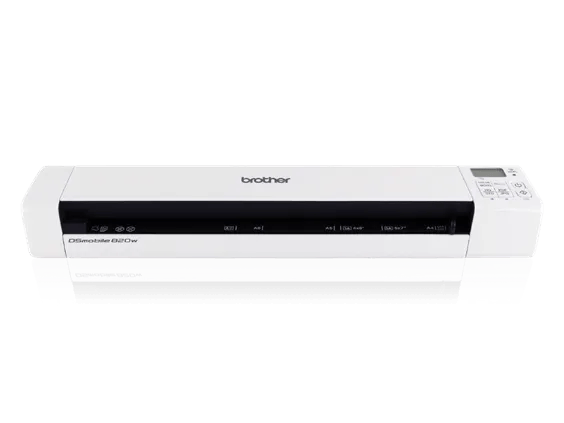
Explore this need in the finder →The Brother DSmobile DS-820W is a discontinued, battery-powered portable scanner for someone who wants a small sheet-fed device that can work either from a computer or over Wi-Fi. Its useful distinction from Brother's wired DS-700D and DS-720D is the wireless/mobile route—not faster stack handling. Brother's U.S. brochure describes a single-sheet scanner rated up to 8 pages per minute, and the model-specific manual confirms that only one page should be loaded at a time. The “up to” speed is a manufacturer figure under stated conditions, not a test result or a promise of real-world throughput.
Two connection choices, with separate setup steps
The DS-820W can connect by Hi-Speed USB 2.0 or 802.11 b/g/n Wi-Fi. USB provides a conventional computer-connected workflow. Brother's manual also documents Wireless Access Mode for a computer and a separate access mode for a smartphone or tablet, with the ScanHub application described for iOS and Android. The supplied rechargeable lithium-ion battery supports portable placement; USB power is another documented option. Do not read “both” as simultaneous USB and wireless operation—the practical reason to value both is that the same scanner can be used in different supported setups.
The manual includes TWAIN-mode procedures and the brochure lists a TWAIN driver. That is useful when a host application expects a TWAIN source, but it does not guarantee that a particular current operating system and application pair still works. Brother's current Windows 11 support table marks the DS-820W driver/software as not supported. Check the exact host before choosing this older model; producing a scan with an app is not interchangeable with having a supported TWAIN driver in a specific workflow.
Portable capture is still one page at a time
This is a simplex model: it captures one side rather than automatically scanning both sides. The manual warns against loading more than one page at once. Its stated maximum of 8 ppm is therefore not an ADF capacity, batch-throughput guarantee, or equivalent to a duplex desktop scanner. Receipts, travel documents and isolated pages may be reasonable jobs if a person is present to feed each original. Repeated stacks make the manual feed rhythm a real drawback. The documented 600-dpi optical resolution and 1200-dpi interpolated figure are different claims; the latter is not additional optical detail.
The U.S. product page's carton list includes the scanner, micro-USB cable, rechargeable battery and a 4 GB SD card. Still, a used or refurbished listing may not include those items, and a battery's present condition cannot be inferred from the original carton list. Confirm the exact DS820W code, whether the battery charges and holds enough power for your intended outing, the card and cable, and the seller's condition and return terms. Do not assume an accessory or condition from a base-model page.
Cloud language needs a date and a qualification
The archived model guide documents a Browser-based Brother Online (BOL) workflow that sends a scan to BR-Docs through a wireless access point. It also has instructions for BR-Docs and for direct wireless transfers to supported computers and mobile devices. That is evidence of what the manual describes, not confirmation that the required Brother online service, login path or account enrollment is currently available. Brother separately announced the end of BR-Receipts cloud backup in 2024; BR-Receipts and BR-Docs are different named services, so that notice does not prove BR-Docs is discontinued. But the current status of this DS-820W BR-Docs route remains unverified. Treat computer-free cloud delivery as an open compatibility check, not a dependable current capability.
How it compares with the wired portable models
The DS-820W is the one to inspect when Wi-Fi and a phone/tablet route matter more than duplex or a stack feeder. Brother's DS-700D and DS-720D are USB-powered alternatives; both are documented duplex devices, though they still accept a single page at a time. The DS-720D's model-specific materials state up to 5 ppm for duplex capture, while its simplex maximum is 8 ppm; its older Windows software is also not a modern support guarantee. The DS-700D is an earlier black-and-white/colour scanner with older documented host support. None of these older portable devices should be assumed compatible with a named contemporary app without checking current downloads and the intended OS.
For a phone-first buyer, verify that the model's supported Wi-Fi mode and app remain usable on the actual phone, and distinguish direct local transfers from cloud destinations. For a driver-dependent workplace, verify the named TWAIN application and current host separately. For two-sided forms or any regular pile, a one-page feed slot remains the bottleneck even if the device is wireless.
Bottom line
The DS-820W is an interesting historical portable option because its battery, USB, Wi-Fi and mobile access modes combine in a small, one-sheet simplex scanner. It is not an automatic duplex or document-feeder substitute. The discontinued status, Windows 11 driver warning, uncertain present BR-Docs service availability, and unknown condition of any used battery all call for extra verification. The official U.S. product page, DS-820W/DS-920DW guide and U.S. brochure provide the basis for this assessment; consult the manual's mode-specific setup steps before relying on any single route.
Primary sources and limits
- Brother U.S. DS820W product page — exact base model identity, discontinuation, listed specifications and reference carton contents.
- Brother U.S. DS-820W brochure — rated speed, interfaces, battery, TWAIN and product claims.
- Brother U.S. DS-820W / DS-920DW User's Guide — USB/TWAIN, Wi-Fi, mobile and historical BOL/BR-Docs procedures; current cloud service availability is not established here.
- Brother Windows 11 support table — the current table marks DS-820W driver/software not supported.
Key specifications
Key details at a glance
| Scanner class | Portable single sheet fed |
|---|---|
| Manufacturer-listed simplex rate | 8 ppm |
| Optical resolution | 600 dpi |
| Connection options | USB / Wi-Fi |
| Automatic duplex capture | No |
| Touchscreen | No |
| TWAIN driver documented | Yes |
Use the exact model’s instructions for operating limits, supplied equipment and version differences.
Sources for this review
Sources for this assessment
- Brother DS820W exact U.S. product page
- Brother DSmobile 820W U.S. brochure
- Brother DS-820W / DS-920DW U.S. User’s Guide, version C
- Brother DS-820W U.S. Quick Setup Guide
- Brother DS820W U.S. product support page
- Brother U.S. Windows 11 support table
- Brother U.S. recalls page, screened for these exact models
- Brother DS820W exact U.S. page-linked front image
- Brother DS820W U.S. manuals index
Compare the workflow before you choose
Use the finder to test your connection, paper and software requirements against the documented scanner arrangements.