
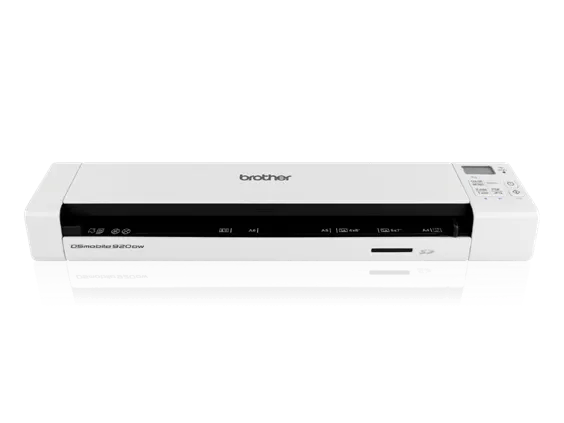
Your needs, this model
Does it fit your priorities?
Will it capture both sides of one sheet in a pass?
Yes. Brother documents single-pass duplex capture; it still accepts only one original at a time.
Explore this need in the finder →Can it load a stack unattended?
No. The manual states a maximum input of one sheet, so each original must be fed separately.
Explore this need in the finder →Can a phone retrieve scans without a computer?
A local route is documented: scan to the SD card, then access stored scans using Wi-Fi and the browser or named MiWand app. This is not a cloud upload.
Explore this need in the finder →Brother’s DS-920DW is an older portable scanner with an unusual combination for its size: single-pass duplex capture, Wi-Fi, a rechargeable battery and a memory-card slot. The combination makes it a more capable travel reference than a USB-only wand, but it does not turn the machine into a small batch feeder. Brother documents one sheet at a time, and its product page marks this model discontinued. This assessment follows the exact US DS-920DW page and its US user guide; it does not represent hands-on testing, current app compatibility or a guarantee about any particular used unit.
Two different ways to get a scan
The scanner can connect to a computer by Micro USB or operate over its 802.11 b/g/n Wi-Fi connection. Those are separate working modes, not a promise that the same scan is sent to both destinations at once. In computer mode, the host and its software own the capture. In SD mode, the scanner saves a scan to the supplied card; the guide then describes access from a computer or mobile device over Wi-Fi, a browser, or Brother’s named MiWand route. The card is local storage, not cloud backup, and Wi-Fi does not by itself establish a direct upload to a cloud service.
Duplex is useful, but every original is still a separate feed
Brother advertises up to eight pages per minute for single-sided capture and up to five sheets per minute when scanning both sides; its specification table expresses the duplex rate as ten images per minute. These are manufacturer figures under the stated letter-size, 300-dpi conditions with advanced features disabled, not independent speed results. The guide sets a maximum input of one sheet. Duplex therefore saves the need to turn a two-sided original and feed it again, but it does not automate a stack. For receipts, a contract or a handful of travel documents that distinction may matter more than a headline speed.
Storage, mobile access and security require setup
The US package listed by Brother includes a 4 GB SD card and rechargeable lithium-ion battery. A user can scan directly to the card, then browse or retrieve those files over a local wireless connection. Brother’s manual tells users to set a Wi-Fi password: without one, files on the card may be viewable by another party on the wireless route. That is a practical setup step, not an optional cloud feature. The documented TWAIN and SANE drivers serve a computer workflow; the wireless browser or MiWand route serves card access. Check the actual app, operating system and network requirements before relying on either.
Paper handling stays narrow
The guide allows standard documents and receipts within separate one-sided and two-sided length limits; it lists a longer one-sided maximum than duplex maximum. It also excludes media such as stapled, wet-ink, glossy or embossed-card originals and recommends the supplied carrier sheet for certain fragile or irregular papers. The manufacturer’s example list is not a blanket approval for every plastic card or original. Check width, thickness and mode-specific length in the manual before feeding a valuable document. A one-sheet input and a carrier sheet are not an ADF or a second, continuous-feed channel.
Who should compare it
The DS-920DW belongs on a shortlist when portability, a battery, two-sided capture and a local phone-accessible route are all meaningful, and the work is a short run of individual sheets. It is less convincing for a daily stack, fast unattended intake, an essential current-driver guarantee or a required computer-free cloud destination. The older DS-920DW is also distinct from newer Brother portable models with USB-C; do not choose by a family name alone. Its Wi-Fi, battery and SD arrangement are the important differences to verify against the exact model code.
Checks before considering an older offer
Brother lists the model as discontinued, so an old listing should be treated as an exact-condition question, not as a current product recommendation. Confirm the seller’s condition and return terms, whether the battery holds a charge, whether the required cable and the claimed card are actually included, and whether the device’s drivers and MiWand workflow still work with the intended host and phone. Brother’s listed US carton contents include the scanner, Micro USB cable, battery, 4 GB card, carrier sheet, calibration sheet, cleaning cloth and carrying bag, but a secondhand or refurbished package can differ. No price, availability or battery-life result is inferred here.
Evidence boundary
Brother’s US product page and model-specific manual support the modes, one-sheet input, paper limits, supplied-card workflow and advertised speeds discussed here. The model’s age makes present-day support a check rather than a conclusion. No claim is made about OCR accuracy, image quality, feed reliability, real-world throughput or the condition of an individual machine.
Key specifications
Key details at a glance
| Scanner class | Portable one-sheet sheet-fed scanner |
|---|---|
| Manufacturer-listed simplex rate | 8 ppm |
| Manufacturer-listed duplex image rate | 10 ipm |
| Optical resolution | 600 dpi |
| Connection options | USB / Wi-Fi |
| Automatic duplex capture | Yes |
| Touchscreen | No |
| TWAIN driver documented | Yes |
Use the exact model’s instructions for operating limits, supplied equipment and version differences.
Sources for this review
Sources for this assessment
Compare the workflow before you choose
Use the finder to test your connection, paper and software requirements against the documented scanner arrangements.