
Your needs, this model
Does it fit your priorities?
Can I load a full 100-sheet ADF stack?
Brother's exact guide specifies 100 sheets only for 28–80 g/m² stock; it lowers the stated load to 90 sheets at 105 g/m² and further for heavier paper. Treat 100 as a paper-qualified per-load maximum, not a general or daily-volume promise.
Explore this need in the finder →Can it duplex very long drawings or reports up to 236 inches?
No: Brother specifies the 236-inch single-sheet limit for one-sided scanning at 200 dpi and caps two-sided document length at 14 inches. Use the long-paper figure only for the documented simplex route.
Explore this need in the finder →Can it send scans directly from the scanner to a phone or cloud service?
No computer-free mobile or cloud route is documented. The PDS-5000 is USB-connected to a computer; Button Manager's email, FTP, shared-folder and SharePoint destinations are host-mediated, not direct scanner networking.
Explore this need in the finder →Assessment: The Brother PDS-5000 is an earlier, USB-only desktop document scanner designed around batch work: a 100-sheet ADF on specified paper, single-pass duplex capture and a manufacturer-rated 6,000-page daily maximum. Its high-volume numbers need qualification. The long-paper limit is simplex only, the feeder holds fewer heavier sheets, and Brother's current support list does not name newer computer operating systems. This is a research-based assessment of published specifications and instructions, not a hands-on test.
Confirm the exact model and era
Brother's U.S. product page identifies the model code as PDS5000 and marks it discontinued; the page showed it out of stock when checked on November 1, 2026. That is the manufacturer's listing state, not a reseller-stock report. No separate retail part number, UPC, seller package or resale condition was established. Verify a used unit's cables, AC adapter and warranty directly with the seller.
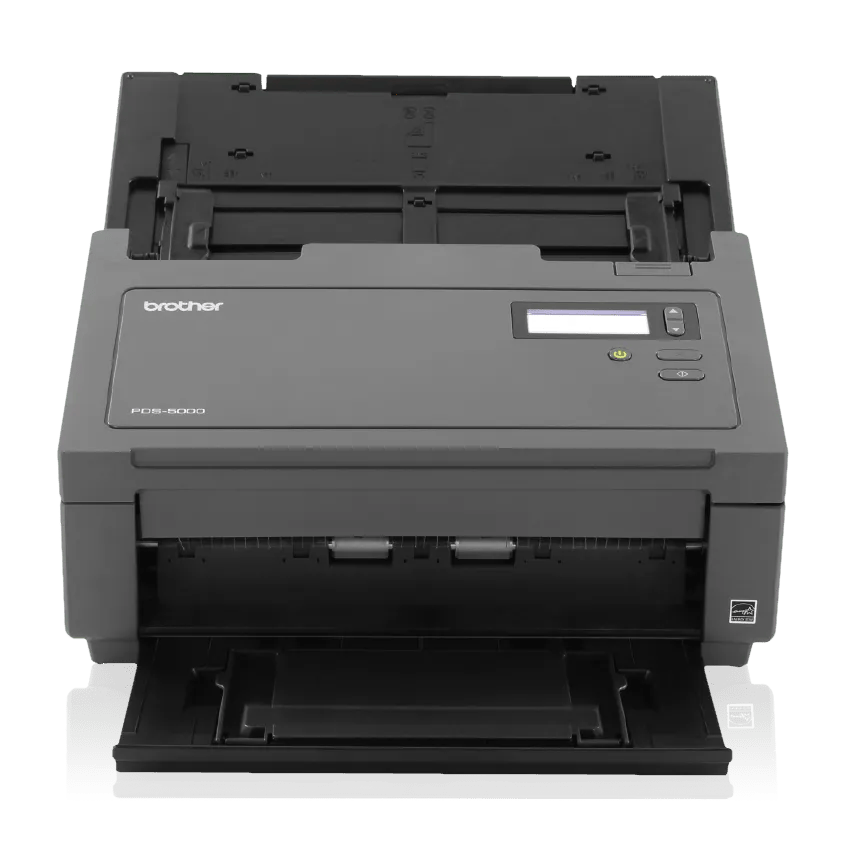
The U.S. package description names the PDS-5000, AC adapter with U.S. and Brazil power cords, USB 3.0 interface cable, Quick Setup Guide and installation DVD. A current resale unit may not contain all of those items. The separate PDS-5000F is a different flatbed/ADF configuration; its features should not be transferred to this sheet-fed PDS-5000.
Batch feeding: 100 sheets is not universal
The headline ADF limit is 100 sheets, but Brother's exact User's Guide makes that a paper-dependent loading figure. The listed maximum is 100 sheets for 28–80 g/m² stock, 90 at 105 g/m², 60 at 127 g/m², 50 at 200 g/m² and 15 at 400 g/m²; business cards are listed separately at up to 15 sheets. Brother's support specification gives its 100-page rating on 20 lb (80 g/m²) paper. These are per-load limits, not evidence that a scanner can run all day without sorting, clearing errors or checking output.
For two-sided work, the PDS-5000 uses single-pass duplex. Brother lists up to 60 ppm / 120 ipm in color or monochrome at 200 or 300 dpi; the support table drops to 15 ppm / 30 ipm at 600 dpi. The product-page footnote bases the advertised rate on Letter at 300 dpi with advanced features off. OCR, preparation, host performance and file handling add steps not represented by that rate.
Brother lists a maximum daily duty cycle of 6,000 pages. Its own caveat describes that number as a way to compare designed durability among similar Brother products and advises choosing a rating above the intended requirement. It is neither a tested daily workload nor a guarantee of uninterrupted production. A department should compare its actual volume and service expectations with the scanner's age, condition and available parts.
Long originals, cards and fragile paper
The 236-inch (5,994 mm) long-paper specification applies to a single sheet scanned one-sided at 200 dpi. Brother's support specification limits a two-sided original to 14 inches (356 mm). A long receipt or continuous form can therefore fit the stated simplex route but not the same length in duplex. The guide also specifies ordinary paper size and weight limits; curled, stapled, wet, glossy or otherwise unsuitable originals are not made safe simply by a high ADF capacity.
Plastic cards require special care. Brother's product-page disclaimer says plastic-card scanning uses an A4 carrier sheet and that this item is an additional purchase. The User's Guide says to feed one plastic card at a time and recommends the carrier sheet for cards, receipts, envelopes, photos, damaged or uneven documents, and other named exceptions. The carrier sheet goes through the ADF; the PDS-5000 sources do not document a separate manual-feed inlet or switchable manual-feed mode. It is also not a flatbed for bound books or fragile sheets that need to remain stationary.
USB is the scanner's boundary
This model connects to a computer over SuperSpeed USB 3.0, with USB 2.0 compatibility. Brother's brochure explicitly says network connectivity is absent. There is no documented scanner Wi-Fi, Ethernet, mobile-device scanning or computer-free cloud route. The distinction matters because Button Manager V2 can route a scan to email, FTP, a shared folder or SharePoint through a connected computer; those software destinations do not make the scanner a network appliance.
Brother lists TWAIN, WIA, ICA, ISIS and SANE drivers; its manual describes DS Capture and Button Manager V2. A listed driver standard does not guarantee a particular capture application. The U.S. supported-OS page I checked lists through Windows 10 and macOS 14.x, not Windows 11 or macOS 15 or later, and warns that software for greyed entries is no longer updated. Verify an exact driver, host version, cable and target application before buying. For a recent computer or shared wireless routine, compare a current-reference scanner too.
What to compare it with
The current-reference Brother ADS-4300N is a different workgroup choice: its assessed profile has an 80-sheet duplex ADF and up to 40 ppm / 80 ipm, but adds Ethernet and a documented separate manual-single mode; it does not have scanner Wi-Fi. The PDS-5000's rated load, speed and daily maximum are higher on paper, while its interface is USB-only and its documented host support is older. Choose based on whether the workflow needs a larger batch, wired networking, special-sheet handling or a presently supported host.
For a discontinued PDS-5000 offer, ask for the exact model code and photographs of the actual unit, verify roller and feed condition, ask what power and USB accessories are included, and check the return/warranty terms. Brother's guide describes periodic roller cleaning and replacement; a used machine's counters and maintenance history are not established by the model specifications. If USB, TWAIN and a batch-capable ADF match the documented setup, the PDS-5000 is worth comparing on paper. If direct mobile, scanner-side cloud, Wi-Fi or current-host support is non-negotiable, its listed configuration does not answer that need.
For the practical difference between a sheet-per-load rating and daily workload, see the feeder and duplex guide. The connection guide explains why computer-mediated network destinations differ from scanner-side Wi-Fi or direct cloud.
Key specifications
Key details at a glance
| Scanner class | Professional desktop sheet-fed scanner |
|---|---|
| Manufacturer-listed simplex rate | 60 ppm |
| Manufacturer-listed duplex image rate | 120 ipm |
| Automatic document feeder capacity | 100 sheets |
| Optical resolution | 600 dpi |
| Connection options | USB |
| Automatic duplex capture | Yes |
| Separate manual-feed route | No |
| Touchscreen | No |
| TWAIN driver documented | Yes |
Use the exact model’s instructions for operating limits, supplied equipment and version differences.
Sources for this review
Sources for this assessment
- Brother PDS-5000 U.S. product page, specifications and carton contents
- Brother PDS-5000 U.S. support specifications
- Brother PDS-5000 U.S. manuals index
- Brother User's Guide for PDS-5000/PDS-6000, version C
- Brother Button Manager V2 User's Guide for PDS-5000
- Brother Quick Setup Guide for PDS-5000/PDS-6000, U.S./Canada version A
- Brother PDS-5000 U.S. professional document scanner brochure
- Brother PDS-5000 U.S. supported operating systems page
- Brother U.S. product recalls page screened for PDS-5000
Compare the workflow before you choose
Use the finder to test your connection, paper and software requirements against the documented scanner arrangements.