
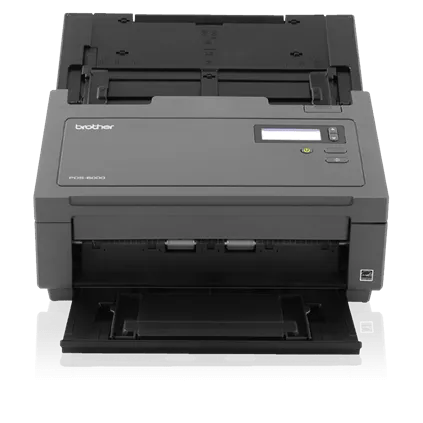
Your needs, this model
Does it fit your priorities?
What does the PDS-6000's 80 ppm duplex rating mean?
Brother lists up to 80 ppm / 160 images per minute for color or monochrome at 200 or 300 dpi, with advanced features off and Letter originals; at 600 dpi the listed duplex maximum falls to 20 ppm / 40 ipm. These are manufacturer settings-based rates, not a measured job result.
Explore this need in the finder →Is a 100-sheet load still possible with heavier paper?
Not for every stock. The PDS-6000 guide states 100 sheets at 28–80 g/m², 90 at 105 g/m², 60 at 127 g/m², 50 at 200 g/m² and 15 at 400 g/m². Match the intended stock to that exact table before treating 100 as your batch size.
Explore this need in the finder →Does the PDS-6000 include the PDS-5000F flatbed?
No flatbed route is documented for the exact PDS-6000 in its product material, brochure or PDS-5000/PDS-6000 guide. Brother's PDS-5000F/PDS-6000F is a separate flatbed family; check the suffix on an offer if bound originals matter.
Explore this need in the finder →Assessment: The Brother PDS-6000 is an earlier USB desktop scanner built around a 100-sheet ADF and one-pass duplex capture. Brother rates it at up to 80 ppm under specific settings, but its paper-weight limits, simplex-only long-page maximum and discontinued status matter as much as the headline rate. One unusual warning is especially practical: the U.S. product page's carton-content row names a PDS-5000 scanner. This is a desk-based review of published material, not a hands-on test or endorsement of a particular resale unit.
Verify the model and the package separately
Brother's U.S. product title and support key identify the model as PDS6000, and the page marks it discontinued. The model is distinct from PDS-5000, the slower version in the same feeder family, and from PDS-5000F/PDS-6000F flatbed versions. The F suffix changes the originals-handling setup; do not assume a flatbed is part of the PDS-6000.
The exact product page's carton table says “PDS-5000 Scanner,” despite identifying the page as PDS6000. That contradiction makes the table unsuitable proof of what a PDS-6000 box contains. The source material identifies the model's connection and workflow, but a discontinued listing does not confirm an individual seller's unit, accessories, warranty, condition or present availability. Ask for a photograph of the actual model label and an itemized package list; check returns and condition before committing.
ADF capacity depends on stock
Brother lists up to 100 sheets for 28–80 g/m² paper. The PDS-5000/PDS-6000 User's Guide lowers that to 90 sheets at 105 g/m², 60 at 127 g/m², 50 at 200 g/m² and 15 at 400 g/m², with business cards listed separately at up to 15. The guide advises using 20 lb (80 g/m²) stock and fanning pages before loading. This is a per-load limit, not a promise for a mixed stack or an entire day of production. It also differs from the PDS-5000F's own table, which gives a lower 70-sheet maximum at 105 g/m²; use the exact guide for the scanner's full suffix.
For cards, Brother specifies an optional A4 carrier sheet for the ADF and one-card-at-a-time handling in the manual. Thin or delicate originals may need smaller loads or a carrier sheet, and the manual warns against feeding stapled, wet, curled, folded, ripped, taped or pasted pages. The PDS-6000 documentation reviewed describes an ADF route, not a separate manual-feed inlet or flatbed for bound material.
80 ppm is a conditional rating
Brother lists up to 80 pages per minute and 160 images per minute for two-sided capture at 200 or 300 dpi, in color or monochrome. Its footnote specifies Letter pages with advanced features off; at 600 dpi, the model-qualified table drops to 20 ppm / 40 ipm. These are manufacturer ratings, not my measured results. Computer performance, document preparation, detection settings and the file workflow affect total job time.
The 236-inch (5,994 mm) maximum applies to a single sheet scanned one-sided at 200 dpi. Brother limits the listed two-sided document length to 14 inches (356 mm), so long simplex originals should not be mistaken for a long duplex mode. The 6,000-page daily maximum is not a recommended schedule: Brother says the figure compares designed durability among like products and advises choosing a rating above the intended need. It is not evidence of uninterrupted daily throughput or a tested endurance result.
USB computer capture, not a network scanner
The PDS-6000 connects over SuperSpeed USB 3.0, with USB 2.0 compatibility listed. Brother's brochure says network connectivity is absent. Its product material lists TWAIN and other driver standards, and the manual describes DS Capture and Button Manager V2. Email, FTP, network-folder and SharePoint destinations are software routes through the attached computer; they are not Wi-Fi, mobile-device scanning or a direct computer-free cloud path. Brother also lists OCR-related output, but no source reviewed here establishes recognition accuracy for a particular page or host.
The supported-OS page names Windows versions through 10 and macOS through 14.x and warns that software for gray-listed OS versions is no longer updated. The checked list does not establish compatibility with a newer operating system or a named capture app. Confirm the current PDS-6000 driver, application requirements, computer port and cable before buying an older unit.
Maintenance and comparison
Brother's brochure lists the PFK-P001 roller kit with a 200,000-page yield. That is a published replacement-part rating, not an estimate of the rollers left in a used scanner. Ask about feed history and service, and do not interpret the model's 6,000-page daily maximum as evidence of the actual unit's wear state.
Compared with the PDS-5000, the PDS-6000 is rated faster at the same 100-sheet maximum and both share a 6,000-page daily design rating; neither source establishes current reseller condition or newer-host support. Compared with the PDS-5000F, the PDS-6000 prioritizes a faster ADF path but the reviewed PDS-6000 materials do not document the F model's flatbed. Choose by the actual original types and desktop workflow, not the number alone. For feeder and duplex constraints, see the feeder and duplex guide; for host-routed destinations, see the connection guide.
Key specifications
Key details at a glance
| Scanner class | Professional desktop sheet-fed scanner |
|---|---|
| Manufacturer-listed simplex rate | 80 ppm |
| Manufacturer-listed duplex image rate | 160 ipm |
| Automatic document feeder capacity | 100 sheets |
| Optical resolution | 600 dpi |
| Connection options | USB |
| Automatic duplex capture | Yes |
| Separate manual-feed route | No |
| Touchscreen | No |
| TWAIN driver documented | Yes |
Use the exact model’s instructions for operating limits, supplied equipment and version differences.
Sources for this review
Sources for this assessment
- Brother PDS-6000 U.S. product page, model identity, status, features and package-table inconsistency
- Brother PDS-6000 U.S. support and downloads route
- Brother PDS-6000 U.S. support specification table
- Brother PDS-6000 U.S. manuals index, User's Guide version C and Setup Guide
- Brother User's Guide for PDS-5000/PDS-6000, version C
- Brother U.S. Quick Setup Guide for PDS-5000/PDS-6000, version A
- Brother PDS-6000 Professional Document Scanner brochure
- Brother PDS-6000 supported operating systems page
- Brother PDS-6000 official product-page image asset
- Brother U.S. recall notice page, screened for PDS-6000
Compare the workflow before you choose
Use the finder to test your connection, paper and software requirements against the documented scanner arrangements.