
Your needs, this model
Does it fit your priorities?
Does this refurbished listing establish a separate manual-feed path for envelopes or other special originals?
No. The identified ADS-2800W scanner has ADF, carrier-sheet and plastic-card procedures, but the inspected model guide does not establish a separate general manual-feed inlet. Do not count a carrier sheet as a second feed route.
Explore this need in the finder →Can its ADF hold 50 sheets for every kind of original?
No. Brother lists 50 sheets for the ordinary supported paper basis; the model-qualified guide narrows long-paper and card modes, and a carrier sheet uses a page. The refurbished listing names the ADS-2800W scanner, but the exact stock and loading instructions still apply.
Explore this need in the finder →What does its computer-free cloud option actually require?
After a supported Web Connect service is configured, the ADS-2800W guide documents scanner-side upload without a computer at scan time. Initial service-access/software setup requires an Internet-connected computer, and later use needs Internet access and a supported account; Brother says services may change.
Explore this need in the finder →The RADS2800W is Brother’s U.S. refurbished listing for a scanner identified in its carton contents as the ADS-2800W. This is a separate assessment of that refurbished configuration, not a claim that every seller’s unit has the same condition, accessories or warranty. Brother’s listing showed it out of stock when checked. The assessment below uses Brother’s model-specific product page and manuals; it is not a hands-on inspection or test.
What the refurbished listing establishes—and what it does not
Brother calls the RADS2800W “Refurbished” and names the scanner in the box as an ImageCenter ADS-2800W. It lists an AC adapter, USB cable, carrier sheet, Quick Setup Guide, installation DVD, a user guide accessible from the DVD, warranty and registration sheets, plus a one-year limited warranty. That is useful evidence for the exact manufacturer listing. It does not describe the refurbishment process, cosmetic grade, replaced parts, unit-level inspection, seller return terms or a serial-number-specific warranty status. Ask the actual seller to confirm those details and the box contents in writing; do not assume another used or renewed offer follows Brother’s list.
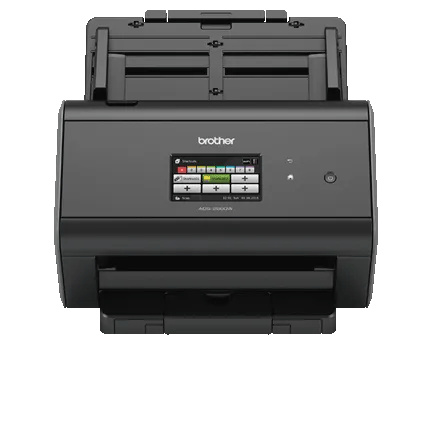
The product page’s scanner image is the same ADS-2800W body shown on Brother’s discontinued base-model page. It identifies the scanner, not an individual refurbished unit or its condition. Brother’s refurbished and base listings both showed out of stock when checked, so neither page establishes current availability.
Workgroup batches and two-sided capture
The ADS-2800W scanner inside the refurbished listing is a sheet-fed duplex design. Brother specifies a 50-sheet ADF and advertises up to 40 pages per minute, with up to 80 duplex images per minute in the detailed specifications. Those are manufacturer ratings, not results measured here. Brother’s speed qualification is based on Letter originals at 300 dpi with advanced features off; OCR, image cleanup, destination and host/network setup can all add work outside that rating.
The 50-sheet number is not a universal load promise. Brother’s U.S. support table qualifies it for 20 lb (80 g/m²) Legal paper or a stack below 5 mm; the model-applicable guide lowers the load for long-paper and special-card modes, and a carrier sheet occupies a page. Follow the exact stock and mode instructions rather than treating receipts, photos, laminated cards and ordinary office paper as one interchangeable batch. Brother lists support for plastic cards, including embossed cards, but the guide’s card mode does not turn the machine into a separate manual-feed scanner.
If you need a distinct path for occasional envelopes, folded originals or sheets carrying notes, this is a poor fit on documented evidence: the inspected ADS-2800W guide describes its ADF and special-media handling, not a general manual-feed inlet. The current-reference Brother ADS-4300N is a different workgroup trade: its review describes a larger 80-sheet ADF and a separate manual-feed mode, while this RADS2800W configuration offers built-in Wi-Fi and a touchscreen. Compare the exact route you need rather than choosing by feeder capacity alone.
Three ways to connect, with different setup requirements
The refurbished listing’s specifications identify Hi-Speed USB 2.0, wireless 802.11 b/g/n, Wi-Fi Direct and Gigabit Ethernet. For a dedicated desk, USB is the straightforward computer-attached path. For a shared office, Ethernet or Wi-Fi can support network capture; they remain different deployments, and neither guarantees that an enterprise network will allow the scanner or its cloud destinations. Check authentication, firewall and destination requirements with the network administrator before buying an older network device.
Brother lists TWAIN, WIA, ICA, ISIS and SANE drivers for the ADS-2800W family and documents TWAIN capture in its guide. The exact support route offers operating-system downloads, but a legacy driver list does not prove that a particular current computer, application build or managed workstation will work. Confirm the operating system and capture application you actually use; do not rely on an old included DVD as a current software source.
Brother iPrint&Scan is listed for mobile-device use, with wireless networking required. The model-specific user-guide index separately links the ADS-2800W to iPrint&Scan guides. Treat that as documented capability, not a guarantee for every present-day phone, app version or mobile workflow.
Touchscreen destinations and the Web Connect caveat
The 3.7-inch color touchscreen and 48 programmable shortcut buttons are the strongest workflow distinction from simpler host-only units. Brother documents shortcuts for scan profiles and network destinations. Its Web Connect guide also describes uploading from the scanner without a computer at scan time, after setup: initial service access and the full software/driver setup require an Internet-connected computer, and later use still depends on Internet access and a supported service account. Brother warns that services may change or require additional purchase. Confirm the named destination and account route before treating computer-free upload as essential.
Network folders, FTP/SFTP, SharePoint and USB flash storage appear among the documented destinations, but each has its own setup requirements. A USB cable to a computer and a scan to a USB flash drive are not the same workflow; Brother does not list a flash drive in the refurbished carton contents.
Who should consider it
On paper, the RADS2800W fits a small workgroup that needs automatic duplex scanning, a 50-sheet load, wired or wireless sharing, touchscreen profiles and model-specific mobile or configured Web Connect routes—and is willing to verify the refurbished unit and older software path. It is a weaker choice if you need documented separate manual feeding, a larger feeder, a guaranteed current cloud service, or a low-effort purchase with a fully specified unit condition. The base ADS-2800W and RADS2800W share the documented scanner hardware, but their identities and acquisition terms are not interchangeable: this review retains the manufacturer-refurbished listing and its package/warranty evidence separately. Before purchase, verify condition, serial/warranty coverage, included items, return policy, current drivers, and the exact host, network and destination you plan to use.
Key specifications
Key details at a glance
| Scanner class | Professional desktop sheet-fed scanner |
|---|---|
| Manufacturer-listed simplex rate | 40 ppm |
| Manufacturer-listed duplex image rate | 80 ipm |
| Automatic document feeder capacity | 50 sheets |
| Optical resolution | 600 dpi |
| Connection options | USB / Wi-Fi / Wi-Fi Direct / Ethernet |
| Automatic duplex capture | Yes |
| Separate manual-feed route | No |
| Touchscreen | Yes |
| TWAIN driver documented | Yes |
Use the exact model’s instructions for operating limits, supplied equipment and version differences.
Sources for this review
Sources for this assessment
- Brother U.S. RADS2800W refurbished product page
- Brother U.S. RADS2800W product-support route
- Brother image linked from RADS2800W refurbished listing
- Brother ADS2800W U.S. product page
- Brother U.S. ADS-2800W support specifications
- Brother U.S. ADS-2800W manuals index
- Brother ADS-2400N / ADS-2800W / ADS-3000N / ADS-3600W User's Guide
- Brother Web Connect Guide for ADS-2800W / ADS-3600W
- Brother ADS-2400N / ADS-2800W / ADS-3000N / ADS-3600W Network User's Guide
- Brother U.S. ADS-2800W downloads and current operating-system selectors
Compare the workflow before you choose
Use the finder to test your connection, paper and software requirements against the documented scanner arrangements.