
Your needs, this model
Does it fit your priorities?
What does the DR-C225 II's 45-sheet feeder rating mean for my loading routine?
Canon specifies up to 45 sheets per ADF load. Its separate suggested daily-volume statements are manufacturer guidance, not an endurance test; paper weight and path instructions still govern an actual stack. If 40 sheets meets your minimum and you are considering earlier models, this profile can qualify; 50 sheets excludes it.
Explore this need in the finder →Can the DR-C225 II scan both sides to a USB-connected computer?
Canon lists USB 2.0 and automatic duplex up to 25 pages/50 images per minute at its stated conditions, with desktop CaptureOnTouch. Check the current host software and actual application; the rate is not an independently timed file workflow.
Explore this need in the finder →Does the DR-C225 II have a TWAIN route for capture software?
Canon lists Windows ISIS/TWAIN and Mac TWAIN for this exact model. Verify the current driver, host version and capture application's required interface; a listing does not guarantee every TWAIN integration.
Explore this need in the finder →Can I count the DR-C225 II as satisfying a separate manual-feed requirement?
Not on the evidence available here. Canon labels feeding 'Automatic or Manual', but the exact guide file was unavailable and the remaining sources do not define a separate special-original feed procedure. Keep it unconfirmed until the current manual supports your original type.
Explore this need in the finder →A small desk footprint built around the paper path
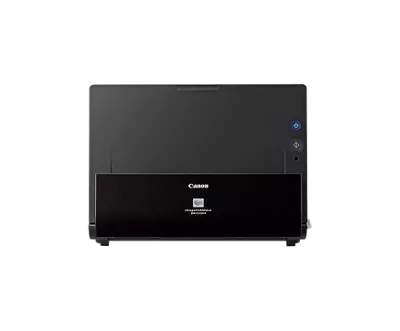
The DR-C225 II is an earlier-listed Canon office feeder with a distinctive upright J-path. Instead of projecting a long input and output tray into the desk, its normal route moves a sheet around the scanner body and returns it at the front. That layout can be useful on a reception counter or a narrow work surface where a protruding tray is awkward. Canon's closed-tray dimensions are 8.7 by 11.8 by 6.1 inches, and the unit weighs 5.95 pounds. Those are machine dimensions, not the clearance needed to open and operate it; check the real shelf depth, cable exit and route for the originals you intend to feed.
Forty-five sheets is its important boundary
Canon rates the automatic feeder for up to 45 sheets. That makes the C225 II a different loading proposition from the newer DR-C340 and DR-C350, each listed with a 100-sheet ADF. A 45-sheet maximum can be enough for a small recurring batch, but it means loading more often than a larger feeder when work arrives in thick stacks. The actual count depends on the permitted stock and loading instructions; it should not be treated as a guarantee for every paper weight or a daily workload figure.
Automatic duplex is documented, with a rated maximum of 25 pages per minute simplex or 50 images per minute duplex. Canon's model data ties those rates to defined test conditions such as A4 paper, portrait feed and 200 dpi. They are useful as manufacturer comparisons, not an independent scan-to-file test. Canon's U.S. support table says approximately 1,500 suggested daily scans, while its global datasheet gives a suggested 1,000–2,500 range. Neither statement is an endurance test or a promise that every batch will run at the headline speed.
Use the right path for the original
The compact J-path is not the only documented route. Canon lists a straight-through path for different sizes and stock weights, including Folio mode up to 11 by 17 inches and long-document mode up to 118.1 inches. The U.S. specification table gives different stock ranges for the U-turn and straight-through paths: a heavier original allowed in the straight path is not automatically allowed in the ordinary U-turn path. Canon also lists plastic and embossed-card support, but the exact DR-C225 II user-guide tile was unavailable when checked, so consult current instructions for card shape, thickness, orientation and path before feeding a valuable original.
One detail deserves extra caution: Canon labels the document-feeding specification “automatic or manual,” but the accessible model sources do not explain a separate manual-feed procedure for special originals. A selectable straight-through paper path is not enough to establish every manual-feed use. If a separate feed route is essential for envelopes, folded sheets or cards, treat that requirement as unconfirmed until the exact current guide spells out the routine.
USB and TWAIN keep the workflow computer-centered
The reviewed U.S. configuration lists USB 2.0 and desktop CaptureOnTouch software. Canon's exact support information lists ISIS/TWAIN for Windows and TWAIN for Mac. That combination is relevant when a computer or capture application owns the scan. A driver listing still does not promise compatibility with every operating system version or every TWAIN application, and Canon's posted host table includes older Windows, Server and Mac versions. Confirm a current driver for the actual computer and ask the software owner to verify its required interface.
Canon describes saving scans to cloud destinations through CaptureOnTouch, but that is a computer-mediated route: the documentation reviewed here does not establish Wi-Fi, a mobile scan path or scanner-side cloud delivery without a computer. Its physical side buttons and one-touch start are also a simpler interface than a profile touchscreen. If wireless placement, phone scanning, direct cloud operation or on-device profile selection is a hard requirement, this is the wrong configuration to assume will meet it.
Compare capacity before choosing a Canon suffix
The DR-C225 II belongs in an earlier-model search, not as a substitute for the DR-C340 or DR-C350. All three have a USB-connected duplex route and a listed TWAIN driver, but the C225 II is rated at 25 ppm/50 ipm with a 45-sheet feeder. Canon lists 40/80 for the C340 and 50/100 for the C350, each with 100 sheets. A faster rating or larger ADF may matter for repeated office batches; the C225 II's vertical path may matter more where the counter is shallow. These comparisons use published specifications, not timed performance.
If a flatbed is part of the plan, verify the exact accessory rather than reading “optional” as included. Canon's U.S. support table names Flatbed Scanner Units 102 and 201, while the global datasheet refers to 102 and 202. The unit is not part of this base scanner profile, and the source materials do not resolve that accessory-number difference for every market/package.
Check the actual unit and its software before buying
Canon's U.S. product page identifies the retail listing as DR-C225II but displays both an in-stock label and discontinued/no-longer-available language. I treat that as an earlier model with unresolved offer status, not as proof of present stock, price or a particular seller. Its product page lists a USB cable, AC adapter, power cable and setup disc; Canon's global datasheet describes revised packaging without a setup disc. Ask what is in the exact carton and verify the software and warranty terms, especially for an older or third-party offer.
Overall, the DR-C225 II is a plausible research-based fit when the job is USB desktop capture, automatic duplex and batches that stay within a 45-sheet load. Its compact vertical paper route and listed TWAIN path give it a clear role, but its older host information, unresolved manual-feed details, smaller capacity and conflicting availability text are meaningful caveats. Compare those limits with the newer 100-sheet C340/C350 profiles, then verify the exact model suffix, software, path instructions and seller package before relying on it for a records workflow.
Key specifications
Key details at a glance
| Scanner class | Desktop sheet fed office |
|---|---|
| Manufacturer-listed simplex rate | 25 ppm |
| Manufacturer-listed duplex image rate | 50 ipm |
| Automatic document feeder capacity | 45 sheets |
| Optical resolution | 600 dpi |
| Connection options | USB |
| Automatic duplex capture | Yes |
| Touchscreen | No |
| TWAIN driver documented | Yes |
Use the exact model’s instructions for operating limits, supplied equipment and version differences.
Sources for this review
Sources for this assessment
Compare the workflow before you choose
Use the finder to test your connection, paper and software requirements against the documented scanner arrangements.