
Your needs, this model
Does it fit your priorities?
What does the C340's 100-sheet feeder rating mean for my loading routine?
Canon specifies up to 100 sheets per ADF load and single-pass duplex capture. Its 7,000 suggested daily-volume figure is a speed-and-assumed-use calculation, not an endurance test; follow the current media loading instructions for the actual stack.
Explore this need in the finder →Can it capture both sides from a USB-connected office computer?
Yes. Canon lists USB 2.0 Type-C and duplex capture in a single pass. The supported operating arrangement is workstation-centered; speed figures are manufacturer ratings, not a scan-to-file test.
Explore this need in the finder →What if my capture program specifically requires TWAIN?
Canon lists an ISIS/TWAIN driver for the DR-C340. Confirm the current driver, supported host OS and target application's exact interface/version before relying on it in a production workflow.
Explore this need in the finder →The Canon imageFORMULA DR-C340 is a USB-attached office feeder, not a wireless desk hub. Canon U.S.A.'s product page identifies the reviewed base scanner as SKU 7291C002; its linked four-page brochure repeats that item number. The gallery asset name adds “AA,” but that image filename is not a different package or seller SKU. Canon lists compatible Flatbed Scanner Units 102 and 202 separately, so this assessment does not treat either accessory as part of the base scanner.
A full-size feeder with a clear ceiling
The DR-C340 is rated for up to 100 sheets in its automatic document feeder and captures both sides in one pass. Canon publishes a maximum of 40 pages per minute simplex and 80 images per minute duplex. Its footnote defines the speed example as letter-size sheets, 200 dpi and portrait feeding direction; the company says the figures come from internal testing and that computer performance, software, warm-up and other restrictions affect actual processing. They are not independent measurements or a prediction of how quickly a particular searchable-PDF job will finish.
The 100-sheet figure describes one ADF loading, not a daily workload. Canon's suggested daily volume is 7,000 scans, but the exact-model footnote says that figure is calculated from scan speed and assumed daily use. Canon explicitly says the rating is not a guarantee of hardware durability. For a file room or small office moving batches through a desktop application, the stated feeder size and double-sided route are meaningful planning data; the number alone does not prove that every mixed paper stack should be loaded to the maximum.
Canon specifies regular originals from 2 to 8.5 inches wide and 2.1 to 14 inches long, plus a long-document mode up to 240 inches. The product page and brochure describe thick, thin, long or oversized documents, plastic or embossed cards, and passport capture; depending on the passport's condition, Canon says a passport carrier sheet may still be needed to prevent damage. Those are not blanket permissions for every stock or folded original. The listed document-weight range is 7.2 to 110 lb bond, and the shared C340/C350/C360 manual was listed but unavailable when checked. Verify current loading and carrier-sheet instructions for the media that matters to your workflow.
Desktop software, with the computer in the loop
Canon lists CaptureOnTouch Pro, a DR Scanner Management Tool and an ISIS/TWAIN driver for the U.S. DR-C340. The brochure describes CaptureOnTouch job setup, one-touch selections and scan output to selected destinations. That is useful when the host computer and its capture application are part of the plan; the driver names do not promise that every document-management product, OS update or security policy will work without checking its version requirements. Canon's U.S. product page lists Windows 10 (64-bit), Windows 11, Windows Server 2022 and 2025, and macOS 13, 14 and 15. Confirm the exact download and application support before standardizing a fleet.
The interface is USB 2.0 Type-C. Canon describes cloud destinations through CaptureOnTouch and says use of a third-party cloud service requires a subscription under that provider's terms. That is a computer-side software route, not a scanner that joins Wi-Fi and sends files independently. No mobile-device scanning route is documented for this reviewed configuration. If the requirement is phone capture, computer-free cloud, Ethernet or simultaneous network sharing, this is not a supported match on the reviewed evidence.
Buttons, footprint and special-original limits
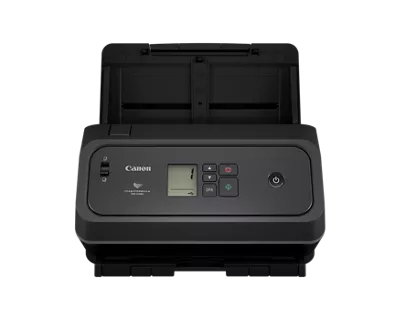
The panel is a monochrome LCD with physical buttons and icons, rather than a touchscreen for profile selection. Canon also describes a one-touch double-feed-release control and processing tools such as blank-page skipping, deskew and text enhancement. The product page gives closed dimensions of 8.6 inches high by 11.2 inches wide by 8.8 inches deep and a weight of 7.05 pounds. Those dimensions are for the trays closed; the available listing does not establish the working clearance needed with both input and output paths open. A three-year limited warranty is listed for the scanner, while consumables such as rollers are excluded from that warranty language.
There is an important distinction between the specification table's phrase “Automatic or Manual” feeding and a confirmed separate special-original route. The model page and brochure do not explain the manual procedure or define its allowed originals, and Canon's shared manual download reported that the file was unavailable. This assessment therefore leaves the finder's manual-feed requirement unconfirmed rather than assuming that hand-placing a page or scanning a card proves the special-feed option. Ask for the current instructions if a passport, embossed card or delicate original is central to the purchase.
When the C340 makes more sense than the C350
The paired DR-C350 uses the same stated 100-sheet capacity, USB Type-C connection, closed dimensions, weight and broad paper-size range. Its rated maximum is higher: 50 ppm / 100 ipm rather than the C340's 40 / 80, and its suggested daily volume is 8,000 rather than 7,000. Both models' volume figures are manufacturer calculations, not endurance tests; the C350's larger printed numbers do not establish that it will finish an individual office job proportionally faster. The C340 is the lower-rated-speed configuration for a buyer whose required operating plan is USB, duplex and a 100-sheet ADF—not a different network or paper-handling class.
The U.S. product page is internally inconsistent: it shows an “In Stock” label alongside “Discontinued” and “no longer available.” Canon's dated U.S. announcement says the C340 and C350 were introduced and available through authorized Canon partners, but that statement does not settle today's exact-SKU offer. This review keeps the DR-C340 as a current-reference profile and makes no claim about present stock, seller, price or warranty transfer. Match 7291C002, confirm the carton and included software, verify host/app support and media instructions, and resolve an exact offer before ordering. This is a source-based assessment of published information, not hands-on use or independent testing.
Key specifications
Key details at a glance
| Scanner class | Desktop sheet fed office |
|---|---|
| Manufacturer-listed simplex rate | 40 ppm |
| Manufacturer-listed duplex image rate | 80 ipm |
| Automatic document feeder capacity | 100 sheets |
| Optical resolution | 600 dpi |
| Connection options | USB |
| Automatic duplex capture | Yes |
| Touchscreen | No |
| TWAIN driver documented | Yes |
Use the exact model’s instructions for operating limits, supplied equipment and version differences.
Sources for this review
Sources for this assessment
- Canon U.S.A.: imageFORMULA DR-C340 Office Document Scanner
- Canon U.S.A. support: imageFORMULA DR-C340 Office Document Scanner
- Canon imageFORMULA DR-C340 Office Document Scanner brochure
- Canon U.S.A. announces imageFORMULA DR-C350 and DR-C340 office document scanners
- Canon U.S.A.: Document Scanners office-deals catalogue
Compare the workflow before you choose
Use the finder to test your connection, paper and software requirements against the documented scanner arrangements.