
Your needs, this model
Does it fit your priorities?
What does the C350's 100-sheet feeder rating mean for my loading routine?
Canon specifies up to 100 sheets per ADF load and single-pass duplex capture. Its 8,000 suggested daily-volume figure is a speed-and-assumed-use calculation, not an endurance test; follow the current media loading instructions for the actual stack.
Explore this need in the finder →Can it capture both sides from a USB-connected office computer?
Yes. Canon lists USB 2.0 Type-C and duplex capture in a single pass. The supported operating arrangement is workstation-centered; speed figures are manufacturer ratings, not a scan-to-file test.
Explore this need in the finder →What if my capture program specifically requires TWAIN?
Canon lists an ISIS/TWAIN driver for the DR-C350. Confirm the current driver, supported host OS and target application's exact interface/version before relying on it in a production workflow.
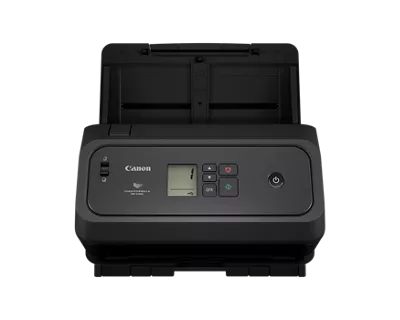
Explore this need in the finder →The Canon imageFORMULA DR-C350 is the faster sibling in Canon's compact, USB-connected office-feeder pair. The U.S. product page labels the reviewed base configuration SKU 7290C002, and the matching model brochure names the same item number. Canon's gallery filename uses a longer “AA” image identifier; it is not a second version of the retail package. A compatible flatbed scanner unit is shown as a separate accessory, not included in this base configuration.
The useful difference is rated throughput
Like the DR-C340, the C350 has a 100-sheet ADF and single-pass duplex capture. Canon rates the C350 at up to 50 pages per minute simplex and 100 images per minute duplex, compared with the C340's 40 ppm and 80 ipm. The C350 is therefore the model to consider when its higher published ceiling matters to a USB-based batch workflow. Canon's footnote qualifies those examples: letter-size originals, 200 dpi, portrait feed, typical settings, with speed based on internal testing. The company warns that actual processing varies with the host computer, application and warm-up time. These are manufacturer specifications—not an independent scan-to-file test or guaranteed end-to-end job rate.
Canon gives the C350 a suggested daily volume of 8,000 scans, versus 7,000 for the C340. Those are calculated planning figures based on scan speed and assumed daily hours, not a rated durability promise. Neither number is a substitute for an actual site's batch profile, document mix and maintenance plan. A 100-sheet maximum means one loading under the manufacturer's permitted media conditions; it does not promise that all paper weights can use that full stack without adjustment.
The listed ordinary document range is 2 to 8.5 inches wide and 2.1 to 14 inches long, with a long-document mode up to 240 inches. Canon describes mixed-size batches, plastic and embossed cards, and passport capture, including some passports without a carrier sheet. Its caution is practical: depending on the passport's condition, the sheet may be necessary to avoid damage. The official product page and brochure give a 7.2–110 lb bond range, but the combined user manual for C340/C350/C360 was unavailable in the support page's download control. Check the current handling instructions for fragile or unusually thick originals rather than extrapolating from the headline range.
What the included desktop path does—and does not—mean
The C350 connects by USB 2.0 Type-C. Canon lists CaptureOnTouch Pro, the DR Scanner Management Tool, ISIS/TWAIN drivers and a Readiris PDF license in the U.S. package information. Those pieces support a workstation-centered workflow; they do not establish app compatibility for every software version. If a records-management, accounting or imaging program requires TWAIN or ISIS, check the named driver, host OS and application build together before deployment. Canon lists Windows 10 (64-bit), Windows 11, Windows Server 2022 and 2025, and macOS 13, 14 and 15 for this configuration.
Cloud delivery is described through CaptureOnTouch and a third-party service subscription. The scanner's listed interface remains USB; no Wi-Fi or Ethernet scanner plan, phone/tablet scanning route or computer-free cloud route is established here. A connected computer may use cloud destinations, but that is not the same as a standalone network scanner. The small control panel is a monochrome LCD with physical buttons and icons, not a color touchscreen profile station.
Fit, footprint and cautions for recurring use
The C350's published closed dimensions are 8.6 inches high, 11.2 inches wide and 8.8 inches deep; Canon lists its weight as 7.05 pounds. Closed dimensions help judge a shelf or compact desk, but they do not show the clearance needed to open the feeder and receive pages. Canon describes processing features such as deskew, auto color and page-size detection, text enhancement, blank-page skipping and double-feed detection, including a physical control that can release a detected overlap. Those are feature descriptions, not evidence that every batch will feed perfectly or that image processing meets a particular records standard.
Canon's technical table says “Automatic or Manual” feeding, yet the exact accessible sources do not show how to use a separate manual path or which special originals it supports. Because the shared manual download was marked unavailable, this guide does not count the phrase as proof of the finder's manual-feed requirement. Canon lists a three-year limited warranty, with feed rollers and similar consumables excluded from its warranty language. Check the seller's exact warranty documentation and roller replacement path.
Choosing between the C350 and C340
Choose by the documented difference rather than a broad family label: C350 is rated for 50 ppm / 100 ipm and 8,000 suggested daily scans; C340 is rated for 40 ppm / 80 ipm and 7,000 suggested daily scans. Both have the same 100-sheet loading ceiling, USB connection, duplex route and body dimensions in the U.S. listings. If the lower published maximum is enough, the C340 retains the same basic paper and connection plan. If a higher rated ceiling is worth checking in your own software and host environment, the C350 is the corresponding option. The speed delta is conditional on Canon's test footnote, not a guarantee about a given searchable PDF, mixed-stock run or network destination.
Finally, Canon's exact U.S. product page shows contradictory status text: “In Stock” appears next to “Discontinued” and “no longer available.” Canon's dated U.S. announcement introduced the pair as available through authorized partners, but that does not establish a current offer. This review retains the C350 as a current-reference profile without asserting live stock, price or seller status. Verify the exact 7290C002 SKU, included Readiris license key, service terms, host compatibility and paper instructions against the offer in front of you. This assessment is based on official published material, not ownership, hands-on testing or independent speed measurement.
Key specifications
Key details at a glance
| Scanner class | Desktop sheet fed office |
|---|---|
| Manufacturer-listed simplex rate | 50 ppm |
| Manufacturer-listed duplex image rate | 100 ipm |
| Automatic document feeder capacity | 100 sheets |
| Optical resolution | 600 dpi |
| Connection options | USB |
| Automatic duplex capture | Yes |
| Touchscreen | No |
| TWAIN driver documented | Yes |
Use the exact model’s instructions for operating limits, supplied equipment and version differences.
Sources for this review
Sources for this assessment
- Canon U.S.A.: imageFORMULA DR-C350 Office Document Scanner
- Canon U.S.A. support: imageFORMULA DR-C350 Office Document Scanner
- Canon imageFORMULA DR-C350 Office Document Scanner brochure
- Canon U.S.A. announces imageFORMULA DR-C350 and DR-C340 office document scanners
- Canon U.S.A.: Document Scanners office-deals catalogue
Compare the workflow before you choose
Use the finder to test your connection, paper and software requirements against the documented scanner arrangements.