
Your needs, this model
Does it fit your priorities?
Can I load a larger stack and scan both sides automatically?
Canon rates the DR-C360 for up to 100 ADF sheets and single-pass duplex capture, with maximums of 60 ppm and 120 images per minute under its stated letter/200-dpi/portrait conditions. Those are manufacturer figures, not an end-to-end scan-and-save test; check the manual for your paper stock and do not treat the 13,000 suggested daily figure as a measured duty cycle.
Explore this need in the finder →Can my document system call a TWAIN or ISIS driver?
Canon lists an ISIS/TWAIN driver with the DR-C360. Confirm the current OS-specific driver and your application's supported interface/version before building a workflow around it; a driver label does not certify every records application.
Explore this need in the finder →Can it send scans to cloud storage without a computer?
No computer-free route is established. Canon describes CaptureOnTouch cloud destinations from a connected computer and says a third-party service subscription is required. USB connection and desktop cloud software do not equal a stand-alone network scanner.
Explore this need in the finder →Does its LCD count as touchscreen profile selection or prove a manual-feed mode?
Canon describes an icon-based monochrome LCD with physical buttons, not touchscreen profile selection. Its specification table says automatic or manual feeding, but the shared manual is unavailable and the other exact-model sources do not define a special manual-feed procedure, so verify the intended original type before relying on that mode.
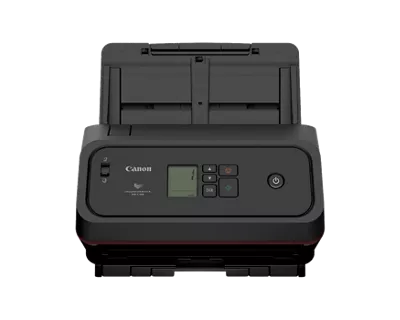
Explore this need in the finder →The imageFORMULA DR-C360 is Canon’s recently introduced office feeder for a computer-centered document workflow. Canon’s four-page U.S. brochure identifies the base scanner as item 7629C002; this assessment does not treat the “7629C002AA” gallery filename as a separate retail SKU. It is a single-pass duplex automatic document feeder with USB 2.0 Type-C and bundled desktop software. The product page also lists optional Flatbed Scanner Units 102 and 202, but neither is part of the reviewed base configuration.
A 100-sheet desktop routine, with an important caveat
Canon specifies a feeder capacity of up to 100 sheets. That is useful when a regular workday involves repeated, moderate stacks rather than feeding every page by hand. Duplex capture can collect both sides as one pass, and Canon rates the DR-C360 up to 60 pages per minute simplex or 120 images per minute duplex in black-and-white, grayscale and color. The footnote matters: those are manufacturer ratings at typical settings on letter pages at 200 dpi in portrait direction; the company says actual speed varies with the computer, application and warm-up time. They are not a measured scan-to-folder or OCR workflow.
Canon also publishes a suggested daily volume of 13,000 scans, but footnotes that number as a calculation from speed and assumed daily use. It is not an independent endurance test, a promise that a mixed batch will run unattended, or a substitute for proper consumable and loading guidance. The combined C340/C350/C360 user manual is listed on Canon’s support page, dated September 21, 2026, but its file control reported that the document was unavailable during review. Check the current instructions for your paper weight, stack condition and maintenance plan before treating the maximum ADF number as a routine load.
Good software hooks, but still attached to a computer
The C360’s appeal is not only feeder capacity. Canon lists its CaptureOnTouch software, DR Scanner Management Tool and ISIS/TWAIN drivers, along with Readiris PDF and Tungsten VRS Elite. That gives an office several possible desktop routes: use Canon’s capture software for profiles and file delivery, or validate the TWAIN/ISIS path with a records or imaging application. “Driver included” does not certify every app build, security policy or operating-system version. Canon’s support page lists Windows 11, Windows Server 2022/2025 and macOS 14, 15 and 26; an IT owner should check the live downloads and software-license terms for the actual workstation.
Connectivity is narrower than the software list can make it sound. The reviewed U.S. configuration is USB 2.0 Type-C, not a Wi-Fi or Ethernet scanner. Canon describes delivery to third-party cloud services through computer-side CaptureOnTouch and notes that a third-party subscription is required. This is not a direct scanner-to-cloud route without a computer, and no phone/tablet scanning arrangement is documented. Canon specifies an icon-based monochrome LCD with physical buttons; it is not a color touchscreen profile station.
Special originals need a manual check
Canon describes broad media handling, including plastic and embossed cards, long or oversized documents, and passports that may not require a carrier sheet. The caveat is explicit: depending on a passport’s condition, the carrier sheet may be needed to protect it. The long-document mode reaches 240 inches, distinct from the ordinary 2.1-to-14-inch page length. But Canon’s product/support pages and brochure disagree about supported document weight, and the page and brochure also disagree on closed depth. The exact manual was not available to settle either conflict.
The specification tables say “Automatic or Manual” feeding. That wording alone does not tell a buyer how the manual path works or which special originals may be fed that way, so this assessment does not treat manual feed as a confirmed must-have. Ask Canon or the seller for the current manual if a passport, embossed card, unusually thin original, exact desk clearance or specialty application is central to the purchase.
Where the C360 fits among office scanners
Canon describes the DR-C360 as the successor to the DR-M160II and says the change raises the feeder from 60 to 100 sheets and the long-document maximum to 240 inches. Those are manufacturer comparisons, not a head-to-head test; the older DR-M160II remains separately unresolved in this catalogue work. The newer C360 should be assessed as an attached-computer office model with a high stated per-load capacity, duplex and enterprise driver options—not as a portable, wireless or standalone cloud appliance.
Canon’s U.S. September 23, 2026 announcement says the model is available through authorized partners, yet the exact shop page simultaneously displays “Out Of Stock,” “Discontinued” and “no longer available.” This review keeps the conflict visible and makes no claim about present stock, price or the state of a particular reseller offer. Match item 7629C002, confirm what is in the seller’s carton, verify current host support and cloud-service terms, and resolve the depth and media-weight discrepancy before buying for a tight installation. This is a source-based comparison of Canon’s published information, not hands-on use or independent testing.
Key specifications
Key details at a glance
| Scanner class | Desktop sheet fed office |
|---|---|
| Manufacturer-listed simplex rate | 60 ppm |
| Manufacturer-listed duplex image rate | 120 ipm |
| Automatic document feeder capacity | 100 sheets |
| Optical resolution | 600 dpi |
| Connection options | USB |
| Automatic duplex capture | Yes |
| Touchscreen | No |
| TWAIN driver documented | Yes |
Use the exact model’s instructions for operating limits, supplied equipment and version differences.
Sources for this review
Sources for this assessment
Compare the workflow before you choose
Use the finder to test your connection, paper and software requirements against the documented scanner arrangements.