
Your needs, this model
Does it fit your priorities?
What does the DR-G2090 offer for a large production batch?
Canon specifies a 300-sheet ADF and single-pass duplex capture at up to 90 ppm/180 ipm. The speed is a manufacturer maximum under stated conditions, while 30,000 pages is only Canon's calculated suggested daily volume; neither number describes an independent endurance test.
Explore this need in the finder →Can the DR-G2090 join a wired office network or scan directly to a phone?
No such path is documented for this SKU. Canon's shared manual lists DR-G2090 as USB-only with no LAN connector; it needs a compatible computer for the documented capture workflow. The Wi-Fi/mobile and network features of other models are not transferable.
Explore this need in the finder →Does DR-G2090 manual feed mean I can put any special original through it?
No. The manual describes driver/panel-selected manual and continuous-manual modes, with their own stock and feeding limits. The ADF's 300-sheet load and 118.1-inch long-document limit do not authorize every heavy, delicate, folded or unusually long item; check the exact manual and separately identify any flatbed accessory.
Explore this need in the finder →A production feeder, not a networked office all-rounder
The Canon imageFORMULA DR-G2090 USB is a discontinued U.S. production scanner built around large batches at one workstation. Its defining limitation is right in the model name: Canon documents USB-only connectivity for this configuration, not Ethernet or Wi-Fi. The exact U.S. listing identifies store SKU DR-G2090 and says the product is discontinued and no longer available, so this assessment treats it as an earlier model rather than a current offer. The network-equipped DR-G2110 and DR-G2140, and their separate USB variants, are distinct entries; their interfaces and capacities should not be assumed for the G2090. See Canon's exact U.S. product page and the shared G-series user manual for the model-specific boundaries.
Large batches, with a ceiling below its G-series siblings
Canon specifies a 300-sheet ADF for the DR-G2090, single-pass duplex scanning and maximum rated speeds up to 90 pages per minute or 180 images per minute in color and black-and-white/grayscale. These are manufacturer's figures, not an independent timed job test. Canon's qualification notes describe typical settings, letter-size sheets, landscape feed direction and resolution up to 300 dpi; actual processing also depends on the computer and application. A long job's file handling, inspection and exception cleanup still matter beyond the rated feed rate.
Do not read “300 sheets” as a daily-duty rating. Canon separately lists 30,000 as a suggested daily volume, and its note says that estimate is calculated from scanning speed and an assumed daily time. It is not a measured endurance result or guarantee that every mixture of stock can be loaded to the tray's maximum. The manual states that the DR-G2090 is limited to a 300-sheet tray setting; the 500-sheet setting listed for other models in the same manual is explicitly unavailable here. That distinction matters when considering a used G2090 against the faster, higher-capacity G2110/G2140 family.
Paper range is broad, but feed mode and length matter
The U.S. specifications list document widths from 2 to 12 inches and ordinary lengths from 2.8 to 17 inches, with a Long Document Mode up to 118.1 inches. The shared manual excludes the G2090 from the 5,588 mm/220-inch mode supported by other models; longer pages can also slow operation and restrict some scan modes.
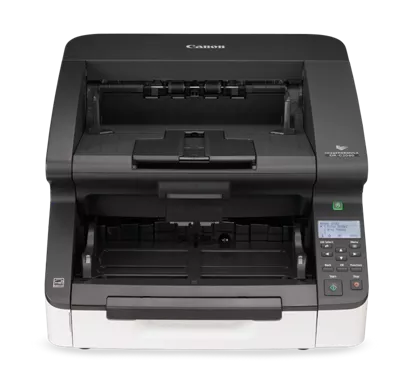
There are automatic, manual and continuous-manual feeding operations. Manual feed is an alternate setting, not a second physical tray: it changes how the transport handles an individual original and has its own material limits. This can be useful for supported special documents, but it does not make a fragile, folded, unusually thick or irreplaceable original safe to feed without checking the model's exact instructions. Canon also lists compatible Flatbed Scanner Units 102 and 201. Those are separate accessories, not part of the base configuration, and the product photo shows the scanner alone.
USB-only has real workflow consequences
The manual identifies DR-G2090 as the model without a LAN connector; its documented host path is USB. That is a sensible distinction for a dedicated, locally attached capture station, but it rules out placing this SKU directly on a shared wired network. Nor do the reviewed Canon sources establish scanning from a phone, a Wi-Fi connection or a scanner-to-cloud route without a computer. A computer can of course transfer resulting files onward through its own software, but that is not the same as a network destination built into the scanner.
Canon lists ISIS/TWAIN and CaptureOnTouch software for the model. The U.S. product page's host list names Windows 8.1 and Windows 10 plus several older Windows Server releases. Canon's support interface now presents Windows 10 and 11 selectors, but the browser view did not show a model-specific compatibility mark; that is not sufficient evidence of current Windows 11 support. Check the exact driver download, target TWAIN/ISIS application and license availability before buying a used unit. The page does not establish a supported macOS or Linux workflow for this U.S. SKU.
It is a substantial machine, with a date-sensitive support question
The scanner weighs 55.1 pounds and measures about 18.9 inches wide by 12.4 inches high by 22.4 inches deep with trays closed. Canon's shared manual gives a larger footprint with extensions open, so a closed-body photo is not an installation-clearance diagram. This belongs on a stable production work surface, with access to feed and output trays and room to maintain the transport. Its heft and USB tether make it a poor match for a shared counter where operators expect wireless starts or network delivery.
Canon's brochure describes onboard processing, double-feed detection and programmable jobs; these design claims do not replace matching the actual host and paper workflow. The U.S. page lists EPEAT Gold, TAA compliance and a limited warranty statement, but a discontinued unit's condition, service coverage, included cables and software can differ by seller and serial history. No current price, stock, refurbishment grade or transferable support term is established here.
Who should keep it on a shortlist?
The DR-G2090 makes sense to investigate only if a high-capacity USB production station is the intended workflow, the 300-sheet limit and 118-inch long-document ceiling are sufficient, and current driver compatibility can be confirmed for the exact host. Automatic duplex, manual-feed modes and Canon's published maximum rates support that narrow fit. If network access is essential, compare the network-equipped G-series variants instead of assuming a USB model can be upgraded. If installed flatbed capability is required, budget and verify the separate unit rather than counting it as included.
For a new purchase, start by confirming the precise DR-G2090 identity, seller's condition and return terms, included setup media/cables, tested feed path, driver version and service coverage in writing. Because Canon marks this exact SKU discontinued, the remaining availability is a seller-specific question, not something this review can certify. This is a research-based fit assessment from Canon's U.S. listing, brochure and operating manual; it is not a report of hands-on use or measured performance.
Key specifications
Key details at a glance
| Scanner class | Professional production sheet-fed scanner |
|---|---|
| Manufacturer-listed simplex rate | 90 ppm |
| Manufacturer-listed duplex image rate | 180 ipm |
| Automatic document feeder capacity | 300 sheets |
| Optical resolution | 600 dpi |
| Connection options | USB |
| Automatic duplex capture | Yes |
| Separate manual-feed route | Yes |
| Touchscreen | No |
| TWAIN driver documented | Yes |
Use the exact model’s instructions for operating limits, supplied equipment and version differences.
Sources for this review
Sources for this assessment
- Canon U.S.A.: unfiltered Production Scanners catalogue
- Canon U.S.A.: imageFORMULA DR-G2090 USB Production Document Scanner
- Canon Support: imageFORMULA DR-G2090 USB Production Document Scanner
- Canon imageFORMULA DR-G2140/DR-G2110/DR-G2090 User Manual (English)
- Canon U.S.A.: imageFORMULA DR-G2090 USB Document Scanner brochure
- Canon U.S.A.: official DR-G2090 product-page image
Compare the workflow before you choose
Use the finder to test your connection, paper and software requirements against the documented scanner arrangements.