
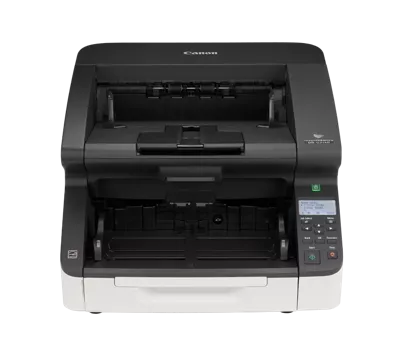
Your needs, this model
Does it fit your priorities?
Is the faster G2140 USB-only?
No. Canon lists this exact DR-G2140 as USB and wired Ethernet; the separate DR-G2140USB is the USB-only variant. Both are rated at 140 ppm / 280 ipm, so the meaningful difference between their cards is the documented connection configuration, not the speed tier.
Explore this need in the finder →What paper capacity can I rely on for this exact model?
Canon lists a 500-sheet ADF, but this capacity is stock- and loading-dependent. For the G2110/G2140, the shared manual limits an above-A4 load to 200 sheets and specifies a 48 mm loading height. That is one loading, not daily throughput or a guarantee for every paper mix.
Explore this need in the finder →Can a host automatically send directly to cloud storage without a computer?
No such scanner-side destination is documented in the reviewed Canon sources. The supported capture plan uses a host computer, and network-connected models mean wired Ethernet—not a computer-free cloud function.
Explore this need in the finder →A separate earlier-production configuration
The imageFORMULA DR-G2140 is the network-capable, 140-ppm model in this set, distinct both from the slower G2110 pair and from the USB-only DR-G2140USB. Canon’s exact U.S. product page identifies the model and marks it discontinued/no longer available. That status makes exact package, driver and service checks central; no present stock, price or remaining support is promised. See Canon’s exact U.S. product listing, its support specification page and the shared G-series manual when checking the exact version. The base DR-G2140 is the USB-and-Ethernet member. The DR-G2140USB is a separate USB-only configuration, not an interchangeable name. Both retain the 140/280 rate, but only the base configuration lists Ethernet.
Rated throughput is not a job guarantee
Canon specifies a 500-sheet feeder and automatic two-sided capture. The published ceiling for this model is up to 140 pages per minute simplex or 280 images per minute duplex. These are manufacturer figures under defined conditions, not an independently timed scan-to-file result. Long-run throughput still depends on the host, software, image settings, document mix, operator checks and file handling. Canon's 70,000-scan suggested daily figure is calculated guidance, not an endurance test or assured duty cycle. One ADF load is not the same thing as a day's volume.
For the G2110/G2140 models, the shared manual says the 500-sheet setting applies to stated 80 g/m² stock, limits loads larger than A4 to 200 sheets, and gives a 48 mm loading height. Paper weight, thickness, condition and feed direction matter; do not promise the full capacity for every paper mixture. The G2110 models share the 110/220 speed class, while the G2140 models are rated at 140/280. This is the actual speed distinction between the two G families, not a claim that the Ethernet version scans faster than its USB-only sibling.
Connection is the decisive SKU difference
This exact base model offers USB and wired Ethernet as separate host connection choices. The shared manual explains that connecting both cables does not make the scanner use both simultaneously: USB takes precedence, and changing the active connection requires a restart. A wired-LAN plan depends on a router and network setup; Canon does not include the LAN cable. The optional flatbed cannot be used through the wired-LAN setup described in the manual.
Canon's sources list CaptureOnTouch, VRS and ISIS/TWAIN for the supported host arrangement. The manual names supported Windows versions in its 2023 edition; current product/support selectors should not be read as a guarantee that an old application, OS build or TWAIN implementation will interoperate. Check the exact driver installer, image-capture application and host environment together before using it in a production workflow. A computer might send captured files onward, but that is a computer-mediated workflow—not a scanner-side cloud destination.
Feeder modes and stock checks
The G-series manual documents continuous-feed and manual-feed operation, plus a continuous-manual procedure. Manual feed is a selected transport mode rather than a second physical tray. The manual describes different paper-weight and handling conditions for those paths. Canon's current support technical table gives a different range from the retrieved 2023 manual: the support page states 14–56 lb bond for both automatic and manual operation, while the manual gives 5–56 lb for continuous feed and 5–64 lb for manual feeding. Because both are Canon primary sources, the conflict is explicit here; check the applicable manual edition and paper-path instructions for the exact unit rather than treating one broad range as universally valid. Special feed procedures are not a license to handle every folded, fragile, coated or irreplaceable sheet automatically.
Canon lists a 220.1-inch long-document mode for the G2110/G2140. It is a model-and-mode limit; the manual cautions about feed direction, speed and function restrictions. A normal document's published length span is shorter. Optional Flatbed Scanner Units 102/201 are separate accessories, and the official body photograph does not show that hardware. This base assessment does not count a flatbed, service plan or reseller-selected extras as included.
Footprint, lifecycle and procurement checks
The G2110/G2140 body is listed at 55.1 pounds, about 12.4 inches high, 18.9 wide and 22.4 deep with trays closed. Allow extra working clearance for feeding, output and maintenance; a closed-body measurement is not an installation diagram. This is production equipment for a fixed station rather than a portable desktop device. Canon’s exact U.S. page labels the model discontinued/no longer available. No current price, seller stock, refurbished condition or remaining warranty is claimed here.
Before evaluating any specific unit, confirm the exact SKU on the nameplate, the connection hardware actually present, the available current driver and supported application, the chosen paper stock and feed path, included setup media/cables, roller/service history and return terms. For network models, determine who configures the wired network and test the documented connection-switch behavior; for USB-only versions, verify host distance and workstation ownership. Do not infer a field from the adjacent model or from a gallery image.
Who should investigate this model?
This is the G-series option to assess when a supported host can use USB or wired Ethernet and the higher manufacturer-rated ceiling—up to 140 ppm / 280 ipm—is useful. The shared manual documents a 500-sheet feeder on the specified stock and two-sided capture; the 200-sheet above-A4 limit and loading instructions still apply. A separate manual mode exists for supported originals. If Ethernet is essential, the USB-only sibling is not a substitute; if it is not essential, the network model still does not add Wi-Fi or a phone-first plan. If the higher G2140 rate is not useful to the application's actual capture process, compare the G2110's lower published maximum rather than treating top speed as guaranteed job time. This is a research-based assessment from Canon's product/support views and manual, not a report of hands-on use, ownership or independent testing.
Key specifications
Key details at a glance
| Scanner class | Professional production sheet-fed scanner |
|---|---|
| Manufacturer-listed simplex rate | 140 ppm |
| Manufacturer-listed duplex image rate | 280 ipm |
| Automatic document feeder capacity | 500 sheets |
| Optical resolution | 600 dpi |
| Connection options | USB / Ethernet |
| Automatic duplex capture | Yes |
| Separate manual-feed route | Yes |
| Touchscreen | No |
| TWAIN driver documented | Yes |
Use the exact model’s instructions for operating limits, supplied equipment and version differences.
Sources for this review
Sources for this assessment
Compare the workflow before you choose
Use the finder to test your connection, paper and software requirements against the documented scanner arrangements.