
Your needs, this model
Does it fit your priorities?
How much paper can the DR-M1060II load at once?
Canon lists up to 80 sheets for one ADF load. The path and paper stock matter, so treat it as a published maximum rather than a promise for every mixed or thick batch. It clears a 70- or 80-sheet quiz minimum but not 90.
Explore this need in the finder →Is the DR-M1060II a sensible choice for thicker cards or large originals?
Canon documents a U-turn route for standard-thickness paper and a straight path for cards and thicker stock; the allowed size/weight changes by route. Measure rear clearance and consult the exact manual before feeding a valuable original.
Explore this need in the finder →Can I connect the DR-M1060II to TWAIN capture software?
Canon lists a USB 2.0 computer connection and TWAIN/ISIS support for Windows. Confirm the exact current driver, OS, and application version; a listing is not a guarantee for every host.
Explore this need in the finder →Two paper routes change where it fits
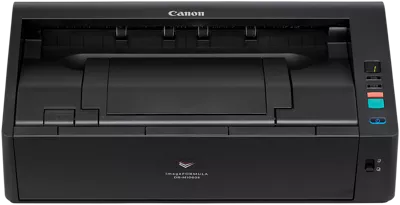
The DR-M1060II is not just a wider version of a small desktop feeder. Its U-turn route keeps ordinary sheets moving around the body, while a straight-through route lets thicker originals and cards pass through a different path. That distinction makes the model more flexible for mixed office records, but it also changes the desk layout: Canon lists the body at 16.7 by 9.7 by 4.7 inches with trays closed, and 16.7 by 17.3 by 8.3 inches with them extended. The straight path needs space behind the scanner for ejected sheets. A closed measurement alone is not an installation-clearance plan.
Canon specifies widths up to 11.8 inches and ordinary lengths up to 17 inches, with a long-document mode reaching 118.1 inches. That makes wide forms, ledger-size papers and some long originals a different job from standard letter stacks. It remains a sheet-fed scanner: Canon lists a Flatbed Scanner Unit 102 as an optional compatible accessory, but that is separate equipment, not a platen included in this base profile. Check the exact accessory number and market if a flatbed is important.
An 80-sheet load and a conditional speed rating
The automatic feeder is rated for up to 80 sheets per load. Treat that as a loading maximum governed by the paper and the manual’s same-type guidance, not a promise that every mixed, curled or thick batch will fit. Canon lists speeds up to 60 pages per minute and 120 images per minute in its stated modes, but its table also gives a lower 40/80 maximum for color at 300 dpi. Higher-resolution settings, image processing, the host computer and the application can all affect the complete scan-to-file routine. These are manufacturer ratings; this review does not claim an independent speed test.
The brochure and U.S. product table list about 7,500 suggested scans a day. That number is not a tested duty cycle, service-life estimate or assurance that a full workday of scanning will be trouble-free. For a purchase decision, distinguish the 80 sheets loaded at once from the manufacturer’s separate suggested daily-volume figure.
Choose the route for the original, not just the scanner
Canon gives the U-turn path a lower document-weight ceiling than the straight path: its U.S. table lists 7–32 lb bond for U-turn and 7–68 lb bond for straight-through. The higher number is not permission to feed that stock through the ordinary route. The manual describes the straight route for cards and thicker originals, and sets specific orientation, size and thickness limits for card handling. Use that path only with the instructions for the exact original in hand; an embossed card or fragile document is not automatically safe because the scanner can accept some cards.
The unit also has single-sheet/manual procedures, but that does not mean a second physical tray is supplied. Check whether the chosen original uses the straight route, a non-separation mode or another documented procedure. If feed-path flexibility is essential, plan the physical space and verify the precise media support before ordering.
USB and TWAIN keep the workflow computer-centered
The reviewed U.S. configuration uses USB 2.0. Canon lists CaptureOnTouch and a Windows ISIS/TWAIN driver package, which suits a computer-based capture routine when the current driver works with the organization’s software. Confirm the operating system and application version rather than relying on an old compatibility table alone. A TWAIN listing helps only if the application actually supports that interface.
The sources reviewed for this SKU do not establish Wi-Fi, scanning from a phone or scanner-side cloud capture without a computer. A cloud destination inside desktop software is still a computer-mediated workflow. The front controls are physical buttons and a job-number display, not a profile touchscreen. If the routine must start from a phone, run over Wi-Fi or send a scan to cloud storage with no computer, this is the wrong configuration to assume will meet it.
Compare it with the other DR-M models
The smaller DR-M140II has the same listed 80-sheet class but is rated at 40/80 and handles narrower documents; its closed body is substantially lighter. The DR-M160II is rated at 60/120, but its 75-sheet load and 8.5-inch paper width make it a different choice from this large-format model. The current-reference DR-C340 and DR-C350 use 100-sheet ADFs for more conventional office stacks, though they do not replace the M1060II’s wide-format path. These are published-specification comparisons, not side-by-side performance tests.
Verify the exact package and seller terms
Canon identifies the U.S. store SKU as DR-M1060II; the 6049C002AA brochure identifier and gallery filename are not retail SKUs. Its page mixes Backorder/In Stock signals with an explicit discontinued/no-longer-available notice. That supports treating the model as earlier, but does not establish present seller stock, price or a valid offer. Canon’s listed in-box items include a USB cable, adapter and setup materials; an older or secondary-market carton may differ. Ask what is actually included, whether software can still be installed, and what warranty or return terms apply.
Overall, the DR-M1060II is a research-based fit when 11-inch-class paper, duplex capture and two distinct feed paths justify a wider, heavier USB scanner. Its large-original capability is useful only with the correct path and enough room, while 80 sheets is a moderate ADF load rather than a high-volume promise. Confirm the host, current driver, path instructions and actual package before relying on it for a records workflow.
Key specifications
Key details at a glance
| Scanner class | Desktop sheet fed office |
|---|---|
| Manufacturer-listed simplex rate | 60 ppm |
| Manufacturer-listed duplex image rate | 120 ipm |
| Automatic document feeder capacity | 80 sheets |
| Optical resolution | 600 dpi |
| Connection options | USB |
| Automatic duplex capture | Yes |
| Separate manual-feed route | Yes |
| Touchscreen | No |
| TWAIN driver documented | Yes |
Use the exact model’s instructions for operating limits, supplied equipment and version differences.
Sources for this review
Sources for this assessment
- Canon U.S.A.: Canon imageFORMULA DR-M1060II Office Document Scanner
- Canon Support for Canon imageFORMULA DR-M1060II Office Document Scanner
- Canon Canon imageFORMULA DR-M1060II Office Document Scanner user manual (official linked manual)
- Canon Canon imageFORMULA DR-M1060II Office Document Scanner brochure (official product-page download)
- Canon official exact-model gallery image for Canon imageFORMULA DR-M1060II Office Document Scanner
Compare the workflow before you choose
Use the finder to test your connection, paper and software requirements against the documented scanner arrangements.