
Your needs, this model
Does it fit your priorities?
Does the DR-M160II VRSEL meet a 70-sheet minimum?
Yes on Canon’s published 75-sheet ADF specification, subject to paper size, stock and the manual’s maximum stack height. It drops out when the selected minimum reaches 80. The fact is about one loading, not suggested daily volume.
Explore this need in the finder →Can the DR-M160II feed a single special original?
Its manual documents a non-separation mode for originals such as a card fed one at a time. That is a driver-selected mode, not an additional manual tray. Check orientation, thickness and the instructions for your actual original.
Explore this need in the finder →Does the exact DR-M160II package provide a TWAIN route?
Canon lists Windows ISIS/TWAIN and Mac TWAIN for this model/package, but the current host and application must be checked. The U.S. store page identifies package SKU M160II VRSEL; confirm that the used offer includes any VRS software license you expect.
Explore this need in the finder →Keep the U.S. software package in the product identity
Canon’s U.S. store identifies this specific listing as the imageFORMULA DR-M160II with package SKU M160II VRSEL. That detail matters: the page promotes Tungsten VRS Elite, while the listed carton materials also mention a VRS Basic CD and software inserts. The 0114T27903 code on the brochure is an item identifier, not the store SKU. If comparing a used unit, confirm the actual license, activation method, installer media and software version rather than assuming that a third-party VRS entitlement transfers with the scanner.
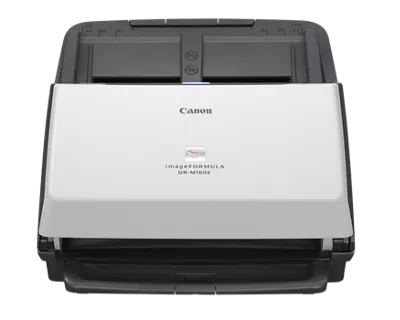
The body is compact for a desktop office feeder: Canon lists 9.09 by 11.02 by 9.76 inches with the feed closed and 7.05 pounds. A front LED control panel supports one-touch stored tasks, but this is a physical control panel rather than a touchscreen. The scanner is still computer-based; a displayed profile does not mean it has a wireless route or stand-alone cloud connection.
A 75-sheet load is a meaningful middle ground
Canon rates the feeder for up to 75 sheets, subject to paper size, stock and stack-height instructions in the manual. That capacity lands below the 80-sheet DR-M140II and DR-M1060II profiles and above smaller compact feeders. It makes a real numeric boundary: this model can meet a 70-sheet minimum, but a buyer requiring 80 sheets per loading should exclude it. Mixed or thick originals may reduce the permitted stack.
Canon rates the scanner up to 60 pages and 120 images per minute for A4 documents at 200 dpi. That is a manufacturer condition, not a measured scan-to-file result. The USB 2.0 connection, image processing, software, file format, host computer and image corrections affect the complete routine. The manual also documents long-document mode up to 118.1 inches, but do not assume every long or fragile original can use the ordinary ADF path.
Special feed procedures are modes, not an extra tray
The user manual documents non-separation mode for originals that should pass without normal page separation, including a card placed one at a time. It also describes folded or Folio work within the model’s instructions. This gives the DR-M160II a documented special-original path, but the mechanism is still the same scanner: non-separation feed is a setting, not a second manual feed tray. Check the exact card size, thickness, orientation and host-side driver option before relying on it.
For routine office batches, its operating arrangement is straightforward: USB to a computer, Canon CaptureOnTouch and listed TWAIN/ISIS support. Canon also describes cloud applications through the computer software, sometimes requiring a separate service subscription. The reviewed package does not establish Wi-Fi, mobile scanning or a direct computer-free cloud workflow. Canon’s store page lists Windows and Mac, but the detailed Mac operating-system ranges differ between the U.S. product/support information and the 2025 Version 2 brochure. Confirm a current driver and application version for the actual host.
Do not turn suggested daily volume into a durability claim
Canon’s technical material is inconsistent about suggested daily volume: the U.S. support table reports about 7,000 scans, while its 2025 Version 2 brochure says up to 13,000. The fact profile leaves that figure unresolved rather than selecting the larger number. Neither statement is an endurance test, a guarantee of page quality, or the same thing as the 75-sheet ADF capacity. If a purchase depends on sustained daily duty, ask Canon or the seller for the current support specification and consider maintenance and roller condition as separate issues.
Compare capacity, speed and package rather than a suffix
The DR-M140II is slower at a listed 40/80 but has an 80-sheet feeder and a much shallower closed body. The M1060II is also rated at 60/120 but has an 80-sheet load and accommodates larger-width paper with its distinct straight path. The DR-M160II’s 75-sheet ADF, compact body and exact software package define a different tradeoff. Those comparisons use published manufacturer information, not hands-on results. The current-reference DR-C340/C350 pair adds a 100-sheet class but does not make the earlier M160II package interchangeable.
Verify the package and the older listing
Canon’s product page displays both backorder and discontinued/no-longer-available wording. That supports an earlier lifecycle classification, not a current stock or offer claim. The U.S. package includes VRS-related materials, but confirm the seller has the expected software and rights to use it. Also check the condition of the feed rollers, manual, USB/power items and return terms. Older operating-system tables and installation discs may not match the buyer’s current environment.
Overall, the DR-M160II VRSEL is a plausible research-based choice for a USB duplex workflow that needs a 75-sheet ADF, compact body, listed TWAIN support and the exact bundled VRS package. Its LED profile panel is not a touchscreen; its cloud routine still depends on the computer; and its daily-volume and OS tables warrant caution. Verify the 75-sheet loading instructions and software entitlement before treating the package as ready for a current office.
Key specifications
Key details at a glance
| Scanner class | Desktop sheet fed office |
|---|---|
| Manufacturer-listed simplex rate | 60 ppm |
| Manufacturer-listed duplex image rate | 120 ipm |
| Automatic document feeder capacity | 75 sheets |
| Optical resolution | 600 dpi |
| Connection options | USB |
| Automatic duplex capture | Yes |
| Separate manual-feed route | Yes |
| Touchscreen | No |
| TWAIN driver documented | Yes |
Use the exact model’s instructions for operating limits, supplied equipment and version differences.
Sources for this review
Sources for this assessment
- Canon U.S.A.: Canon imageFORMULA DR-M160II Office Document Scanner
- Canon Support for Canon imageFORMULA DR-M160II Office Document Scanner
- Canon Canon imageFORMULA DR-M160II Office Document Scanner user manual (official linked manual)
- Canon Canon imageFORMULA DR-M160II Office Document Scanner brochure (official product-page download)
- Canon official exact-model gallery image for Canon imageFORMULA DR-M160II Office Document Scanner
Compare the workflow before you choose
Use the finder to test your connection, paper and software requirements against the documented scanner arrangements.