
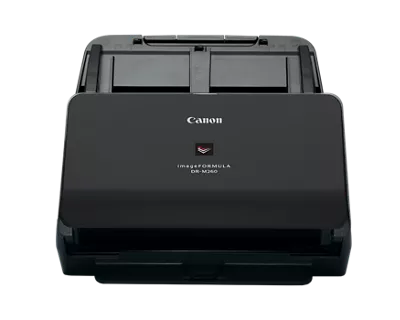
Your needs, this model
Does it fit your priorities?
Should I count the DR-M260 as a 90-sheet feeder?
Not for this shortlist. Canon’s U.S. product/support page says 90, but the exact manual and brochure specify 80 for A4-or-smaller (65 for larger sheets) and a 10 mm maximum stack. The matcher uses 80 conservatively: it clears 80 but not 90.
Explore this need in the finder →Can the DR-M260 scan a passport?
Canon describes passport capture through a separately sold passport carrier sheet; the manual specifies a maximum total thickness of 6 mm including the carrier. Check that the exact offer includes the carrier and follow the loading mode.
Explore this need in the finder →Does the DR-M260 support USB/TWAIN without a touch panel?
Canon lists USB 3.1 and ISIS/TWAIN drivers. The physical LCD/control panel is not a touchscreen. Confirm the current driver for your OS and application; computer-free mobile or cloud capture is not documented for this base configuration.
Explore this need in the finder →The ADF specification has an unresolved 80-versus-90 conflict
Canon’s U.S. product and support pages say the DR-M260 feeder holds up to 90 sheets. The exact user manual and the 2025 brochure instead specify up to 80 A4-or-smaller sheets and 65 for larger-than-A4 originals, with a maximum stack height of 10 mm. Because those sources disagree, this assessment uses 80 sheets for matching. That conservative number lets the model meet an 80-sheet minimum but not a 90-sheet requirement. It avoids promising the higher capacity before the applicable paper and loading instructions are reconciled.
Capacity is per loading, not a daily throughput figure. Paper thickness, size and the manual’s maximum stack matter. Canon also publishes a suggested 7,500 scans/day, but the brochure says its figure is calculated from rated speed and assumed daily use. It is not a durability test, warranty promise or evidence that every original will run unattended.
A fast USB office workflow with a physical LCD
The DR-M260 is rated up to 60 pages per minute and 120 images per minute at typical settings. Canon’s brochure ties that comparison to letter-size pages at 200 dpi in landscape feed and warns that actual processing can vary with the computer and application. The scanner connects through USB 3.1 Gen 1 and Canon lists ISIS/TWAIN drivers, CaptureOnTouch, CapturePerfect and Tungsten VRS. That combination is aimed at computer-led office capture, not a stand-alone wireless workflow.
The front panel has an LCD and physical controls for stored scan profiles. Canon’s manual describes profile handling, but that does not make the display a touchscreen. This matters for teams that specifically need staff to tap a touch interface. The reviewed base configuration does not establish Wi-Fi, mobile scanning or computer-free cloud delivery. A desktop application’s ability to send or save files to a cloud service is still a computer-mediated step.
Long papers, special feed and passports need separate checks
Canon lists an ordinary document length just over 14 inches and long-document mode up to 220 inches. The manual also documents non-separation feeding for thicker originals or pages that should not be separated in the usual way. Those are useful options when the documents match the exact size, paper and driver instructions; they do not mean that any fragile or stapled item can go through the feeder without preparation.
Passport scanning is accessory-dependent. Canon says passports use a separately sold passport carrier sheet, and the manual limits total thickness to 6 mm with the passport inside the carrier. Do not assume the carrier sheet is in the base carton. Check its availability, the correct driver document type and the condition of the scanner before planning passport work. The control panel and passport workflow are separate from the ADF’s conflicting maximum-sheet statement.
Why the conservative capacity is the useful choice
For the numeric finder, the difference between 80 and 90 matters: an 80-sheet match is supported by both the manual and brochure, while 90 appears in Canon’s U.S. web table. Without resolving why those source values differ, reporting 90 would make a stronger buying claim than the exact paper instructions justify. This is an editorially conservative model value, not a claim that the web page is necessarily wrong. A buyer should check the current manual, loading conditions and exact seller configuration before relying on an 80-sheet unattended stack.
Compared with the DR-M1060II, the M260 uses USB 3.1 and offers a longer listed document mode, but it is a narrower model and its feeder number is disputed. The DR-M160II has 75 documented sheets and a different software package; the DR-M140II lists 80 under same-type paper conditions with different path limits. Newer Canon models such as C340/C350 have 100-sheet ratings, making them useful comparisons for large stacks, but they are not a substitute for the M260’s distinct LCD and special-media options.
Check the exact older offer and warranty
Canon’s U.S. page identifies the store SKU as DR-M260 and simultaneously shows In Stock language with a discontinued/no-longer-available notice. The model is classified as earlier, but the page is not evidence that a current offer is available. Canon advertises a five-year warranty in the original U.S. product material; warranty terms refer to the packaged product and original purchaser, so do not assume they transfer to a used scanner. Check the seller’s condition, exact software, passport carrier, rollers, cable and return policy.
Overall, the DR-M260 is a research-based fit for USB duplex office capture when 80 sheets per loading, a physical profile LCD, long-document mode or the optional passport route suits the work. It is not a touchscreen or network scanner. Its conflicting 80/90-sheet specification, separate passport accessory and discontinued status deserve more attention than a headline speed figure. Verify the exact driver and package before making it part of a current records workflow.
Key specifications
Key details at a glance
| Scanner class | Desktop sheet fed office |
|---|---|
| Manufacturer-listed simplex rate | 60 ppm |
| Manufacturer-listed duplex image rate | 120 ipm |
| Automatic document feeder capacity | 80 sheets |
| Optical resolution | 600 dpi |
| Connection options | USB |
| Automatic duplex capture | Yes |
| Separate manual-feed route | Yes |
| Touchscreen | No |
| TWAIN driver documented | Yes |
Use the exact model’s instructions for operating limits, supplied equipment and version differences.
Sources for this review
Sources for this assessment
- Canon U.S.A.: Canon imageFORMULA DR-M260 Office Document Scanner
- Canon Support for Canon imageFORMULA DR-M260 Office Document Scanner
- Canon Canon imageFORMULA DR-M260 Office Document Scanner user manual (official linked manual)
- Canon Canon imageFORMULA DR-M260 Office Document Scanner brochure (official product-page download)
- Canon official exact-model gallery image for Canon imageFORMULA DR-M260 Office Document Scanner
Compare the workflow before you choose
Use the finder to test your connection, paper and software requirements against the documented scanner arrangements.