
Your needs, this model
Does it fit your priorities?
Does the DR-S250N provide Wi-Fi as well as USB?
Canon documents USB and wired Ethernet, not built-in Wi-Fi, for this exact model. The related DR-S350NW is a different configuration that adds dual-band Wi-Fi and a color touchscreen. Do not treat the S250N's browser route as a wireless scanner connection.
Explore this need in the finder →Can a compatible phone use the DR-S250N without installing a scanner app?
The exact manual describes CaptureOnTouch Lite Web in the scanner: scan its QR code and use a compatible phone or tablet browser on the same network. It requires the wired network and does not establish direct scanner-to-cloud storage or universal handset support.
Explore this need in the finder →Will a 60-sheet load work for every size or a passport?
Canon's manual rates 60 A4-or-smaller sheets and 40 larger-than-A4 sheets under stated stock and stack limits. Passport work requires a separately sold carrier sheet and a special loading sequence; the display is OLED with buttons, not a touchscreen.
Explore this need in the finder →A wired S-series scanner, not a cut-down wireless S350NW
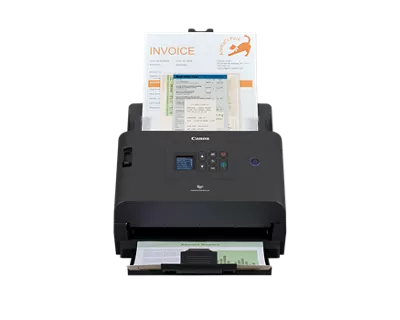
The Canon imageFORMULA DR-S250N is an earlier compact office feeder built around USB and wired Ethernet. The exact Canon U.S. listing identifies the storefront SKU as DR-S250N and marks the model discontinued/no longer available. That status makes this a historical model assessment; it is not an assertion that no reseller has one or that an older unit is in working condition. The similarly named DR-S350NW is a separate configuration with dual-band Wi-Fi and a color touchscreen. The S250N should not inherit those features by association.
The distinction matters because a scanner can participate in a network workflow without having a wireless radio. The S250N connects over Ethernet for networked use and also lists USB for a host-computer workflow. Its compact OLED display and physical keys are useful status controls, but the reviewed material does not describe it as a touchscreen. If staff must select a profile by touch at the scanner, look elsewhere or verify a different exact model.
The unusual phone route depends on the wired network
Canon’s exact manual describes CaptureOnTouch Lite Web as built into the scanner. A compatible phone or tablet can use a QR code and browser on the same network to start or receive a scan without installing the scanner’s mobile app. For the DR-S250N, that route rides on a wired Ethernet setup; a mobile device joining the same network does not turn the scanner into Wi-Fi. Check network segmentation, browser support, device compatibility and any office restrictions before making it the everyday path.
For a computer-managed capture application, USB or Ethernet can support a host arrangement with Canon’s listed ISIS/TWAIN software. Match the driver to the operating system and ask the software vendor which TWAIN interface or version it accepts. Creating a PDF through the scanner’s own utilities is not by itself proof that a separate records system can acquire images through TWAIN. The reviewed sources also do not establish a named scanner-to-cloud-storage route without a computer; neither the browser-based mobile feature nor an email or download should be read as direct cloud filing.
Plan around the feeder’s 60/40 split
Canon documents automatic duplex and rates the unit up to 50 ppm simplex or 100 ipm duplex. The ADF holds up to 60 A4-or-smaller sheets at the stated media conditions, but the manual lowers that figure to 40 sheets for larger-than-A4 originals. The 60-sheet rating is not a daily duty cycle or a promise for every stack; paper weight, condition and double-feed settings still matter.
Use Canon’s listed speed as a manufacturer comparison, not a timed result for mixed paper, color conversion, OCR or a destination workflow. The rate can matter for repeated small batches, while the 60-sheet load means a larger stack may require more frequent attention. Make sure the desk can accommodate both input and output paths, and allow room to clear a misfeed rather than judging fit from the closed scanner dimensions alone.
Special originals are not ordinary stack work
The exact S250N manual describes non-separation feeding and separate instructions for special originals such as cards. This is a controlled operating mode, not a second ADF tray or a license to combine plastic cards and ordinary sheets in one unattended load. Follow the manual’s orientation, count, thickness and double-feed recommendations. Passport scanning requires a separately sold carrier sheet and a specific procedure; do not assume the accessory is in a used unit’s carton.
One evidence caution is important: the short Canon brochure contains a paragraph that appears copied from the DR-S350NW material. It refers to the other model and does not establish S250N features. This assessment relies on the exact S250N product/support material and user manual for its own interface, capacity and operation. The brochure is used only for the S250N-specific published speed and feature table; details that match the neighboring model are not transferred by inference.
Where it fits among Canon’s earlier office models
The S250N is a plausible earlier choice for an office that has wired Ethernet, values an embedded browser route for compatible mobile devices, and handles batches within the 60-sheet A4-or-smaller limit. It is not a good assumption for a Wi-Fi-only placement. The DR-S350NW offers that separate Wi-Fi option, along with a 4.3-inch color touchscreen; its added capabilities answer different workflow needs. The ScanFront 400 moves further toward embedded standalone scanning from a 10.1-inch touch panel to email, FTP, network folders and other destinations, while not establishing a USB-to-computer or TWAIN route in the reviewed evidence.
Across all three, “network” is not enough to select a scanner. Confirm whether the job begins at a computer, mobile browser or device panel, and whether the destination is a host folder, email, network share or a named cloud service. These routes are not interchangeable and the manuals may require a network administrator to prepare credentials or destination settings.
Check the exact model and used package
Before buying an older DR-S250N, verify the label, included power supply and USB cable, feed rollers and service condition, and current software availability for the planned operating system. Confirm that the wired-network configuration is permitted, the mobile browser route fits the organization's security design, and any passport carrier is present if required. Canon’s discontinued status does not validate a reseller’s remaining warranty or package contents. This is a source-based assessment only; no physical unit was tested, and no current price, stock or seller is claimed.
Canon source documents
Primary references read: Canon’s exact U.S. product page, exact S250N support page, English user manual and two-page Canon brochure. Direct product/support retrieval returned HTTP 403; error bodies were preserved and the official pages were inspected in a browser view. The exact manual and brochure were retrieved and read locally. The copied S350NW paragraph in the brochure was excluded as evidence.
Key specifications
Key details at a glance
| Scanner class | Professional departmental sheet-fed scanner |
|---|---|
| Manufacturer-listed simplex rate | 50 ppm |
| Manufacturer-listed duplex image rate | 100 ipm |
| Automatic document feeder capacity | 60 sheets |
| Optical resolution | 600 dpi |
| Connection options | USB / Ethernet |
| Automatic duplex capture | Yes |
| Separate manual-feed route | Yes |
| Touchscreen | No |
| TWAIN driver documented | Yes |
Use the exact model’s instructions for operating limits, supplied equipment and version differences.
Sources for this review
Sources for this assessment
- Canon U.S.A.: unfiltered Office Scanners catalogue
- Canon U.S.A.: imageFORMULA DR-S250N Office Document Scanner
- Canon Support for imageFORMULA DR-S250N Office Document Scanner
- Canon imageFORMULA DR-S250N User Manual (English)
- Canon imageFORMULA DR-S250N brochure
- Canon U.S. official image gallery asset for DR-S250N
Compare the workflow before you choose
Use the finder to test your connection, paper and software requirements against the documented scanner arrangements.