
Your needs, this model
Does it fit your priorities?
Can I retain both wired and wireless connection choices?
Canon lists USB, wired Ethernet and dual-band Wi-Fi for the exact DR-S350NW. Those options support different placements; the 'both' result is not a promise that one USB and Wi-Fi session run simultaneously. The unit is classified earlier because Canon's page now labels it discontinued.
Explore this need in the finder →Can a phone or tablet start a scan without its own scanning app?
Canon says CaptureOnTouch Lite Web is built into the scanner. The manual and brochure describe using a QR code and compatible phone/tablet browser on the same network; verify the device, browser and network. That mobile path does not establish a direct scanner-to-cloud-storage service.
Explore this need in the finder →Is the separate feed mode useful for passports?
The manual documents non-separation feed and special-original handling, but passport capture requires a separately sold carrier sheet and an exact loading procedure. The standard 60-sheet ADF limit is for A4-or-smaller stock; above A4 Canon caps the load at 40 sheets.
Explore this need in the finder →A networked office feeder with more than one way to start
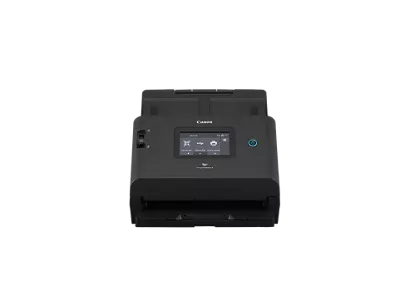
The Canon imageFORMULA DR-S350NW is a compact desktop ADF scanner aimed at shared or counter-side office work. Its defining difference from the similar DR-S250N is built-in dual-band Wi-Fi alongside USB and wired Ethernet, plus a 4.3-inch color touch panel. Canon’s exact U.S. listing identifies the model and publishes its current discontinued/no-longer-available status; I treat it as an earlier model, not a promise that a particular retailer has a unit. The item code 6897C002AA appears in Canon’s brochure, but the U.S. page does not display a Canon Direct retail SKU, so do not mistake the image-file stem or brochure code for a separately verified listing SKU.
Choose between host software and Lite Web
The USB route is the familiar computer-attached workflow: Canon lists CaptureOnTouch Pro and an ISIS/TWAIN driver, with the host computer and capture application managing the scan. That is the relevant route if an office application expects TWAIN. Driver availability is not a guarantee that a specific operating-system build, security policy or third-party capture program will work; verify the exact host and application before relying on it.
Canon also describes CaptureOnTouch Lite Web built into the scanner. Its manual lays out a QR-code and browser flow for a compatible phone or tablet on the same network. The device can use either Ethernet or Wi-Fi for supported arrangements, which gives it more placement flexibility than the DR-S250N. That is not the same as a phone app working on every mobile platform, a Wi-Fi Direct claim, or a scanner-to-cloud storage feature. The reviewed sources do not establish a named computer-free cloud-storage destination for the S350NW. A phone receiving a scan through a browser, email delivery and cloud filing are different endpoints; identify the exact one your routine needs before treating wireless as a solution.
Useful capacity, but size matters
Canon’s manual gives the ADF a 60-sheet load for A4-or-smaller originals and 40 sheets for larger-than-A4 paper at its stated stock and stack-height conditions. That makes 60 a meaningful everyday batch number, not a universal load promise. Heavier or mixed stock, unusually curled pages and special documents still need the manual’s restrictions and handling. A feeder rating does not tell you how many documents can be processed in a day or how reliably a particular paper will behave.
Canon rates the scanner up to 50 pages per minute simplex and 100 images per minute duplex. The brochure reports a suggested daily volume of up to 9,000 scans, but explains it as a planning calculation tied to speed and typical operating hours. These are manufacturer figures, not results from independent testing or a durability guarantee. When comparing models, confirm the paper size, resolution, color mode and output conditions behind a stated rate, and allow for document preparation and file checks in the real workflow.
Special originals need a deliberate route
The exact manual documents a non-separation feed mode for appropriate single sheets and joined originals, plus separate procedures for cards. It does not turn the regular 60-sheet stack into a mixed-media tray. Follow the limits on card orientation, thickness and count, and use the appropriate double-feed settings. Passport scanning is a separate supported use only with Canon’s separately sold passport carrier and its prescribed loading sequence. The carrier is not assumed to be in the base carton. Check the paper path and output clearance before leaving the scanner in a tight alcove.
How it differs from Canon’s other network models
The DR-S250N shares the 60-sheet A4-or-smaller feeder class, duplex scanning and CaptureOnTouch Lite Web concept, but uses USB and Ethernet rather than Wi-Fi. Its OLED screen has physical buttons; it is not a touch-panel substitute. The S350NW’s main practical distinction is the additional wireless plan and touchscreen, not proof of a different scanning quality. The ScanFront 400 is a different kind of network scanner altogether: it is designed around on-device standalone jobs to configured network destinations, rather than the S350NW’s USB/TWAIN host plan and Lite Web mobile browser route. Pick by the exact start and destination path, not just a shared word such as “network.”
What to verify on an older unit
Because Canon marks the exact U.S. model discontinued and no longer available, an older or third-party listing deserves careful configuration checks. Confirm the full DR-S350NW model name, included power supply and USB cable, operating condition, driver availability for the intended host, network security compatibility and whether the optional passport carrier is present if needed. Canon’s suggested daily volume should not substitute for a service-history or maintenance check. Do not assume a similar model’s bundle, support end date or software entitlement applies to this scanner.
As a research-based profile, the DR-S350NW is most compelling when a small office wants a 60-sheet standard-size duplex feeder, three connection choices across different setups, and a touchscreen plus a phone/tablet browser route. It is a weaker fit if direct cloud storage without a computer, universal mobile compatibility, an included passport carrier or current availability is essential. These conclusions come from Canon’s materials; this assessment does not claim hands-on use, measured performance or a live offer.
Canon source documents
Primary references read for this profile: Canon’s exact U.S. product listing, exact-model support page, English user manual and Canon brochure. The product and support pages returned HTTP 403 to direct retrieval; the failed responses were retained and the official pages were inspected in a browser view. Manual and brochure downloads were read locally. No test or measurement was performed.
Key specifications
Key details at a glance
| Scanner class | Professional departmental sheet-fed scanner |
|---|---|
| Manufacturer-listed simplex rate | 50 ppm |
| Manufacturer-listed duplex image rate | 100 ipm |
| Automatic document feeder capacity | 60 sheets |
| Optical resolution | 600 dpi |
| Connection options | USB / Ethernet / Wi-Fi |
| Automatic duplex capture | Yes |
| Separate manual-feed route | Yes |
| Touchscreen | Yes |
| TWAIN driver documented | Yes |
Use the exact model’s instructions for operating limits, supplied equipment and version differences.
Sources for this review
Sources for this assessment
- Canon U.S.A.: unfiltered Office Scanners catalogue
- Canon U.S.A.: imageFORMULA DR-S350NW Office Document Scanner
- Canon Support for imageFORMULA DR-S350NW Office Document Scanner
- Canon imageFORMULA DR-S350NW User Manual (English)
- Canon imageFORMULA DR-S350NW Office Document Scanner brochure
- Canon U.S. official image gallery asset for DR-S350NW
Compare the workflow before you choose
Use the finder to test your connection, paper and software requirements against the documented scanner arrangements.