
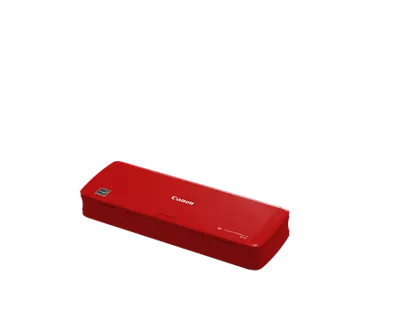
Your needs, this model
Does it fit your priorities?
Can the R10 capture both sides of a short stack automatically?
Yes. Canon specifies duplex capture and up to 14 images per minute in monochrome/grayscale (10 in color) with a 20-sheet paper feeder. Those are manufacturer ratings under named settings, not measured job times; reloads and review still matter.
Explore this need in the finder →Can a USB-connected laptop power it without an AC adapter?
Canon's user manual says the R10 is USB 2.0 bus-powered from a connected computer and cannot use an AC adapter. Confirm the actual computer port and cable arrangement; this is not a standalone battery-powered scanner.
Explore this need in the finder →Is there a separate route for plastic cards?
Yes, but the manual describes a dedicated card slot, not a universal manual-feed option: one supported plastic card at a time, vertical orientation, up to 0.76 mm standard thickness or 1.4 mm embossed thickness. Embossing may still affect results, and the slot is disabled while the ADF contains pages.
Explore this need in the finder →Can an application call the R10 through TWAIN?
The reviewed Canon sources establish built-in CaptureOnTouch Lite but do not explicitly establish a TWAIN interface. Do not assume one; check Canon's current driver files and the application's supported-input list before treating TWAIN as essential.
Explore this need in the finder →The Canon imageFORMULA R10 Red is best understood as a small, host-powered scanner for short batches rather than a self-contained office station. Canon’s U.S. storefront identifies this red finish with the internal SKU “R10-color-swatch.” The related gallery filename begins “0164T350,” but Canon’s red product detail does not print that as a separate commercial part number, so this review does not treat the image name as a SKU crosswalk. The hardware facts below are the published R10 specifications; the reviewed retail identity is the exact red U.S. entry.
A portable feeder, not a pocket batch station
Canon lists a 20-sheet automatic feeder and a closed size of about 11.2 × 3.75 × 1.57 inches at 2.2 pounds. That combination makes sense for moving from a desk to a classroom, shared office or travel workspace. It is still an ADF: pages need supported dimensions and condition, and 20 sheets is a maximum loading figure, not permission to leave a large queue unattended. Canon’s manual advises reducing the load if double-feeds occur. For mixed, creased or unusually thick pages, a careful operator still needs to separate the job and check the output.
The R10 draws USB bus power from a connected computer; the manual says it cannot use an AC adapter. That avoids carrying a separate power brick, but it also means the computer is part of the physical setup. It is not battery-powered and it is not a phone-first Wi-Fi scanner. If a host port, cable arrangement or destination computer is unavailable, the very feature that makes the scanner easy to carry can become a constraint.
Duplex is useful, but the color rate is different
Canon lists two-sided scanning and rates the R10 up to 12 pages per minute simplex or 14 images per minute duplex for black-and-white/grayscale work. The same page lists lower color maxima of 9 ppm and 10 ipm. Those are manufacturer ratings under stated settings, not a measurement of a pile-to-searchable-file job. Loading, deciding on color mode, previewing, saving and naming files take additional time. A small quantity of mixed receipts and cards can still be convenient even if it does not resemble the headline rate.
The distinction matters when comparing the R10 with the more desk-bound R30. The R30’s 60-sheet ADF gives a larger per-loading paper reserve and its published 25 ppm/50 ipm rate is higher, but it is an office-size USB scanner rather than a 2.2-pound portable unit. The R10’s case is not that it beats the R30 on volume; it is that a lighter host-powered unit may be easier to relocate when the job consists of short, ordinary paper batches.
The separate card slot has a narrow purpose
The R10’s card slot is a real second path and a useful difference from a generic feed-only scanner. Canon’s manual says to insert supported plastic cards one at a time, vertically, through the dedicated slot. It gives a standard thickness limit up to 0.76 mm, with embossed cards up to 1.4 mm, but warns that the embossing shape can still interfere with a clean scan. The card slot is disabled when paper remains in the ADF tray, so a card job and a paper batch are separate tasks rather than one mixed load.
This is why “manual feed” should not be read as “it will accept any odd page.” Canon does not establish a general envelope, folded-page or fragile-original mode in this evidence. The manual also lists photographs among unsupported originals. If business cards or a supported plastic card are your occasional special item, the dedicated route may be useful; if you need a broad manual-feed mode, check a different model’s instructions rather than extrapolating from the card slot.
Built-in software keeps setup simple, with host checks still needed
Canon says CaptureOnTouch Lite is built into the R10 and can be used on a computer without first installing a scanner driver. The product page describes saving searchable PDFs, JPEGs and other formats, as well as previewing and editing from the computer. That is a straightforward file workflow for someone who is comfortable connecting the scanner to a supported Windows or Mac host. It is not an onboard touchscreen workflow, a phone app, or a network destination: no Wi-Fi or computer-free cloud arrangement is documented for this configuration.
The Canon technical table names Windows 8.1 and 10 and several older macOS releases; software compatibility changes over time. Before relying on it for a current computer, confirm the live downloads and supported operating-system version with Canon. A driverless “plug-and-scan” description also does not prove a TWAIN interface; if a records application requires TWAIN, verify that exact software route instead of assuming PDF output is equivalent.
Where it fits in a short-list
The R10 Red is a sensible research candidate for someone who values low carry weight, one-cable USB power, automatic two-sided capture and an occasional supported card scan more than feeder size or wireless sharing. For a fixed desk and larger stacks, the R30 has a larger feeder. For a networked setup with a color touchscreen, TWAIN and a documented compatible Android/Mopria route, the R50 is a different class of arrangement, not just a faster R10. Confirm the exact host, original types, included cable and seller package before ordering.
Canon’s page currently shows an in-stock signal and a separate discontinued/no-longer-available message. This assessment records that contradiction rather than converting it into an availability promise. It also describes specifications from Canon’s U.S. pages and manual, not hands-on use, independent tests or a claim about how the red finish performs in someone’s bag.
Key specifications
Key details at a glance
| Scanner class | Portable one-sheet sheet-fed scanner |
|---|---|
| Manufacturer-listed simplex rate | 12 ppm |
| Manufacturer-listed duplex image rate | 14 ipm |
| Automatic document feeder capacity | 20 sheets |
| Optical resolution | 600 dpi |
| Connection options | USB |
| Automatic duplex capture | Yes |
| Separate manual-feed route | Yes |
| Touchscreen | No |
Use the exact model’s instructions for operating limits, supplied equipment and version differences.
Sources for this review
Sources for this assessment
Compare the workflow before you choose
Use the finder to test your connection, paper and software requirements against the documented scanner arrangements.