
Your needs, this model
Does it fit your priorities?
Can it capture a 60-sheet duplex stack in one loading?
Canon specifies a 60-sheet ADF and single-pass duplex capture, so a supported ordinary-paper batch can qualify at the 60-sheet minimum. The manufacturer lowers capacity to 40 legal sheets; actual supported stock and mixed-page loading must be checked in the exact manual.
Explore this need in the finder →Does the R30 require downloaded scanning software?
Canon's brochure describes built-in CaptureOnTouch Lite: connect the supplied USB cable to a Windows or Mac computer and start scanning without a disc or separate software download. Check the current supported operating-system list for the host that will own the workflow.
Explore this need in the finder →Can I use Wi-Fi or scan straight from a phone?
The R30 is specified with USB 2.0 and a computer-side CaptureOnTouch Lite workflow; Canon does not document a Wi-Fi or mobile-device route in the reviewed U.S. pages. If wireless or phone capture is essential, consider a model with a documented wireless plan.
Explore this need in the finder →Does it have a TWAIN driver or general manual-feed path?
Neither is verified here. The spec's phrase 'Automatic or Manual' does not identify a supported manual-feed original or loading sequence, and the manual file was unavailable. Canon's product/support descriptions do not state a TWAIN interface; check with Canon and the target application before making either requirement essential.
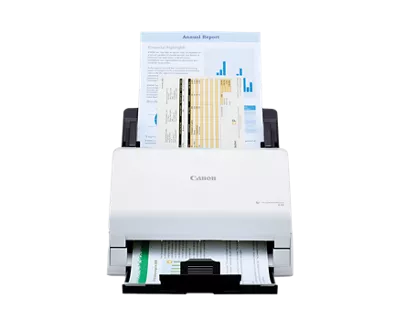
Explore this need in the finder →The Canon imageFORMULA R30 is a desktop sheet-fed scanner built around a deliberately simple computer workflow: connect the supplied USB cable, start CaptureOnTouch Lite, and scan without first installing an application from a disc or download. Canon’s U.S. brochure identifies the exact unit as item 6051C002AA, while the storefront labels it R30. Its strongest distinction from the portable R10 is a larger ADF and a roomier desk setup; its strongest distinction from the R50 is that the reviewed R30 path is USB rather than a touchscreen/Wi-Fi station.
The 60-sheet figure has a legal-paper qualification
Canon rates the R30 feeder for up to 60 sheets, but gives a lower maximum of 40 legal-size sheets. That difference is important for a buyer who loads full-length legal originals: “60-sheet capacity” is not a universal stack promise. The advertised width is 2 to 8.5 inches and the usual length range is 2.1 to 14 inches. The support specification lists long-document mode as not applicable, so the normal range should not be stretched into a claim that the R30 handles very long pages.
Duplex capture is documented, which avoids turning each supported two-sided sheet by hand. Canon’s rated maximum is up to 25 pages per minute or 50 images per minute at the named test conditions. That is a scanner rate, not a timed end-to-end result. A real document workflow still includes loading, selecting settings, checking skew or missed pages, choosing output names and reviewing the file. Canon also provides approximate times for three- and five-sheet starter jobs, but those manufacturer examples do not establish how every mixed batch or host computer will behave.
CaptureOnTouch Lite is a computer workflow
The R30’s built-in CaptureOnTouch Lite can produce searchable PDF, PNG and JPG files, with the software already in the scanner rather than installed from a separate download. This helps reduce one setup task, but the scanner still depends on a connected Windows or Mac computer. Canon specifies USB 2.0; no Wi-Fi, phone scanning or computer-free cloud route is documented for the R30. If several people need to start scans from different desks, the physical USB arrangement is less flexible than the R50’s network option.
Canon’s model support page lists Windows 10 and 11 plus macOS Big Sur 11, Monterey 12 and Ventura 13 in its compatibility table. Those entries are a guide to the model’s stated support, not a promise that the current CaptureOnTouch Lite release works with every later operating-system build. Check Canon’s current download matrix before relying on the scanner in a managed workplace or a recently upgraded computer.
Do not infer a special-original or driver interface
Canon’s technical table uses the phrase “Automatic or Manual” feeding, but the exact R30 manual is currently listed as unavailable in its support widget. The other reviewed U.S. sources do not explain a separate special-original route, its steps or what stock it accepts. For that reason, a manual-feed requirement remains unconfirmed here rather than being inferred from a broad table label. The same caution applies to TWAIN: the R30 sources reviewed for this assessment specify CaptureOnTouch Lite and USB, but do not clearly state whether a TWAIN interface is available. A buyer whose document-management program requires TWAIN should verify the exact driver and application combination first.
Canon lists ordinary documents such as invoices, business cards, IDs and postcards among the kinds of mixed batch that CaptureOnTouch Lite can handle. That list is not blanket approval for fragile paper, photographs, folded originals or every plastic card. The missing manual matters most at this boundary: look up the exact permitted stock and loading instructions before feeding an irreplaceable original.
R30 versus the related R-series models
Compared with the R10, the R30 trades portability and computer-bus power for a larger desktop feeder, a higher published scan rate and a USB cable plus power cable in the Canon box list. The R10 is much lighter and has a separate one-card slot, but its paper ADF holds 20 sheets. Compared with the R50, both are desktop units with a stated 60-sheet ADF, yet the R50 adds Wi-Fi, a color touchscreen, TWAIN support and a documented Mopria/Android scanning route. The R50 also lists long-document mode to 118 inches. These are real workflow differences, not simply cosmetic product tiers.
Who should keep it in consideration
The R30 may suit a small office or home office that feeds regular, supported stacks to one nearby computer, wants automatic two-sided capture and values a built-in file workflow more than wireless sharing. It is less compelling when the requirement is legal-paper loading at the full 60-sheet count, extended-length documents, a known TWAIN interface or a separate manual-feed path. Canon lists no suggested daily volume for this model, so the rated speed should not be turned into a workload recommendation.
Canon’s live product page simultaneously renders an “In Stock” marker and a discontinued/no-longer-available block. This review preserves the conflict and does not promise current availability or a price. It is a source-based assessment of the exact R30 configuration, not a hands-on speed test, ownership report or endorsement of a particular software host.
Key specifications
Key details at a glance
| Scanner class | Desktop sheet fed office |
|---|---|
| Manufacturer-listed simplex rate | 25 ppm |
| Manufacturer-listed duplex image rate | 50 ipm |
| Automatic document feeder capacity | 60 sheets |
| Optical resolution | 600 dpi |
| Connection options | USB |
| Automatic duplex capture | Yes |
| Touchscreen | No |
Use the exact model’s instructions for operating limits, supplied equipment and version differences.
Sources for this review
Sources for this assessment
Compare the workflow before you choose
Use the finder to test your connection, paper and software requirements against the documented scanner arrangements.