
Your needs, this model
Does it fit your priorities?
Can I alternate between USB and Wi-Fi arrangements?
Canon specifies both USB and Wi-Fi, so it qualifies when those connections matter for different supported setups. That does not mean both connections operate simultaneously; check the manual and network requirements for each location.
Explore this need in the finder →Can a compatible phone participate in scanning?
Canon lists Mopria Scan and Android compatibility for the R50. Match the exact phone, Android version, Mopria application, Wi-Fi environment and destination; the model label alone does not promise support for every handset or cloud account.
Explore this need in the finder →Does Wi-Fi make the R50 a computer-free cloud scanner?
No computer-free cloud route is established in the reviewed sources. Canon describes cloud destinations through CaptureOnTouch and notes a third-party service subscription requirement. A compatible mobile scan route and a direct scanner-to-cloud route are different claims.
Explore this need in the finder →Can a TWAIN application use it?
Canon lists TWAIN drivers with the R50. Verify the current driver, supported Windows/macOS version and the target application's TWAIN requirements before purchase; included interface support alone does not confirm a particular program.
Explore this need in the finder →Is the color screen the only way to select a scan destination?
Canon describes the large color touchscreen as a way to select destinations, shortcuts or settings, while its software and TWAIN routes remain separate computer workflows. Confirm which destination setup you need; the screen does not prove permissions, service subscription or a particular app integration.
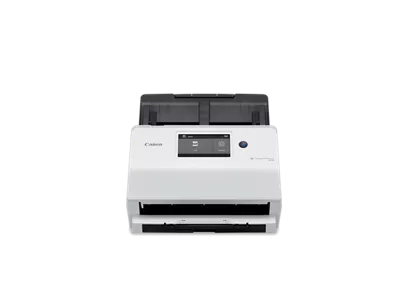
Explore this need in the finder →The Canon imageFORMULA R50 is the most network-oriented of the three Canon R-series models reviewed here. It combines USB and Wi-Fi, a color touchscreen, a 60-sheet duplex feeder and TWAIN drivers. Canon also lists Mopria Scan and Android compatibility, which supports a compatible phone-scanning arrangement. Those features make the R50 more than a USB feeder with a faster rating, but they do not make it a computer-free cloud appliance or guarantee compatibility with every phone, office network or capture program.
Its main distinction is choice of operating route
Canon describes connecting the R50 to a Windows or Mac computer with the supplied USB cable or over a Wi-Fi network, and says it can be shared among multiple users. The touchscreen is used to choose destinations, shortcuts and settings at the device. The finder therefore treats “both USB and Wi-Fi” as two supported arrangements for different setups, not as a claim that the scanner must use both radios simultaneously. A USB workstation can remain one route while a separate wireless workgroup is another.
Canon lists a compatible Mopria/Android route as well. That is helpful if a phone participates in scanning, but the wording does not verify every Android build, app version, Wi-Fi arrangement or destination. Confirm the exact phone and intended workflow before purchase. A wireless interface by itself would not establish phone scanning; here the positive mobile assessment rests on Canon’s product/support listings of Mopria Scan and Android alongside Wi-Fi.
Do not equate Wi-Fi with direct cloud delivery
Canon’s product page describes CaptureOnTouch software that can organize and store files in folders or third-party cloud services, and its brochure notes that a third-party service subscription is required. That is a software and account route, not proof that the scanner alone sends a file to any cloud account without a computer. The R50’s Wi-Fi and mobile capability should not be read as an unlimited direct-to-cloud promise. Confirm which service, application, account and host are involved; Canon’s compatible-products area also lists optional workflow plugins separately, so their presence on a page does not mean that every plugin is included with the base R50 package.
Paper capacity and speed need context
The R50’s ADF is rated for up to 60 sheets and Canon specifies duplex capture at up to 40 pages per minute or 80 images per minute. It also has a long-document mode up to 118 inches, with ordinary documents specified up to 14 inches long. The speed is a manufacturer maximum under typical letter-size, 200-dpi conditions and can vary with computer performance and software. It is not an independent benchmark or a promise about a whole job that includes loading, separation, output naming and quality checks.
Canon lists 4,000 scans as a suggested daily volume, but the footnote says the figure is calculated from scan speed and typical daily time. Treat it as a manufacturer planning figure, not an endurance test. For a regular workflow, compare the permitted originals, daily schedule, host and support terms instead of using the headline rate as the sole buying threshold.
TWAIN and the screen can matter to office routines
Canon lists TWAIN drivers with the R50, a meaningful difference if a specific desktop capture or records application calls for that interface. The existence of a driver does not establish support for every version of an application, so verify the exact operating system and driver release. The touchscreen can make it easier to pick a saved destination at the scanner, but it does not by itself establish user permissions, directory configuration or enterprise security. ReadirisPDF and Cardiris are listed as Windows-only software; their mention should not be generalized to Mac or assumed to satisfy every team’s OCR and records requirements.
The R50’s manufacturer page lists a broad media mix, including receipts, business cards, plastic or embossed cards, photos, reports, contracts and long pages. These are documented media families, not a claim that every damaged, glossy or unusually thick original is safe to feed. Canon’s support page lists an R50 user manual, but its download widget reported the file unavailable during this review. Check the exact manual for the original types, loading, cleaning and network setup that matter to your work.
R50 compared with the R30 and R40II
The R30 has the same headline 60-sheet feeder capacity but a USB-only CaptureOnTouch Lite workflow and lower rated speed; Canon gives it only 40 sheets for legal-size loads and no long-document mode. The R50 adds a wireless network route, a touchscreen, TWAIN and the 118-inch long-page mode. The Canon R40II is another 60-sheet duplex USB option, but Canon explicitly says its standard software route does not provide TWAIN; it is a closer comparison for someone who does not need R50’s network or device-side controls. These comparisons describe published configurations, not independent scan-quality results.
Check compatibility and the exact package
Canon lists the scanner, AC adapter, USB cable, setup guide, power cable and warranty card in the U.S. store box contents. The support page shows specific compatibility rows, while the product copy also names Android and ChromeOS; confirm current downloads for the computer, phone and app that will be used. The base R50 should be distinguished from separately listed optional software plugins and from any retailer-created bundle.
Canon’s product page currently shows both an in-stock label and a discontinued/no-longer-available notice, so current offer status is unresolved in the manufacturer display. This assessment records that conflict rather than quoting a live price or stock promise. It is research-based guidance on the named U.S. R50 configuration, not a claim of hands-on ownership, testing or an independently timed result.
Key specifications
Key details at a glance
| Scanner class | Desktop sheet fed office |
|---|---|
| Manufacturer-listed simplex rate | 40 ppm |
| Manufacturer-listed duplex image rate | 80 ipm |
| Automatic document feeder capacity | 60 sheets |
| Optical resolution | 600 dpi |
| Connection options | USB / Wi-Fi |
| Automatic duplex capture | Yes |
| Touchscreen | Yes |
| TWAIN driver documented | Yes |
Use the exact model’s instructions for operating limits, supplied equipment and version differences.
Sources for this review
Sources for this assessment
Compare the workflow before you choose
Use the finder to test your connection, paper and software requirements against the documented scanner arrangements.