
Your needs, this model
Does it fit your priorities?
Can it automatically scan both sides of a 60-sheet paper stack?
Canon documents duplex scanning and up to 60 A4-or-smaller sheets at 80 g/m² / 22 lb bond, with a 6-mm stack-height limit. Larger-than-A4 capacity is 40 sheets; these are manufacturer loading limits, not an independent throughput test.
Explore this need in the finder →Does Canon list a manual-feed document route?
The RS40 technical table says documents may be fed automatically or manually. The manual's exact special-original instructions are narrower, including a carrier sheet for fragile photos; confirm the material you plan to feed rather than assuming every card or envelope is supported.
Explore this need in the finder →Will it satisfy a capture application that requires TWAIN?
Canon lists a bundled TWAIN driver, but its manual warns that the driver may not operate with every TWAIN-compatible application. Check the exact host operating system and capture software.
Explore this need in the finder →Can it send a scan to cloud storage without a computer?
The documented workflow is USB-connected CaptureOnTouch on a computer, which can save to cloud services. The reviewed sources do not establish a separate computer-free scanner-to-cloud route.
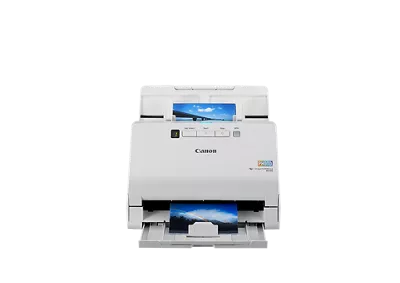
Explore this need in the finder →The Canon imageFORMULA RS40 is a desktop sheetfed scanner with two distinct jobs: feed batches of ordinary documents through a duplex path, or use its separate photo workflow for digitizing prints. The RS40 name is easy to confuse with Canon's imageFORMULA R40 and Receipt Edition, but it is a separate model with shop SKU 5209C001. This assessment uses the RS40's own U.S. brochure and manual rather than importing the R40's bundle or software facts.
Document capacity has a paper-size condition
Canon's product page summarizes an ADF of up to 60 sheets, while the model manual gives the important conditions: up to 60 A4-or-smaller sheets at 80 g/m² (22 lb bond), or up to 40 sheets above A4 at that paper weight. The stack should stay below 6 mm. The 60-sheet figure is a per-loading paper capacity, not a daily duty rating or promise that every page stock will feed at the maximum count. For mixed sizes, thin receipts, curled pages or unusual media, follow the loading instructions and reduce the stack when needed.
Canon lists an automatic or manual document-feed mode, widths from 2 to 8.5 inches, ordinary lengths from 2.1 to 14 inches and a long-document mode up to 118.1 inches. Its manual also treats photos separately: some sizes can be loaded in a 40-photo batch, larger prints in a smaller batch, and instant photos in a still smaller one. Those photo counts do not become the ADF capacity for paperwork. Canon also describes a carrier sheet for small or delicate photos and recommends it for fragile or valuable originals; the product page says one is enclosed, while the manual calls it optional. Confirm the exact seller carton, and do not assume that a carrier-sheet procedure certifies every old, brittle, curled or special-stock original.
Duplex and speed are useful, but still manufacturer rates
The RS40 captures both sides automatically. Canon's U.S. brochure lists maximum black-and-white/grayscale rates up to 40 pages per minute simplex and 80 images per minute duplex, with color maxima up to 30 ppm and 60 ipm. The product page's 40-document-per-minute figure is tied to a Letter-sized document at 200 dpi in landscape feeding direction; Canon says actual speed varies with computer and application. These are named manufacturer conditions, not our timed test and not end-to-end filing throughput. A careful workflow still needs to inspect the output for skew, double-feeds, missing backs and filename or folder mistakes.
Canon includes CaptureOnTouch software for computer use and lists a TWAIN driver. The manual says to use a TWAIN-compatible application and warns that the provided driver may not operate with every TWAIN-compatible program. Match the host operating system and the application's specific driver requirement before purchase. The documented interface is USB 2.0 to a computer; product materials do not establish Wi-Fi or a phone-first scanner path. CaptureOnTouch can direct output to third-party cloud services, but that is a computer-side workflow, not proof that the scanner can send to cloud storage with the computer off.
Photos are part of the appeal—and a separate routine
Canon markets the RS40 as a photo and document scanner. Its software includes image-oriented options such as red-eye and fading correction, and the photo routine can handle mixed print sizes within the manual's separate limits. That makes it more flexible than a document-only feeder for a family archive or small office with both forms and occasional prints. It is still a feed scanner: Canon warns against putting fragile or irreplaceable photos directly in the document tray and describes a carrier sheet for protection. Check how the particular offer handles the sheet and carefully follow the manual rather than treating the advertised photo count as unlimited.
What to verify before choosing it
The control panel described in the manual uses physical job-select, start, stop and double-feed-release controls, not a touchscreen profile menu. A suggested daily volume of 4,000 scans appears in Canon's specs, but Canon says this figure is calculated from the rated speed and typical daily use; it is not an independently established workload or reliability limit. The exact page also contains both an in-stock label and a discontinued/no-longer-available message, so this review cannot claim a current price or available unit. Canon's product page and the manual disagree about whether a photo carrier sheet is included or optional. Confirm the precise RS40 model, software, carrier sheet and condition with the actual seller.
The RS40 is worth comparing when USB-to-computer capture, automatic duplex, a meaningful paper stack and a separate supported photo workflow matter more than wireless sharing. It is not a match for a required computer-free cloud route, Wi-Fi or touchscreen selection. This is a source-based assessment, not a hands-on review: no unit was owned, tested or measured, and no real-world image quality, scan speed, OCR accuracy or customer experience is claimed.
Key specifications
Key details at a glance
| Scanner class | Desktop sheet fed photo document |
|---|---|
| Manufacturer-listed simplex rate | 40 ppm |
| Manufacturer-listed duplex image rate | 80 ipm |
| Automatic document feeder capacity | 60 sheets |
| Optical resolution | 600 dpi |
| Connection options | USB |
| Automatic duplex capture | Yes |
| Separate manual-feed route | Yes |
| Touchscreen | No |
| TWAIN driver documented | Yes |
Use the exact model’s instructions for operating limits, supplied equipment and version differences.
Sources for this review
Sources for this assessment
Compare the workflow before you choose
Use the finder to test your connection, paper and software requirements against the documented scanner arrangements.