
Your needs, this model
Does it fit your priorities?
Can staff scan to an office folder or email without attaching a computer?
Canon's manual documents a standalone touch-panel workflow for configured network destinations including email, FTP, shared folders, fax, printer and USB memory. Email is not cloud storage, and setup requires the network and destination details; the sources reviewed do not document direct cloud storage.
Explore this need in the finder →Do the ScanFront 400's USB ports make it a USB-to-computer scanner?
No. The manual describes its USB ports for removable media and peripherals; the scanner is a wired Ethernet standalone model. A direct USB connection to a host computer or a TWAIN workflow is not established by the reviewed exact sources.
Explore this need in the finder →Can it process cards or passports as well as ordinary stacks?
Canon describes a non-separation feed mode and special-original procedures. Passport use requires a separately sold carrier sheet and the manual's loading limits. The 60-sheet ADF rating is for A4-or-smaller stock; above A4 the published load falls to 40 sheets.
Explore this need in the finder →An office scanner intended to work from its own panel
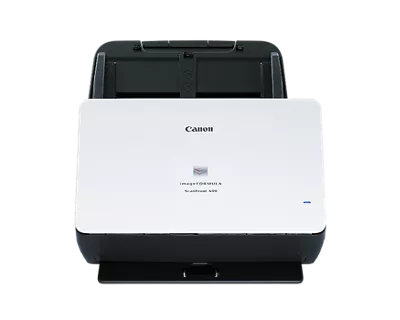
The imageFORMULA ScanFront 400 differs from a desktop USB feeder because its documented workflow is embedded in the scanner. Canon describes a 10.1-inch color touchscreen for setting up users and jobs, then sending scans to configured network destinations. The exact U.S. listing identifies model SKU SF400 and now labels it discontinued/no longer available. This review treats it as an earlier-model option for understanding a workflow, not as a current offer, available unit or promise about a used machine.
Canon’s manual describes direct sending to destinations including email, FTP, shared network folders, fax, printer and USB memory. A receptionist or records clerk can start the scan at the device and direct the result to a configured endpoint instead of handing off the job through a nearby desktop computer. That is the model’s clearest distinction from the DR-S350NW and DR-S250N, whose evidence includes host-computer driver routes and CaptureOnTouch Lite Web mobile-browser routes.
Be precise about what “computer-free” means
The ScanFront 400 can operate without a local computer in the scan-start path when the network and destination are configured. That does not automatically mean it sends to cloud storage. Canon lists email, FTP, folders and other endpoints, but the exact reviewed material does not name a direct cloud-storage service. Email is not the same thing as cloud filing, and a network folder may still reside on an organization-managed server. Confirm the destination type, permissions, authentication, network share setup and any retention rules with whoever administers it.
Likewise, the machine should not be treated as a USB-to-computer scanner just because it has USB ports. The manual describes those ports for removable media and peripherals such as memory devices and a keyboard. The scanner's connection is wired Ethernet; a host PC acquisition link and TWAIN driver are not established by the exact sources reviewed. Nor did I find a phone or tablet scanning route. The touchscreen, standalone operation and mobile scanning are separate capabilities.
Feeder capacity and rated speed
Canon lists a 60-sheet ADF load for A4-or-smaller originals and 40 for larger-than-A4 paper at stated media conditions. This size boundary matters even though the listed maximum resembles the S-series machines. Automatic duplex capture is documented, with manufacturer rates of up to 45 ppm simplex and 90 ipm duplex. These figures are not independent scan-to-file tests; actual workflows include handling, file processing, authentication and destination latency. The reviewed source material does not provide a basis for turning rated speed into daily endurance or suitability for every department volume.
Make sure operators understand that ADF capacity describes the supported load, not the number of pages that can be sent in one job without review. The paper stack still needs to respect weight, thickness, height and orientation. Keep the exit area clear, and establish a routine for checking files before discarding originals or forwarding records. If a long recurring batch is central to the purchase, assess service support and maintenance history for the exact older unit rather than relying on one speed figure.
Use special-feed modes deliberately
The exact ScanFront manual documents non-separation feeding for appropriate special originals and separate card handling. It also requires a separately sold passport carrier for passport scans. Those features describe specific operating sequences and restrictions; they do not create another tray, prove that every special material is safe, or allow different document types to be mixed into a standard stack. For fragile, valuable or thick originals, follow the manual step by step and inspect the resulting image while keeping the source document intact.
An on-device profile cannot override paper limits. Train profile creators to label each media route and destination clearly; a broad “scan to department” shortcut can misfile records if permissions and naming are overlooked.
Compare the right Canon model for the job
The DR-S250N has a 60-sheet standard-size feeder and a built-in Lite Web browser route, but its phone/tablet path is tied to a compatible same-network setup and its own USB/Ethernet configurations. The DR-S350NW adds Wi-Fi and a color touchscreen while keeping host/TWAIN and mobile-browser routes. ScanFront 400 instead centers a large integrated panel and directly configured network destinations. The model's three USB ports do not convert it into the S-series host-computer workflow, and the manual did not establish a TWAIN driver. The best fit depends on where the scan should start, who maintains the network endpoints, and whether the organization requires mobile scanning, direct cloud storage, or a desktop capture application.
What to check before considering a used unit
Confirm the label reads ScanFront 400 / SF400, check the screen and feeder condition, verify the Ethernet port and removable-media accessories, and ask what firmware, admin configuration and support remain available. The base record does not include the passport carrier. Test any intended shared folder, email server, FTP endpoint or printer only under your organization's security process. Canon's discontinued/no-longer-available notice is not current stock data and does not validate a used seller's warranty or support arrangement. No live price or seller offer is represented here.
As a research-based profile, the ScanFront 400 is most distinctive for an office that wants an operator to select a job at the scanner and send it over wired Ethernet to a prepared business destination. It is a poor match to assume for USB-to-computer capture, TWAIN, Wi-Fi, a phone route, or direct named cloud storage. The assessment is based on Canon's product/support pages and its English manual; it does not claim hands-on use or measured performance.
Canon source documents
Primary references read: Canon's exact U.S. product listing, exact support page, and English manual. Canon's brochure was inspected in the official browser view, but a direct download returned HTTP 403 and the failed response was retained; no claim is based on that error body. The product/support pages also returned 403 to direct retrieval, with exact failed responses preserved. No testing or measurement was performed.
Key specifications
Key details at a glance
| Scanner class | Standalone network sheet fed |
|---|---|
| Manufacturer-listed simplex rate | 45 ppm |
| Manufacturer-listed duplex image rate | 90 ipm |
| Automatic document feeder capacity | 60 sheets |
| Optical resolution | 600 dpi |
| Connection options | Ethernet |
| Automatic duplex capture | Yes |
| Separate manual-feed route | Yes |
| Touchscreen | Yes |
Use the exact model’s instructions for operating limits, supplied equipment and version differences.
Sources for this review
Sources for this assessment
- Canon U.S.A.: unfiltered Office Scanners catalogue
- Canon U.S.A.: imageFORMULA ScanFront 400 Office Document Scanner
- Canon Support for imageFORMULA ScanFront 400 Office Document Scanner
- Canon imageFORMULA ScanFront 400 Instructions
- Canon imageFORMULA ScanFront 400 brochure
- Canon U.S. official image gallery asset for ScanFront 400
Compare the workflow before you choose
Use the finder to test your connection, paper and software requirements against the documented scanner arrangements.