
Your needs, this model
Does it fit your priorities?
Can it scan an individual document or photo from a connected computer?
Yes. Canon documents a USB-powered flatbed and computer software for document and photo scans, up to a Letter/A4 platen size. It is not a stack feeder.
Explore this need in the finder →Does Canon document a TWAIN driver?
The LiDE 300's model manual identifies ScanGear as a TWAIN 1.9 driver for Windows. Verify that the specific host OS and capture application support it; this is not a promise of universal compatibility.
Explore this need in the finder →Can its feeder hold a 20-sheet stack?
No ADF is specified: the LiDE 300 is a platen flatbed with one manually placed original at a time, so it cannot meet an ADF minimum.
Explore this need in the finder →Can it upload to cloud storage while no computer is connected?
No computer-free route is documented. Canon's Send to Cloud feature requires the scanning software on a computer, internet and an active cloud account.
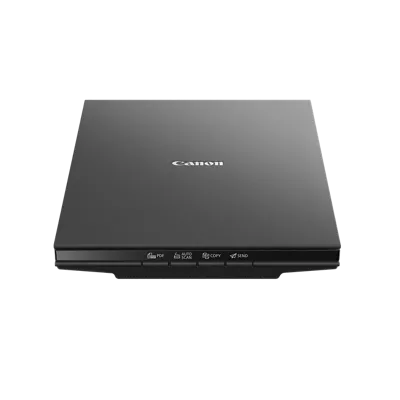
Explore this need in the finder →The Canon CanoScan LiDE 300 is a simple USB-powered flatbed for placing individual documents and photographs on glass. It can make a computer workflow from paper without adding a feeder, separate power brick or bulky office chassis. That compactness is only useful if a single-original scan rhythm fits: this is not a duplex ADF, portable battery unit or computer-free network scanner.
Flatbed simplicity means manual page handling
Canon specifies an 8.5-by-11.7-inch maximum document area, a 3.6-pound body and a profile about 14.5 by 9.9 by 1.7 inches. A page is placed on the platen and scanned from the computer or with one of the four EZ buttons. A multi-page PDF is possible, but the user still has to turn or replace each original. No automatic document-feeder capacity or duplex function is listed. For a few forms, book pages, receipts laid flat or photos, that can be a reasonable compromise; for a recurring paper pile, reload time and manual page handling are the main costs.
The glass area is sized for Letter/A4 documents. Canon's Advanced Z-lid expansion top is intended to accommodate thicker originals, while the product remains a flatbed rather than an overhead book scanner. No scan-speed, OCR or book-edge result should be assumed for a specific original from the lid design alone. Place materials carefully and follow the model manual, particularly with delicate, curled or bound items.
Know what the published speed and resolution describe
Canon lists 2400 × 2400 dpi optical resolution and an approximate ten-second color document figure for Letter/A4 at 300 dpi. The manufacturer says its timing is measured from the scanner-driver button press until the on-screen status display turns off, using a USB 3.0 interface and the included cable; system configuration, interface, software, settings and document size can change it. That rating is not a timed job test and does not include choosing a file name, checking each page, correcting a scan or sending it elsewhere. A high resolution option may be useful for detailed images, but it does not replace a feeder when the paper-handling need is a stack.
The four controls are Auto Scan, Copy, PDF and Send. Canon lists its IJ Scan Utility/IJ Scan Utility Lite programs for common computer scans and describes OCR, multi-page PDF and image-correction features. Those are software-dependent features on a compatible host, not a guarantee of text-recognition accuracy on every document. The model manual identifies ScanGear as a TWAIN 1.9 driver for Windows, which can matter if capture software names TWAIN as a requirement. Canon also cautions that an application has to support that interface; confirm a particular application and the current driver before treating the scanner as compatible.
One USB connection does not mean direct cloud scanning
The LiDE 300 uses a USB 2.0 High-Speed Mini-B scanner interface and receives power through USB, so there is no separate AC adapter in the documented arrangement. The exact cable type matters: check both the scanner-end connector and the available computer port before buying an adapter. Canon's Send to Cloud feature still requires computer-installed software, an internet connection and an active account with the chosen cloud service. It is a computer-mediated upload, not a Wi-Fi scanner that can send files independently of a host. The product-specific OS list is older; check Canon's current software page for the actual Windows, macOS or Linux version and the intended scanner application.
How it differs from LiDE 400
The LiDE 400 is the related model to compare if USB Type-C, five front buttons, 4800 × 4800 dpi optical sampling or the higher published resolution headroom matter. Canon's test figures are approximately eight seconds for the 400 and ten for the 300 under the respective manufacturer conditions, not results from a side-by-side independent run. The two models share the same listed body size and weight and the same maximum document area. Neither is a stack feeder. The LiDE 300 therefore remains distinct as the lower-resolution, four-button Mini-B flatbed rather than a kit or accessory variant of the 400.
Who should keep it in view
This model can suit a home, school or small-office user with a few single-sided originals at a time, a nearby USB host, and a need for both document and photo capture without an ADF. It is not a shortcut to unattended batch duplexing, mobile-device scanning or direct cloud delivery. Canon's live page displays both In Stock and a discontinued/no-longer-available notice, so no current offer, seller or price is claimed. Verify the exact 2995C002AA item, cable, software and seller condition before deciding. This is an assessment based on Canon's published specifications and manual, not on ownership or hands-on work; no measured speed, image-quality, OCR or durability result is offered.
Key specifications
Key details at a glance
| Scanner class | Usb flatbed |
|---|---|
| Optical resolution | 2400 dpi |
| Connection options | USB |
| Automatic duplex capture | No |
| Separate manual-feed route | No |
| Touchscreen | No |
| TWAIN driver documented | Yes |
Use the exact model’s instructions for operating limits, supplied equipment and version differences.
Sources for this review
Sources for this assessment
Compare the workflow before you choose
Use the finder to test your connection, paper and software requirements against the documented scanner arrangements.