
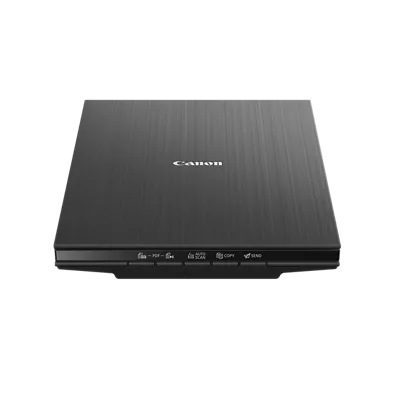
Your needs, this model
Does it fit your priorities?
Can it scan a single document or photo from a connected computer?
Yes. Canon specifies a USB-powered Letter/A4 flatbed and computer software for document and photo scans. It handles originals on the platen, not a paper stack.
Explore this need in the finder →Does it have a TWAIN driver for a required capture application?
Canon's LiDE 400 manual describes ScanGear as a TWAIN 1.9 driver for Windows. Check that the exact host OS and capture application accept this driver; no universal app or Mac TWAIN compatibility is claimed.
Explore this need in the finder →Can its feeder hold a 20-sheet stack?
No ADF is specified. The LiDE 400 is a flatbed where originals are placed on the glass one at a time, so it cannot meet a minimum ADF-capacity requirement.
Explore this need in the finder →Can it send files to cloud storage without a computer?
Canon says Send to Cloud requires software installed on a computer, internet access and an active account. That is not a documented computer-free scanner route.
Explore this need in the finder →The Canon CanoScan LiDE 400 is a USB-powered flatbed for individual documents, books and photos—not a desktop document feeder. Its notable step above the related LiDE 300 is a higher published optical-resolution ceiling, USB Type-C on the scanner and a fifth front button. Those details matter more than an assumption that the model number itself turns it into a faster stack scanner.
A platen is the whole paper path
Canon specifies a flatbed with a maximum document size of 8.5 by 11.7 inches. Place a sheet, receipt, page or photograph on the glass, close the lid and scan it; there is no ADF to load with a stack and no automatic duplex path. That suits a household or small office that scans occasional signed pages, book pages, forms or images and can trade unattended batch handling for a fixed platen. It is a poor fit for an invoice queue where feeding both sides and walking away is the essential task.
The listed 14.5-by-9.9-by-1.7-inch body weighs 3.6 pounds. Canon's Advanced Z-lid expansion top and upright-scanning feature help when desk space or a thicker original matters, but the dimensions describe the scanner itself rather than a ready-made document-storage workflow. Keep the hinge area clear, avoid forcing the lid down on fragile material and use the manual's placement guidance for anything valuable. A flatbed can make books and delicate sheets easier to position than a roller path, but that alone does not certify archival color, bound-book capture quality or flawless edge cleanup.
Resolution and the eight-second figure need context
Canon lists 4800 × 4800 dpi optical sampling and an approximate eight-second color-document figure at 300 dpi for a Letter/A4 page. Its own test note measures the interval from pressing the scanner-driver button to the on-screen status display turning off, using a USB 3.0 computer interface and the included cable. Computer speed, software, resolution, scan settings and page size can change that interval; it is not a measured end-to-end time for opening a multi-page PDF, naming files, correcting pages or sending them to a repository. Increasing resolution can also reduce the maximum scan area, so a large headline number is not a reason to scan every routine form at the maximum setting.
Five EZ buttons include two PDF controls for starting and finishing a multi-page scan, plus Auto Scan, Copy and Send. Canon lists IJ Scan Utility for Windows and IJ Scan Utility Lite for Mac, with OCR and other correction tools in compatible computer workflows. The manual describes ScanGear as a TWAIN 1.9 driver for Windows; that is useful if a named capture application requires TWAIN, but Canon does not thereby guarantee compatibility with every program or a Mac TWAIN route. The model's published operating-system baseline is old, so check the current LiDE 400 download against the computer and application you plan to use.
Cloud is a computer workflow, not a scanner-only destination
The Send to Cloud button can route files to services such as OneDrive or Dropbox, but Canon's fine print requires internet access, an active account with the cloud provider and the necessary software installed on a computer. The USB cable supplies both scanner data and power; it does not make the scanner wireless or let it submit directly to a cloud account while the computer is absent. Buyers who require phone scanning or computer-free network delivery should look for those documented routes specifically instead of treating any mention of cloud as equivalent.
Compared with the LiDE 300
Canon's LiDE 300 has four EZ buttons, a USB 2.0 Mini-B scanner connection, 2400 × 2400 dpi optical resolution and an approximate 10-second Letter/color test figure. The LiDE 400 moves to five buttons, USB Type-C and a 4800 × 4800 dpi specification with an approximate eight-second figure. Both are flatbeds with the same listed maximum document area and body dimensions. This is a real set of differences for a buyer who wants the newer connection or more optical sampling headroom; neither model adds a feeder, duplex scanning, a separate manual-feed path or computer-free cloud capture. Confirm that the included cable fits the host computer, especially if it has only USB-C ports, and do not assume a third-party adapter is in the carton.
Who should shortlist it
The LiDE 400 is a plausible option for a USB-connected user who scans one original at a time, sometimes wants a high-resolution photo or book-page file, and is comfortable managing driver and file choices on a computer. It is not the natural choice for a frequent double-sided stack, a phone-only routine or a requirement for a high-capacity ADF. Canon's exact U.S. page displays an in-stock marker as well as a discontinued/no-longer-available message; this assessment does not resolve that conflict or quote a price. Match item 2996C002AA and check the actual seller, software and box contents. This is a source-based review, not a hands-on test: no ownership, setup, scan-speed timing, image-quality test, OCR test or durability result is claimed.
Key specifications
Key details at a glance
| Scanner class | Usb flatbed |
|---|---|
| Optical resolution | 4800 dpi |
| Connection options | USB |
| Automatic duplex capture | No |
| Separate manual-feed route | No |
| Touchscreen | No |
| TWAIN driver documented | Yes |
Use the exact model’s instructions for operating limits, supplied equipment and version differences.
Sources for this review
Sources for this assessment
Compare the workflow before you choose
Use the finder to test your connection, paper and software requirements against the documented scanner arrangements.