
Your needs, this model
Does it fit your priorities?
Can one model handle ordinary duplex stacks and occasional books or delicate pages?
The DS-1760WN combines a single-pass duplex ADF rated at 60 sheets of 80 g/m² stock per loading with an 8.5-by-11.7-inch glass platen. Epson says the platen can handle books, passports, plastic cards and fragile media; the ADF manual separately warns that some coated, wrinkled, perforated, carbonless or delicate originals may need the glass. It is not an A3/ledger platen or a 100-sheet feeder.
Explore this need in the finder →Can someone use a phone or tablet to scan without a computer at the scanner?
Epson lists Smart Panel for compatible iOS and Android devices and describes Wi-Fi mobile scanning. Install the current app, connect the scanner to the device and confirm OS support; a phone app listing alone does not make every original size or workflow compatible.
Explore this need in the finder →Can the touchscreen send a scan to cloud storage without an attached computer?
Yes, after setup: Epson's exact-model manual requires network setup, Epson Connect registration and a pre-registered destination before the panel sends to cloud. Internet access and continuing support for the named service still matter; services can change.
Explore this need in the finder →Does its feed system count as a separate manual-feed path for unusual originals?
No. The glass is an alternative surface on which to place a book, passport or delicate original; the reviewed manual does not describe a separately selected special-original manual-feed mode. If that exact ADF function is essential, do not count this platen as a substitute.
Explore this need in the finder →Evidence-led assessment of Epson U.S. part B11B274201. This is not a hands-on test, and the manufacturer listing is not a claim about current reseller stock or package condition.
Why choose a platen-and-feeder combination?
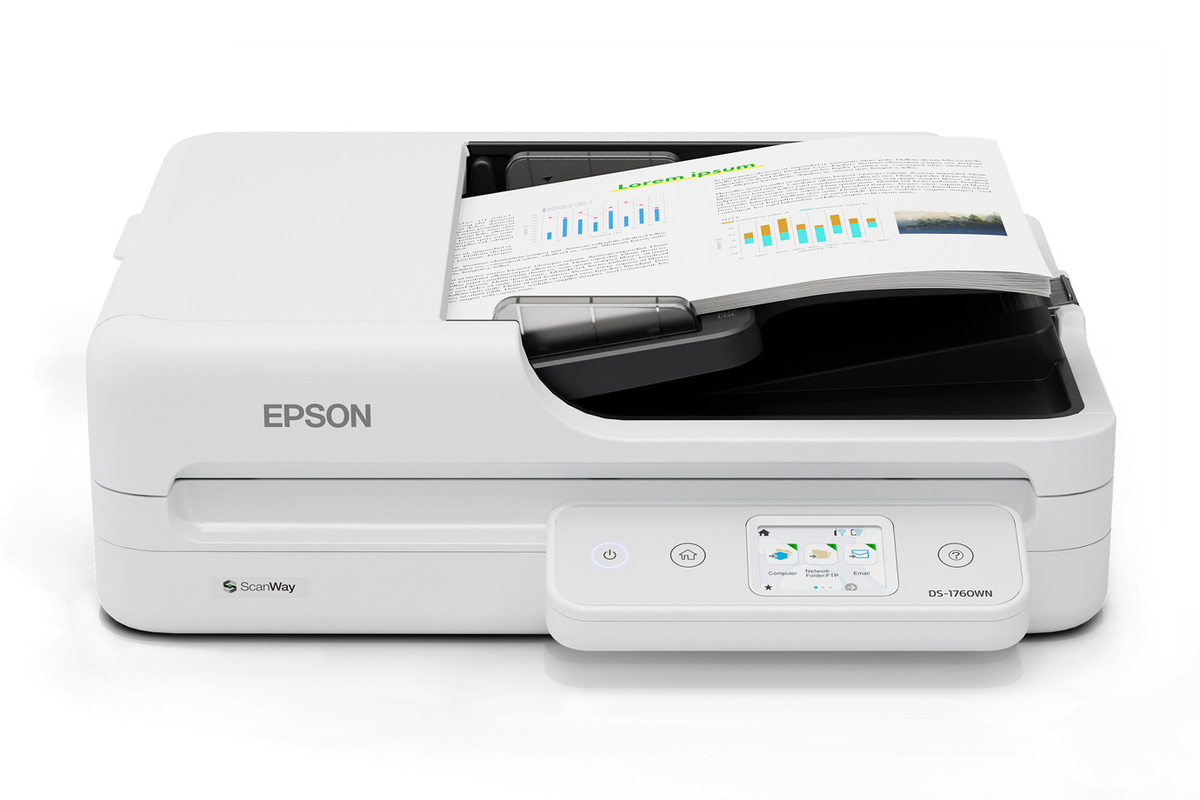
The DS-1760WN is not merely an ADF with a small display. Epson's specification identifies a flatbed color scanner with a duplex automatic document feeder: use the feeder for a stack of routine pages, then place a book, passport, plastic card or delicate original on the glass. That split is useful in a small office that handles both repetitive forms and exceptions that should not be pulled through rollers. The platen is limited to 8.5 by 11.7 inches, however; it is not an A3 or ledger-size copying surface.
For ordinary batches, Epson lists a 60-sheet ADF at 80 g/m² and single-pass two-sided scanning. The rated maximum is 30 pages per minute and 60 images per minute for Letter pages at 200 or 300 dpi, in black-and-white or color, over USB. Those figures describe the manufacturer's specified scan condition—not an independent test, every network setup, OCR time or completed filing workflow. Epson's separately stated 3,000-sheet peak daily-duty value is also a calculated manufacturer recommendation, not a feeder load or endurance result.
Know which originals belong on the glass
The point of the flatbed is not that every difficult sheet becomes safe in the ADF. Epson's model-specific guide says some uneven, wrinkled or folded, perforated, labelled, carbonless, curled and coated originals may not scan successfully through the feeder; for those, it directs users to the glass. It specifically warns that chemicals in carbonless paper can harm the rollers. A flatbed gives you a slower one-at-a-time alternative, not a dedicated manual-feed position for an ADF stack.
The ADF's published 60-sheet load is tied to 80 g/m² paper, while Epson lists a wider 50–120 g/m² paper-weight range. The sheet lists long-original limits that change with resolution: up to 220 inches at 200 dpi, 215 inches at 300 dpi, and 53 inches at 600 dpi; only one very long sheet is allowed at the maximum length. Check size, thickness, curl, labels and the selected resolution before planning a batch. The limit is not a promise that 60 sheets of any supported paper weight can be mixed together.
Three connections, with different jobs
The U.S. part B11B274201 lists Hi-Speed USB 2.0, dual-band Wi-Fi and wired gigabit Ethernet. A nearby computer can use USB and the listed TWAIN or ISIS drivers; Ethernet or Wi-Fi can support a networked setup. The product page specifies speeds over USB and cautions that network conditions affect scan speed, so don't assume the headline rate will carry unchanged over a busy or restricted network.
The 2.4-inch touchscreen is more than a status panel: Epson describes user-defined jobs and ScanWay destinations. After you configure the machine, it can send from the panel to a network folder, email, an attached USB drive, or registered online destinations. The touchscreen-to-cloud path requires an Internet connection, Epson Connect registration and a destination list configured in advance. This is a genuine computer-free route at scan time, not a claim that the scanner connects itself to every cloud account or that service support cannot change.
Epson separately lists Smart Panel scanning on iOS and Android and Mopria Scan on Android; it also names the native Chromebook scan app with ChromeOS 136 or later. The model-specific manual requires the scanner to be connected to the smart device before scanning. Those are useful alternatives when a desk PC is not the operator's main tool, but verify the exact phone, operating-system/app versions and original size. A compatible-app claim is not universal device compatibility.
Where the model is a fit—and where it is not
Consider this hybrid if 60 sheets per load is enough, most paper batches benefit from automatic duplex, and the same workstation must occasionally digitize a bound or fragile item on glass. USB/TWAIN or ISIS host capture, Wi-Fi and Ethernet give an office choices about placement and sharing; a touchscreen plus configured destinations can shorten a repeat scan-to-folder or scan-to-cloud task. Epson rates the glass at 1,200 dpi optical resolution and the ADF at 600 dpi, so compare the correct route for your original rather than reading a single “1,200 dpi” headline as the feeder's resolution.
Look elsewhere if you need a 100-sheet-or-larger routine load, a large-format platen, or a distinct manual-feed selector for special ADF originals. The basic ADF itself is a 60-sheet class. The glass is only letter-size; folded or otherwise difficult originals still need individual care. Drivers and apps should be checked against the current host OS and the named records system. An installation may also need a network administrator to approve ports, destination permissions and service setup before the panel route works.
What to verify before ordering
Match the U.S. part B11B274201 on the quote or offer, and ask whether any listed service plan or accessory is actually included. Epson's U.S. sheet lists a USB 2.0 cable, AC power cable and Start Here poster with the base scanner, and states a one-year limited U.S./Canada warranty; that sheet is not proof that a third-party seller ships the same package. Check the current driver and the app or driver interface your organization requires. For cloud use, identify the destination service, registration and network/internet requirements before purchase. For fragile, perforated, carbonless or coated papers, inspect the model manual's instructions and plan on the glass when it calls for it. No reseller price, stock or real-world throughput is inferred here.
Primary references: Epson U.S. DS-1760WN product page, CPD-65830R1 specification sheet, B11B274201 support downloads, and the DS-1760WN U.S. User's Guide (checked October 31, 2026). The manual is cited for original-handling and network/mobile setup details; the fact sheet and exact U.S. part carry product identity and package claims.
Key specifications
Key details at a glance
| Scanner class | Flatbed document scanner with duplex ADF |
|---|---|
| Manufacturer-listed simplex rate | 30 ppm |
| Manufacturer-listed duplex image rate | 60 ipm |
| Automatic document feeder capacity | 60 sheets |
| Optical resolution | 1200 dpi |
| Connection options | USB / Wi-Fi / Ethernet |
| Automatic duplex capture | Yes |
| Separate manual-feed route | No |
| Touchscreen | Yes |
| TWAIN driver documented | Yes |
Use the exact model’s instructions for operating limits, supplied equipment and version differences.
Sources for this review
Sources for this assessment
- Epson U.S.: unfiltered WorkForce document-scanner category
- Epson U.S.: DS-1760WN Network Flatbed Color Duplex Document Scanner
- Epson DS-1760WN Specification Sheet CPD-65830R1
- Epson U.S. Support: DS-1760WN B11B274201
- Epson DS-1760WN U.S. User's Guide index
- Epson DS-1760WN U.S. User's Guide: ADF originals needing attention
- Epson DS-1760WN U.S. User's Guide: Scan-to-Cloud workflow
- Epson DS-1760WN U.S. User's Guide: Epson Smart Panel
- Epson U.S.: exact DS-1760WN product-gallery image
Compare the workflow before you choose
Use the finder to test your connection, paper and software requirements against the documented scanner arrangements.