
Your needs, this model
Does it fit your priorities?
What exact DS-30 part should I match in a listing?
The base U.S. scanner is B11B206201 and Epson marks it discontinued; the distinct Certified ReNew offer ends in B11B206201-N. Verify the seller's exact suffix, condition, package and return terms.
Explore this need in the finder →Can the DS-30 feed a stack or capture both sides automatically?
No. Epson's guide specifies one sheet in the manual input slot and the product page classifies the mechanism as simplex. Each page is fed separately and two-sided originals need another pass.
Explore this need in the finder →Can I send a DS-30 scan to a phone or cloud account without a computer?
No wireless/mobile path is documented for the base part. Epson's cloud instructions require Document Capture Pro running on a connected Windows PC, so check for a host computer in that workflow.
Explore this need in the finder →Evidence-led assessment of Epson U.S. part B11B206201. This is not a hands-on test; no current reseller stock, price or seller package is implied.
Start with the part number and lifecycle
Epson identifies the WorkForce DS-30 Color Portable Scanner as U.S. part B11B206201 and marks it discontinued. Epson names the ES-50 as its replacement product. That relationship is a useful lifecycle clue, not proof that the two scanners have identical software, performance or package contents. Epson also lists a distinct Certified ReNew offer ending in B11B206201-N. A seller description that omits the suffix or uses “renewed” loosely should be checked against the actual unit and offer terms before treating it as the base scanner reviewed here.
A host-led USB routine, not a wireless mobile workflow
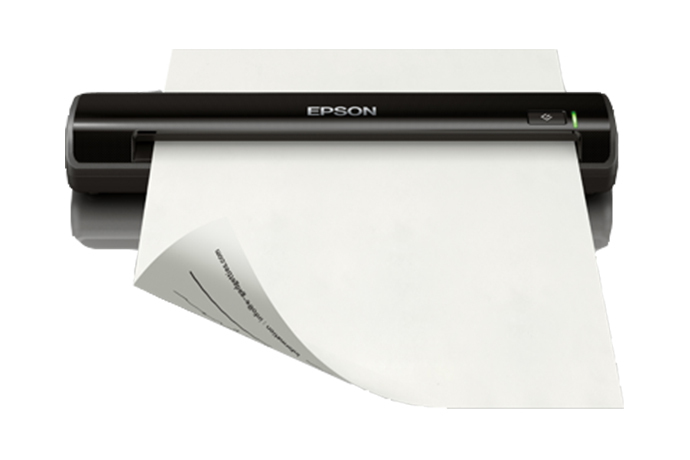
The base DS-30 is a narrow, sheet-fed scanner with a USB 2.0 connection and power from the connected USB interface. Epson lists an included TWAIN driver and bundled scanning software. That makes the model relevant when a supported Windows or Mac computer is already part of an occasional capture routine, especially when a desktop application calls for TWAIN. Driver presence does not guarantee that a particular operating-system release or named application still works: check the exact host, driver and application versions before buying an older device.
There is no documented Wi-Fi or phone-scanning route on B11B206201. Epson's “scan directly to the cloud” wording refers to Document Capture Pro running on a connected PC; the fine print specifies Windows for that cloud workflow. A scanner that can generate a searchable PDF on a computer is not the same as a scanner that can reach cloud storage on its own. If your computer is intentionally absent at scan time, do not interpret the software feature as a computer-free destination.
One original per pass
The model's “manual feed” means that the operator presents a sheet at the input slot. The DS-30 guide specifies a one-sheet loading capacity and calls the mechanism simplex, so there is no stack ADF and no automatic capture of both faces. An operator can feed multiple pages one after another into a software job, but the machine does not pick a pile unattended; duplex originals require separate passes. That is a meaningful distinction for receipts or isolated forms versus a recurring archive box of paperwork.
Epson lists a 4.6-page-per-minute figure on its one-sheet, Letter-size, 300-dpi basis. Treat this as a manufacturer rating rather than an independent result or a promise that OCR, review, naming and filing will finish at that rate. The scanner supports 600-dpi optical scanning and paper up to Letter or Legal size, with the guide giving a 14-inch maximum document length. These dimensions make it useful for individual office sheets, not long continuous forms.
Handling limits matter more than the word portable
The guide describes a single manually loaded original and cautions against feeding folded, overlapped, bound, wrinkled or otherwise unsuitable papers. It lists an ID-card path for plastic or embossed cards, with card thickness and orientation restrictions. That is a paper-path capability, not a separate tray for mixed batches. Buyers scanning a card should check the exact size, thickness and landscape-loading instructions rather than assuming any rigid badge will pass safely.
The published body size is about 10.86 by 1.97 by 1.45 inches, and Epson lists the weight at 0.7 pound. Its light chassis and USB power are advantages for a carry-between-desks setup with a computer nearby; they are less persuasive if every scan should be started from a phone or if the job needs a pile feeder. The small body also means each page is a deliberate manual operation.
How it differs from the DS-40 and newer ES-50
The discontinued DS-40 B11B225201 is a related one-sheet portable model, but it adds USB/Wi-Fi alternatives and an Epson DocumentScan mobile route. Those features belong to that separately reviewed configuration and do not transfer to the DS-30. Conversely, the DS-40's wireless arrangement still does not establish a direct computer-free cloud workflow. Epson's ES-50 replacement is a current product family successor, not a reason to assume its driver support, included software or features apply to an old DS-30 offer.
Check the exact used or renewed offer
Before considering a B11B206201 listing, confirm the exact part, the scanner's condition, the supplied USB cable, calibration or cleaning materials, and whether the software required for the intended computer is still obtainable and supported. Epson's ReNew page cautions that a renewed unit may not include the same software or paper pack as a new product and states a limited return remedy for a defective unit. Those terms apply to that offer page, not automatically to a marketplace seller or the base-part assessment. This library contains no independent scan testing or current offer inspection.
Primary references: Epson U.S. DS-30 product specifications, DS-30 User's Guide, Epson support and downloads, and the separate Certified ReNew offer page.
Key specifications
Key details at a glance
| Scanner class | Portable one-sheet sheet-fed scanner |
|---|---|
| Manufacturer-listed simplex rate | 4.6 ppm |
| Optical resolution | 600 dpi |
| Connection options | USB |
| Automatic duplex capture | No |
| Separate manual-feed route | No |
| Touchscreen | No |
| TWAIN driver documented | Yes |
Use the exact model’s instructions for operating limits, supplied equipment and version differences.
Sources for this review
Sources for this assessment
- Epson U.S.: WorkForce DS-30 Color Portable Scanner, base part B11B206201
- Epson U.S. Support: WorkForce DS-30 support and downloads
- Epson DS-30 User's Guide
- Epson WorkForce DS-30 product brochure
- Epson WorkForce DS-30 launch announcement
- Epson U.S.: DS-30 Certified ReNew, separate suffix B11B206201-N
- Epson U.S.: exact DS-30 product-gallery image
Compare the workflow before you choose
Use the finder to test your connection, paper and software requirements against the documented scanner arrangements.