
Your needs, this model
Does it fit your priorities?
Does the DS-30000 have USB, TWAIN and duplex capture?
Epson lists USB-connected host capture, TWAIN/ISIS and automatic two-sided capture for B11B256201. Verify your OS and capture application.
Explore this need in the finder →Is a separate manual-feed route documented?
Yes. The guide’s selector has a Manual Feed position for supported one-at-a-time originals and special media; double-feed detection is disabled in that position.
Explore this need in the finder →Does the standard ADF meet 120 sheets?
The guide rates Normal Mode at 120 Letter/A4 sheets at 80 g/m² and 60 A3 sheets. Other stocks differ.
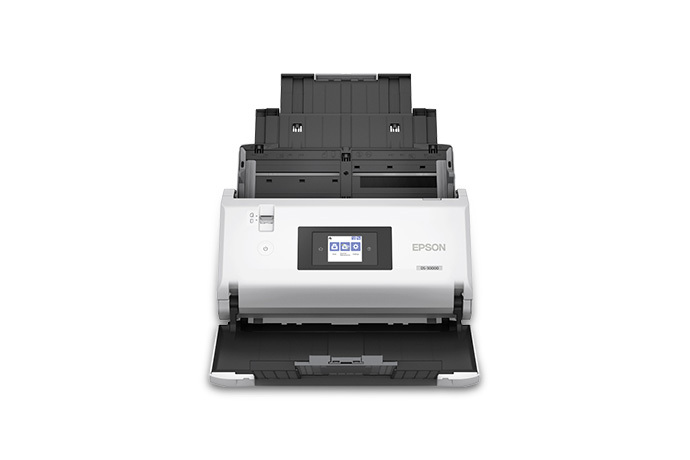
Explore this need in the finder →The Epson DS-30000 (U.S. part B11B256201) is a large-format, desktop ADF scanner that combines a 120-sheet standard-paper load with a 12-by-17-inch document range and a programmable 2.7-inch touchscreen. Its appeal is not just a fast headline. The operating guide distinguishes an ordinary batch path from a selectable manual-feed position for supported special originals, so the unit can serve both stack work and one-at-a-time handling without pretending those are the same route.
Throughput depends on orientation and resolution
Epson rates the DS-30000 up to 70 ppm/140 ipm for landscape A4 scans at 200 or 300 dpi. Its stated portrait A4/Letter rate is 55/110 at 300 dpi, and the 600-dpi figure is much lower. These are manufacturer specifications, not independent tests or guaranteed end-to-end filing times. The ADF capacity is 120 sheets at 21 lb (80 g/m²) for Letter/A4 stock and 60 for A3 in the guide's table. Heavier weights and special media have their own lower counts. A 120-sheet headline does not mean every paper mix fits in one loading.
A real manual-feed selector—with a caveat
The guide directs the operator to choose Manual Feed for one-at-a-time originals and listed special cases such as embossed plastic cards, passport carrier sheets, and booklets. That is a distinct feed-selector setting, not an additional tray and not a larger batch path. Epson cautions that double-feed detection is disabled in this position; for a stack, use Normal Feed instead. Carrier-sheet use and the exact original type have further instructions. The manual-feed answer therefore helps when occasional awkward items alternate with ordinary stacks, but it should not be read as a universal promise for every passport, card, or fragile page.
Controls, drivers, and connection
The panel is a touchscreen for scan jobs, settings, and maintenance. The documented base routine is USB-to-computer with Epson's listed TWAIN and ISIS drivers. The sources do not establish Wi-Fi, a mobile-app path, or scanner-only cloud delivery for this part. Check the current operating-system support, the exact capture application, and the destination software with the IT owner. For long originals, Epson lists limits that depend on resolution—up to 220 inches at 200 dpi or less, and up to 215 inches at 300 dpi—so length and image setting must be planned together.
Who should compare the DS-32000
The DS-30000 is rated at 70/140 for landscape scans and lacks the DS-32000's named storage and delicate positions. The DS-32000 lists up to 90/180 for landscape A4 at 200/300 dpi and offers a compact storage posture, but its Delicate Mode reduces capacity and changes handling. Both models share the standard 120-sheet Letter/A4 and 60-sheet A3 ratings, a touchscreen, USB host workflow, and large-format reach. If paper care or the option to store the unit vertically matters, read the DS-32000's mode-specific limits rather than comparing top speed alone.
The manual-feed selector is best read as an operational choice made for the next original, not a setting to leave on while the feeder handles a stack. In that position the documented loss of double-feed detection shifts more responsibility to the operator, so the feature is useful for occasional special items but not a reason to ignore the load path. For ordinary batches, Normal Feed and its media-specific table are the relevant references. The DS-30000 documents an ADF, duplexing, and special-original handling, but these capabilities describe different jobs.
Assessment: the DS-30000 is a reasonable profile to examine for a wired department that needs a conventional 120-sheet duplex batch path, on-device profile selection, and an explicitly documented special-original feed setting. Its limitations are equally important: no wireless/mobile route is established, special manual feed disables double-feed detection, and capacity changes with paper. Epson states a three-year limited warranty; verify the written terms, standard accessories, carrier sheet requirements, and seller package for the exact part. This is not an ownership or hands-on review.
Key specifications
Key details at a glance
| Scanner class | Large format sheet fed document scanner |
|---|---|
| Manufacturer-listed simplex rate | 70 ppm |
| Manufacturer-listed duplex image rate | 140 ipm |
| Automatic document feeder capacity | 120 sheets |
| Optical resolution | 600 dpi |
| Connection options | USB |
| Automatic duplex capture | Yes |
| Separate manual-feed route | Yes |
| Touchscreen | Yes |
| TWAIN driver documented | Yes |
Use the exact model’s instructions for operating limits, supplied equipment and version differences.
Sources for this review
Sources for this assessment
- Epson U.S.: unfiltered WorkForce document-scanner category
- Epson DS-30000 Large-format Document Scanner — exact U.S. product page
- Epson DS-30000 Large-format Document Scanner — Epson support page
- Epson DS-30000/DS-32000 User Guide, CPD-58205
- Epson U.S.: Epson DS-30000 Large-format Document Scanner — Certified ReNew suffix
Compare the workflow before you choose
Use the finder to test your connection, paper and software requirements against the documented scanner arrangements.