
Your needs, this model
Does it fit your priorities?
Does the DS-40 send scans to a phone or directly to cloud storage?
The manual documents DocumentScan capture to iOS/Android over direct Wi-Fi. Epson's cloud path instead uses Document Capture on a connected PC or Mac, so a phone route does not establish computer-free cloud.
Explore this need in the finder →What power do I need for a wireless DS-40 session?
The guide requires four AA batteries or optional adapter B12B867201 for Wi-Fi; USB can power the scanner when connected to a computer. Check the exact used or renewed package for usable batteries and adapter inclusion.
Explore this need in the finder →Can the DS-40 process a stack or both sides automatically?
No. Epson describes one sheet at a time and a simplex mechanism; a plastic card is also limited to one at a time. Do not confuse manual loading with a separate manual-feed route or an ADF.
Explore this need in the finder →Evidence-led assessment of the Epson WorkForce DS-40 base configuration, U.S. part B11B225201. No hands-on testing, current inventory or seller-specific package inspection is claimed.
Keep the base part separate from the ReNew suffix
Epson's product information identifies the DS-40 as part B11B225201 and marks it discontinued, naming the WorkForce ES-60W as a replacement product. A separate Certified ReNew offer carries the suffix B11B225201-N. The base and renewed product codes should not be collapsed into a generic “DS-40” listing when condition, package, warranty or return terms matter. The DS-40's support page is useful for its driver and manual family, but it is not a promise that a particular second-hand unit is complete or ready to use.
Two connection modes, two different jobs
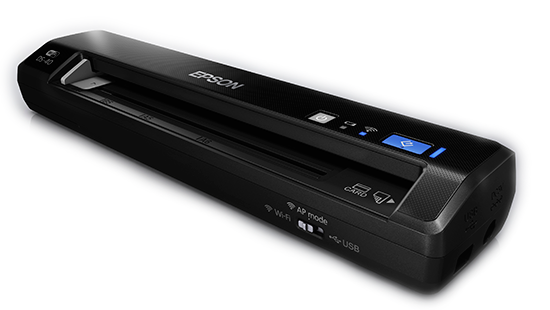
This is a one-sheet portable scanner with both USB 2.0 and 802.11b/g/n Wi-Fi. USB supports a computer-oriented workflow; Epson lists a TWAIN driver and its Scan and Document Capture software. The wireless arrangement can scan to an iOS or Android device using Epson DocumentScan, or connect to a network computer. These are alternatives, not evidence that USB and Wi-Fi operate at the same time. The user guide also instructs that Wi-Fi operation needs four AA batteries or the optional Epson AC adapter B12B867201, while USB can provide scanner power. Epson's base product package lists four AA batteries, but a used, renewed or marketplace offer should be checked rather than assumed to include working cells.
Mobile capture is not the same as direct cloud capture. Epson documents a phone-and-tablet route through DocumentScan; for the cloud-service workflow, its product notes point to Epson Document Capture installed on a connected Windows PC or Mac. The DS-40 therefore has a real mobile route but not a documented computer-free cloud route. Since the app's platform support can change, confirm that the current application supports the intended phone and operating system before relying on it.
A single-sheet slot is still a manual workflow
The guide gives the normal original capacity as one sheet. It also allows one plastic card at a time, with ISO 7810 card dimensions and a maximum thickness of 0.05 inch including embossing. Neither specification turns the input slot into a stack ADF or into a separate special-original feeder. The scanner is classified as simplex, so two-sided pages need additional handling rather than automatic duplex capture. This is a practical fit for travel receipts, one-off forms or a small number of cards where carrying a compact device matters more than feeding a stack.
The stated 1.1-pound weight excludes batteries. Epson's product sheet describes a long-paper mode of up to 36 inches on Windows and 14 inches on Mac. The user guide separately mentions 16.5 inches as a Mac maximum in its general original-loading note, so the inspected documentation is not fully consistent on that boundary. For a Mac job near the limit, use the more conservative product-page figure until Epson's current, software-specific instructions confirm otherwise. The Windows long-paper figure is manufacturer documentation, not a guarantee that every software route, resolution or original type accepts that length.
Speed, power and software checks
Epson publishes mode-specific scan times rather than one simple end-to-end speed. The product sheet varies the seconds per page by resolution, color mode and size; do not convert one of those manufacturer values into a general workflow promise. The same caution applies to its 25-scan daily duty figure: it is a stated limit, not an independently measured reliability result. With Wi-Fi, the four-AA power requirement can add recurring battery maintenance; the optional adapter is called out in the DS-40 guide and is not something to assume in every used package. USB power avoids that battery requirement when the computer is the host.
Epson lists TWAIN support for the DS-40. Its support page currently exposes a DS-40 scanner driver and TWAIN utility for Windows 11 24H2 or later on ARM systems, alongside older packages. That evidence is more useful than treating the scanner as universally compatible: confirm the exact computer architecture, operating-system version, capture application and network setup before purchasing. A successful driver download does not establish that every third-party application has been tested with the model.
Where this model falls short
The DS-40 is not the choice to shortlist for hands-off batches, automatic two-sided capture, a computer-free cloud destination or a touchscreen. Its phone route makes it more flexible than the USB-only DS-30, but it does not remove the one-sheet feed or turn Wi-Fi into a scanner-side cloud service. For volume paper work, a desktop duplex ADF better matches the handling task; for a current compact wireless Epson, compare the exact ES-60W configuration rather than transferring its specifications into the DS-40 review.
Purchase checks for an older portable scanner
Match B11B225201 for the base model or B11B225201-N for the separate Certified ReNew offer. Confirm the scanner, USB cable, four usable AA batteries if Wi-Fi is needed, and any desired optional adapter; inspect the exact offer's condition and return language. Confirm that DocumentScan is still available for the target phone, that a network/direct-Wi-Fi route can be set up in the intended environment, and that the current TWAIN driver supports the host and named capture application. Check the paper size and the conservative Mac length limit against the manual and current instructions. No current seller stock, price, box contents or operating experience is implied by this evidence-led comparison.
Primary references: Epson U.S. DS-40 product specifications, DS-40 User's Guide, Epson support and downloads, and the separate Certified ReNew offer page.
Key specifications
Key details at a glance
| Scanner class | Portable one-sheet sheet-fed scanner |
|---|---|
| Optical resolution | 1200 dpi |
| Connection options | USB / Wi-Fi |
| Automatic duplex capture | No |
| Separate manual-feed route | No |
| Touchscreen | No |
| TWAIN driver documented | Yes |
Use the exact model’s instructions for operating limits, supplied equipment and version differences.
Sources for this review
Sources for this assessment
- Epson U.S.: WorkForce DS-40 Color Portable Scanner, base part B11B225201
- Epson U.S. Support: WorkForce DS-40 model B11B225201
- Epson DS-40 User's Guide
- Epson WorkForce DS-40 wireless portable scanner announcement
- Epson U.S.: DS-40 Certified ReNew, separate suffix B11B225201-N
- Epson U.S.: exact DS-40 product-gallery image
Compare the workflow before you choose
Use the finder to test your connection, paper and software requirements against the documented scanner arrangements.