
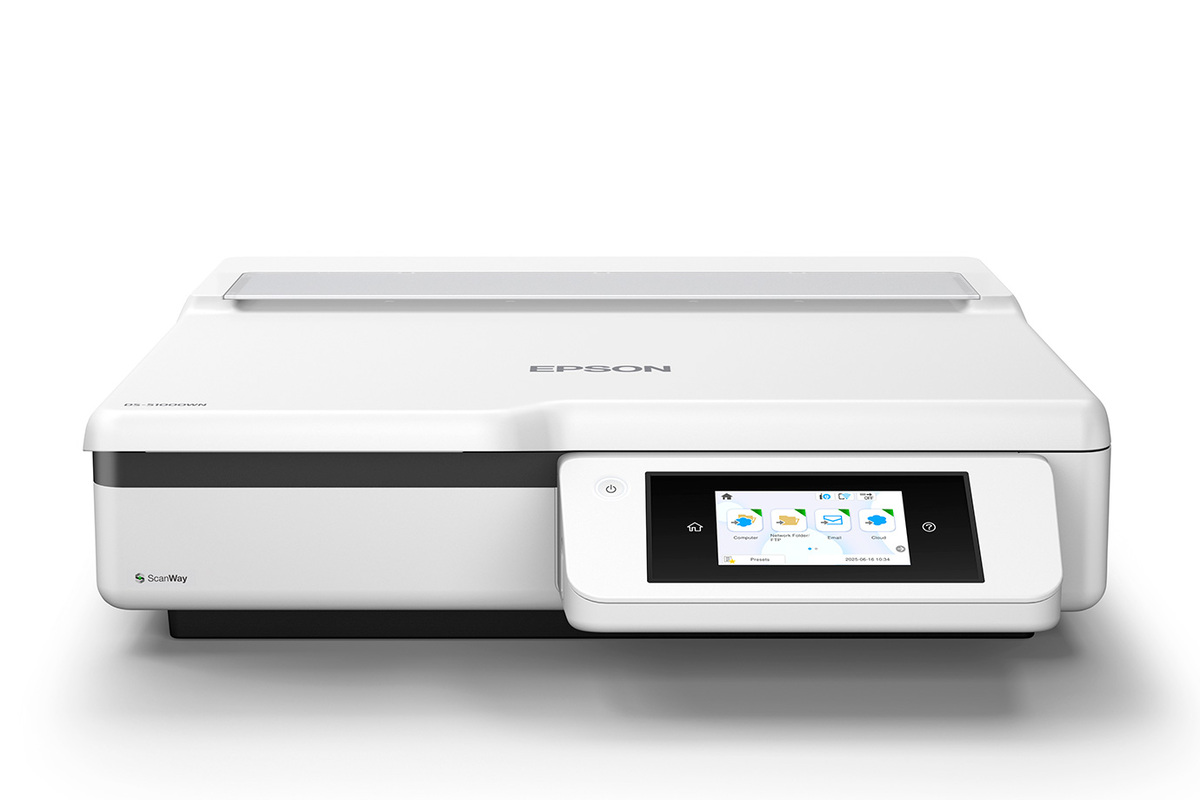
Your needs, this model
Does it fit your priorities?
Can it digitize an oversized bound original without feeding it through rollers?
Yes. Epson specifies an 11 by 17 inch A3 platen and book/photo modes. The glass handles a placed original; it is not an ADF or a way to feed a stack.
Explore this need in the finder →Can a phone be part of the scanning routine?
Epson documents Smart Panel for iOS and Android after connecting the mobile device to the scanner. Check the current app, network and original-size support for the intended job.
Explore this need in the finder →Can it send to online storage without a computer at scan time?
Epson's ScanWay route supports direct online-storage destinations, subject to network/internet setup and account/service requirements. That scanner-side path is not the same as USB-to-computer capture.
Explore this need in the finder →The DS-51000WN is best understood as a large networked platen, not as a batch scanner. Epson's U.S. product page identifies the exact base part as B11B277201 and lists an 11-by-17-inch A3 flatbed, a 4.3-inch touchscreen and USB, Wi-Fi and Ethernet connections. Its product page explicitly says “No ADF.” That last point is decisive: there is no published feeder capacity to compare, and a spacious glass surface does not turn a stack into automatic feed.
When the platen matters more than a stack
The glass is the reason to consider this model. Epson positions it for oversized, bound and delicate material, and lists book and photo modes. The user guide describes placing originals on the glass and using a continuous-book workflow. Those are useful categories of work for archives, records rooms or offices that occasionally capture a book, plan or fragile item, but they are not a promise that every binding, thickness or media type will fit. Check the allowed original size and handling instructions for the particular document before relying on an image-processing mode. For repeated multipage paperwork, the operational cost is the repeated placement and removal of each sheet. There is no ADF to load, no automatic duplex feeder and no published ADF capacity. The flatbed can capture a two-sided original only through a user-managed second pass; it does not satisfy a requirement for automatic two-sided scanning. Likewise, the glass is not a separate manual-feed slot attached to a feeder. Shoppers who need routine batches should compare the DS-61000WN or DS-71000WN, each of which Epson lists with a duplex ADF, rather than treating those models as accessory variations of this one.Connected operation without a computer
This is a connected workgroup model rather than a USB-only platen. Epson lists wireless, Ethernet and USB access, and describes ScanWay destinations on the touchscreen: a USB flash drive, network folder, email or online storage account. That makes the device more flexible than an older glass scanner when different teams need a stand-alone panel workflow. “Computer-free” does not mean setup-free, however. A network or internet connection is needed for the relevant destinations; confirm the required account, destination registration, storage format and current service compatibility before planning a records workflow. The manufacturer also lists Epson Smart Panel support for iOS and Android. The model guide describes connecting the mobile device to the scanner before starting the scan in the app. That is a wireless routine, not a property of the USB-to-computer setup. The distinctions matter if a purchase requirement includes both a USB host application and phone scanning: the product supports those capabilities in different arrangements, not as one simultaneous link.Host software and OCR caveats
Epson lists TWAIN and ISIS drivers, which is relevant when a department already has a capture or document-management application. The same product page describes Epson Document Capture software for Windows and Document Capture for Mac, with OCR producing searchable PDFs or editable Office files. That is a manufacturer-described software workflow, not a test of recognition accuracy on a customer's forms. Current OS support, application version, OCR language and output validation should be checked with the people who maintain the host software. A driver listing does not guarantee that an older, specialized TWAIN client will work unchanged. The separate ScanWay, mobile-app and host-computer paths are worth mapping before deployment. A team that needs user-assigned jobs, external network storage or authentication should confirm the supported configuration, account policy and destination permissions; the presence of a touchscreen alone does not establish enterprise administration.Who should shortlist it?
Consider the DS-51000WN when large, bound or awkward originals are central and a feeder is unnecessary, but the desk still benefits from a modern network and panel workflow. The touchscreen and multiple connections are meaningful advantages over a basic USB flatbed. The main tradeoff is not a small speed difference: it is the absence of an ADF. If your regular workload is a stack, a 150-sheet ADF or automatic duplex is essential, or you need a separate manual-feed route into a feeder, this exact part is the wrong configuration. No ADF capacity is documented, so it cannot pass any positive minimum-capacity requirement. Before comparing an offer, confirm the model badge and U.S. part B11B277201, then check the seller's exact unit condition and package. The assessment does not imply that a particular box includes cables, storage media, an extended service plan or a software license. Also verify the required connection, app and cloud service in your actual network environment. Epson's U.S. product and category pages identify the model, but a current-reference listing is not a guarantee of retailer stock or an endorsement of a seller's bundle. This is a source-based fit assessment of published documentation, not a hands-on test. No scan-speed, OCR-accuracy or media-reliability result is claimed.Key specifications
Key details at a glance
| Scanner class | Large format flatbed document scanner |
|---|---|
| Connection options | USB / Wi-Fi / Ethernet |
| Automatic duplex capture | No |
| Separate manual-feed route | No |
| Touchscreen | Yes |
| TWAIN driver documented | Yes |
Use the exact model’s instructions for operating limits, supplied equipment and version differences.
Sources for this review
Sources for this assessment
Compare the workflow before you choose
Use the finder to test your connection, paper and software requirements against the documented scanner arrangements.